How to Select the Best LED Screen Rental in Dallas

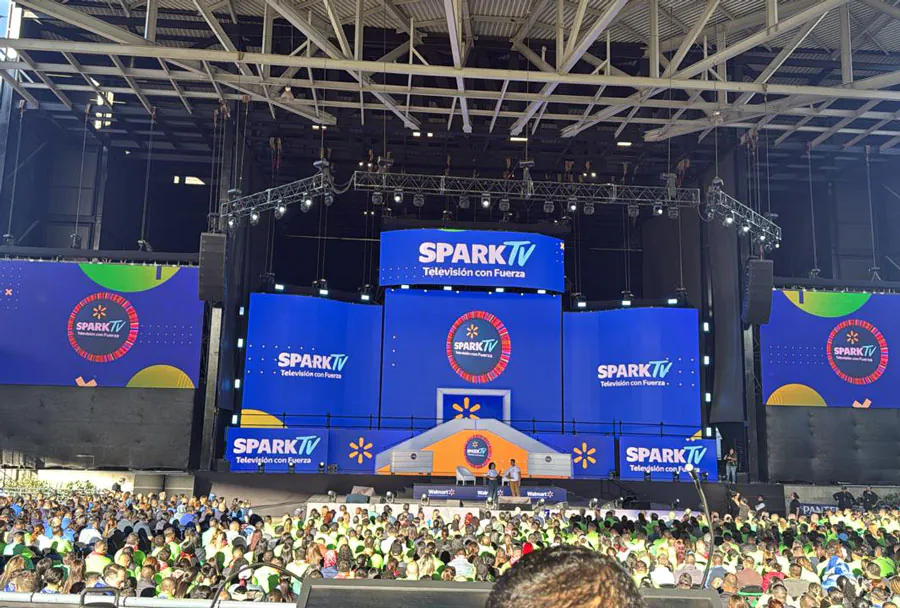
Choosing the right LED screen rental for your event in Dallas can make or break the audience experience. Whether you’re producing an outdoor concert at Fair Park, a corporate product launch downtown, a trade show at the Kay Bailey Hutchison Convention Center, or a private wedding in a venue, the LED screen is the focal point for visuals, video playback, live feeds and branding. This guide walks you through practical, technical and vendor-selection steps to help you pick the best LED screen rental in Dallas — covering what to ask, what to inspect, local considerations and a side-by-side analysis table so you can compare options quickly.
Know Your Event Needs First
Before you call vendors, be clear about your event goals and constraints:
– Event type and content: live video, pre-produced playback, graphics, or mixed media.
– Indoor or outdoor: outdoor screens need higher brightness and weatherproofing.
– Audience size and viewing distance: this determines screen size and pixel pitch.
– Venue limitations: rigging points, load limits, available power and sightlines.
– Duration, setup window and tear-down constraints.
– Budget: total rental budget including installation, crew, transport and insurance.
Having answers to these items saves time and ensures vendors give realistic proposals.
Key Technical Specifications to Understand
– Pixel pitch (P): Measured in millimeters (e.g., P2.6, P4). Smaller numbers mean denser pixels and better close-range detail. For indoor events with close viewers, P2–P4 is common. For outdoor events and longer viewing distances, P6–P10 is often sufficient.
– Brightness: Measured in nits. Outdoor screens typically need 5,000–7,000 nits (or more) to remain visible in daylight. Indoor screens can work well at 800–2,500 nits.
– Resolution and aspect ratio: Determine whether the screen can reproduce your content at native resolution or if you’ll need to scale. Confirm compatibility with common aspect ratios (16:9, custom crops).
– Refresh rate and scan: Higher refresh rates (≥3,840 Hz) avoid flicker for camera capture — essential for live broadcast and social media feeds.
– Viewing distance: A rule of thumb is that the optimal minimum viewing distance (in meters) ≈ pixel pitch (mm) × 1.5–2. For example, P4 is comfortable at ~6–8 meters and beyond.
– Module and cabinet quality: Check cooling, ingress protection (IP rating), and wiring standards. Outdoor cabinets should be IP65 or better.
– Power requirements: Understand the per-panel draw and total power needs to plan generators or venue circuits.
Logistics: Size, Rigging, Power and Permits
– Rigging and structural support: Confirm the venue’s rigging points or whether a ground-supported truss or scaffold is required. Check load ratings and hire a licensed rigger if needed.
– Weight and transport: Some venues have limited access. Make sure the rental company can deliver and maneuver the screen into place.
– Power supply and distribution: Ask for detailed power specs and whether the vendor supplies distribution boxes, cables and backup UPS or generators.
– Permits and local rules: Dallas may require permits for street-facing installations, amplified outdoor events, or road closures. Ask your vendor if they assist with local permitting, inspections or coordination with venue operations.
– Weather policy: For outdoor events, clarify contingency plans for rain, high winds, or heat advisories. Ask whether the screen can be safely wind-rated for your planned installation and whether re-scheduling/ cancellation fees apply.
Vendor Selection Criteria
– Local inventory and experience: Local vendors reduce transport costs and can respond faster for repairs. Ask how many similar events they’ve supported in Dallas and request case studies or photos.
– Crew and technicians: Confirm that trained technicians will handle setup, calibration and live operation. Find out whether you’ll get an on-site operator for changes during the event.
– Maintenance and spares: Ask if the company brings spare modules, power supplies and backup controllers to prevent downtime.
– References and reviews: Request references from recent clients, check online reviews, and look for long-term relationships with venues or production companies.
– Insurance and compliance: Ensure the vendor carries general liability insurance, worker’s comp and equipment coverage. Get certificates of insurance if required by the venue.

– Contract clarity: Read the contract carefully — check for hidden fees (travel, overtime, weekend surcharges), cancellation policy, damage liability and delivery times.
Content and Control Workflow
– Media playback options: Confirm whether you’ll deliver one master video file or multiple layers. Ask about playback devices (media servers, laptops, DVI/HDMI, SDI).
– Live video capture and routing: If using live cameras, ensure the screen supports low-latency input and that the vendor can handle frame-syncs and multi-source switching.
– Scaling and mapping: For unconventional screen shapes or multiple panels, check whether the provider offers pixel-mapping and content calibration services.
– File format and codec support: Share your content specs early (frame rate, codec, resolution). Confirm the vendor can accept and play your files without re-rendering delays.
– Remote access and monitoring: Some vendors offer remote diagnostics and monitoring, allowing quicker response to issues.
Pricing: What’s Included and What’s Extra
Quotes often vary widely. Ensure line items for:
– Screen rental (per day or per event)
– Transportation and labor hours (setup/strike and technicians)
– Power distro and generators
– Rigging equipment and crew (if applicable)
– Content playback devices or operators
– Insurance administration or permits assistance
– Overtime, weekend premiums and emergency callouts
Compare apples-to-apples across vendors by standardizing days/hours and services included.
Dallas-Specific Considerations
– Sunlight and brightness: Dallas sun can be intense. Prioritize high-brightness displays (≥6,000 nits) for outdoor daytime events or plan for shade and sightline optimization.
– Heat and cooling: High temperatures stress electronics. Ensure adequate ventilation, cooling and heat-rated components.
– Local traffic and logistics: Downtown setups can be impacted by traffic, deliveries and parking restrictions. Vendors familiar with Dallas venues will plan routes and staging areas.
– Permitting timeline: Start permit applications early — Dallas Park permits, venue permits and street-use approvals can take time depending on the scope.
– Local vendor benefits: Local inventory, faster tech response, better knowledge of vendors who can supply generators and scaffolding quickly.
Analysis Table: Comparing Key Rental Options
| Criteria | Why It Matters | What to Ask | Typical Range / Metric | Dallas-Specific Tip |
|---|---|---|---|---|
| Pixel Pitch | Determines clarity at close distances | What pixel pitch is available and recommended for X ft viewing? | P2–P4 (indoor close); P6–P10 (outdoor long) | Choose denser pitch for corporate shows where viewers are close |
| Brightness (Nits) | Visibility in ambient light; critical outdoors | Maximum brightness and auto-dimming features? | Indoor: 800–2,500 nits; Outdoor: 5,000–8,000+ nits | Opt for ≥6,000 nits for daytime Dallas events |
| Refresh Rate / Camera-Friendliness | Affects live camera capture without flicker | What is the refresh rate and scanning method? | >3,000–8,000 Hz preferred for broadcast | Higher refresh recommended if social streaming is expected |
| Cabinet IP Rating | Weatherproofing for outdoor reliability | What is the IP rating and wind/load rating? | IP65 or higher for outdoor use | Check wind rating — Dallas storms can be sudden |
| Support & Spares | Reduces risk of downtime during events | Do you bring spare modules, power supplies and techs on-site? | On-site technician + spare modules for medium/large events | Prioritize vendors with local warehouses for same-day swaps |
Step-by-Step Vendor Comparison and Selection Process
1. Scope your event details and create a one-page spec sheet (date, load-in/out times, site map, audience size, content specs, budget).
2. Send the spec sheet to 3–5 local rental companies for preliminary quotes and availability.

3. Ask for references and photos/videos of similar Dallas events; request a site visit with the vendor for complex installs.
4. Compare quotes line-by-line using the analysis table criteria (pixel pitch, brightness, refresh rate, spares, rigging).
5. Request a demo or ask to see the actual cabinets in person — photos aren’t always representative.
6. Confirm insurance, contract terms and cancellation policy.
7. Schedule a pre-event technical rehearsal or run-through with the vendor, production lead and venue tech.
Checklist of Questions to Ask a Potential Vendor
– How many identical cabinets do you have in stock for my required screen size?
– What pixel pitch do you recommend for my viewing distance and budget?
– What brightness level do the panels deliver? Are they readable in direct sunlight?
– Will you provide an on-site technician and spare modules/power supplies?
– What are the power requirements and do you provide distro/generators?
– What is your wind rating and weather policy for outdoor setups?
– Can you handle live camera feeds and do you provide video switching or server playback?
– What are your setup and teardown times and associated labor costs?
– Do you assist with permits, site surveys, or rigging approvals?
– What is your cancellation and inclement weather policy?
Negotiation Tips
– Bundle services: Ask for a package that includes screen, playback server and tech support for a flat fee.
– Lock in rates early: Dallas can be busy during festival season — securing inventory early may avoid surge pricing.
– Ask for a damage cap: Negotiate a reasonable liability limit on accidental damage to avoid large replacement charges.
– Request a trial day or demo for larger events to ensure performance expectations are met.
– Clarify overtime rates and the threshold for additional charges to avoid surprises during long events.
Contract Essentials
– Clear scope of work and equipment list with part numbers and sizes
– Delivery, setup, test and strike schedules with responsibilities
– Payment schedule, deposits and final payment terms
– Cancellation and rescheduling terms, including weather clauses
– Insurance requirements and indemnification clauses
– Warranty and support parameters including response times
On Event Day: Best Practices
– Conduct a technical check one to two hours before doors open: connectivity, brightness, audio sync and camera feeds.
– Monitor temperature and ventilation around outdoor cabinets — ask techs to log conditions.
– Keep a single point of contact who can make decisions and communicate changes to the vendor.
– Use walkie-talkies or event comms for quick resolution of issues between visuals, lighting and stage teams.
– Plan for content redundancy — have a backup playback device and copies of all media.
When to Hire a Production Company Instead
If your event requires complex video walls, multi-camera live switching, projection mapping or broadcast-grade output, consider hiring a full-service production company. They bring end-to-end capabilities (creative, content prep, control room, signal distribution) and manage vendor coordination on your behalf.
Selecting the best LED screen rental in Dallas comes down to matching technical specs with event needs, choosing a vendor with local experience and transparent contracts, and planning proactively for local conditions like sunlight and heat. Use the analysis table and checklist provided to standardize requests and compare quotes effectively. With the right preparation and a reliable rental partner, your visuals will deliver maximum impact and keep the audience engaged from the first frame to the final fade-out.