Outdoor LED Screen Rental for Concerts, Festivals & Sports Events

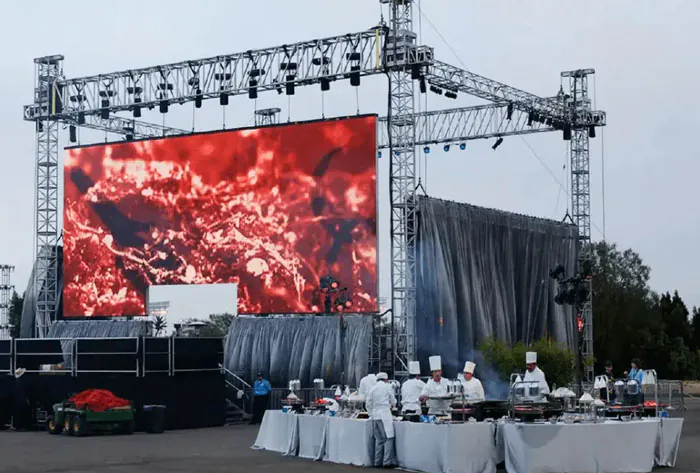
Outdoor LED Screen Rental for Concerts has become a core part of modern live event production. Whether the goal is to boost visibility for fans at the back of the venue, create a visual centerpiece for the stage, or support branded sponsor content, the right screen setup can change the entire experience. Large-format LED displays are now expected at festivals, stadium shows, and open-air performances because they deliver brightness, scale, and clarity in environments where traditional projection often falls short. In this guide, you will learn how outdoor concert screens work, what to look for in a rental provider, how to plan the technical setup, and how to avoid costly mistakes when choosing a display solution for your event.
TW VISION has a large stock in the USA. Welcome to contact us if you are interested. WWW.CSTWVISION.COM
Table of Contents
- Why Outdoor LED Screens Matter at Live Concerts
- Key Factors to Consider Before Renting
- Planning the Right Screen Setup for Your Venue
- Content, Playback, and Show Control
- Working With a Rental Provider
- FAQ
- What screen size is best for an outdoor concert?
- Is outdoor LED better than projection for concerts?
- How far in advance should I book a rental?
- Can the screen be used for live video and graphics at the same time?
- What happens if the weather changes during the event?
- Conclusion
Why Outdoor LED Screens Matter at Live Concerts
Outdoor LED Screen Rental for Concerts matters because open-air shows create viewing challenges that indoor venues do not. Distance, crowd size, stage depth, weather, and ambient light all affect how well the audience can see performers and production elements. A properly chosen LED screen keeps the audience engaged even when they are far from the stage.
One of the biggest advantages is brightness. Outdoor concerts often take place during daylight, sunset, or under strong venue lighting. LED displays remain visible in these conditions, making them more reliable than many other visual formats. They also scale well. A screen can be sized to fit intimate outdoor performances, large festival stages, or multi-screen setups for side viewing.
Another benefit is flexibility. Outdoor LED Screen Rental for Concerts can support live camera feeds, lyric graphics, sponsor slides, countdowns, social media walls, and pre-produced visuals. That makes the screen useful before, during, and after the performance. It can help with crowd flow, event branding, and safety messaging too.
Event organizers benefit from better sightlines, stronger audience engagement, and more professional production, while performers can expand the visual language of their shows and sponsors gain high-value visibility through a format that is impossible to ignore.

Key Factors to Consider Before Renting
Outdoor LED Screen Rental for Concerts should never be chosen on size alone. The most effective rental starts with a technical and operational review of the event. The first factor is pixel pitch, which determines how sharp the image appears at different viewing distances. Smaller pixel pitch offers finer detail, but it usually costs more. For large outdoor audiences, the ideal choice depends on how close viewers will be to the screen.
Brightness is another critical factor. Outdoor displays need high nit ratings to stay visible in daylight and through changing weather conditions. If the screen is too dim, graphics lose impact and live camera feeds become difficult to follow. Refresh rate also matters, especially when cameras are recording the show. A low refresh rate can cause flicker or banding on video capture.
You should also assess the venue layout. Outdoor LED Screen Rental for Concerts must fit the stage design, crowd sightlines, and rigging plan. A screen placed too low can be blocked by audience members or stage structures. A screen placed too high may feel disconnected from the performance. Side screens, IMAG displays, and center-backdrops each serve different purposes.
Power and structural support are easy to overlook until late in the process. The screen’s power draw, distribution path, and mounting method must be confirmed in advance. Outdoor environments may require ground support, truss systems, wind-rated structures, or additional ballast. Weather protection is another non-negotiable issue, especially in regions where rain, dust, or heat can affect equipment performance.
Finally, ask about the rental company’s support model. A dependable provider should handle delivery, setup, testing, operation, and teardown. Outdoor LED Screen Rental for Concerts works best when the vendor can coordinate closely with the production manager, lighting team, and AV crew.
Planning the Right Screen Setup for Your Venue
Outdoor LED Screen Rental for Concerts works best when the screen design is matched to the venue type and audience behavior. A small amphitheater, a city park concert, and a multi-day festival will each require a different layout. Planning begins with audience distance. The farther the crowd sits from the screen, the more the system can prioritize scale over ultra-fine resolution.
For front-of-stage use, a wide-format LED backdrop can serve as the show’s main visual surface. This works well when the artist wants dynamic visuals behind the performance. For larger outdoor crowds, side screens are often essential. They give distant audience members a clear close-up view of the stage without forcing them to rely on binoculars or guesswork.
Outdoor LED Screen Rental for Concerts also needs to account for content framing. Live camera shots, motion graphics, and pre-rendered visuals should be created for the screen aspect ratio and native resolution. Cropped or stretched content can undermine the entire presentation. A good production team tests content on the actual screen or in a realistic playback environment before show day.
Sightline testing is useful before finalizing placement. Standing in multiple audience zones reveals whether the screen is visible behind trees, towers, lighting rigs, or scaffolding. The viewing angle also matters. Some screens perform better when viewed head-on, while others are designed to hold image quality across a wider field.
Weather planning should be part of the venue setup from the beginning. Outdoor LED Screen Rental for Concerts often involves contingency plans for wind, rain, heat, and direct sunlight. That means checking equipment ratings, cabling protection, and safe shutdown procedures. If the event spans multiple days, the rental plan should also include overnight security and maintenance checks.
A well-planned layout reduces production stress and gives the audience a more polished experience. It also helps the event team avoid last-minute hardware changes that can affect pacing, budget, and safety.
Content, Playback, and Show Control
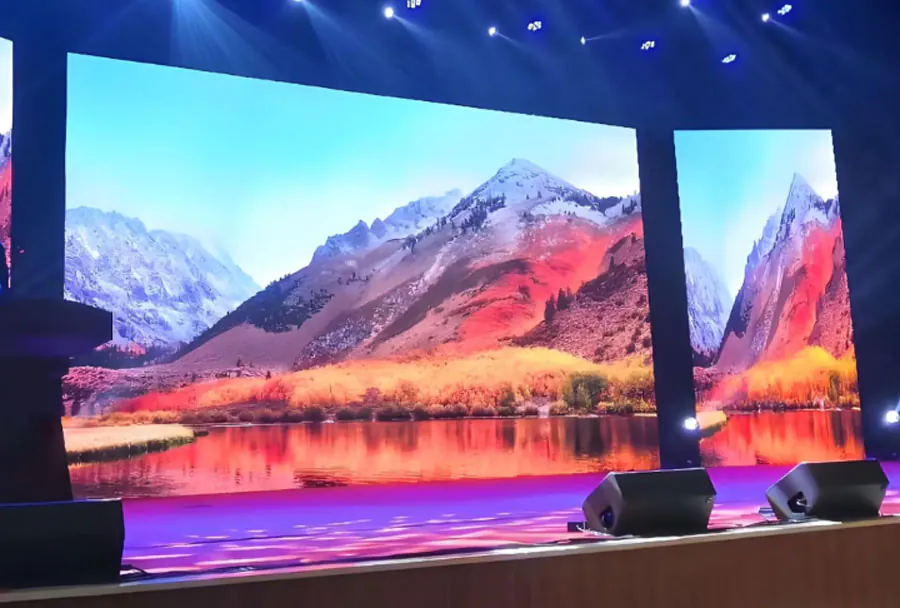
Outdoor LED Screen Rental for Concerts is only as effective as the content it displays. A great screen with poor content design will still feel underwhelming. Concert visuals should be built for motion, distance, and fast audience comprehension. That means using large typography, high-contrast graphics, and bold framing when text is necessary.
Live camera integration is often the most important content layer. Audience members want to see the performer’s expressions, movement, and stage interaction. A skilled camera director can make the screen feel like part of the performance instead of a simple relay. Wide shots, close-ups, and dynamic switching all increase energy when timed correctly.
Pre-programmed visuals can reinforce the tone of the performance. These may include brand animations, tour identity graphics, interstitial loops, or song-specific visual sequences. Outdoor LED Screen Rental for Concerts should support seamless playback from professional media servers or show-control systems. Reliability is more important than novelty here. The equipment must run smoothly for the entire set without stutter, delay, or sync problems.
Audio-visual synchronization is another important issue. If the screen is used for live camera feeds, the image must stay aligned with the sound. Even a small delay can be noticeable and distracting. That is why event teams should test the playback workflow in advance, especially when they connect multiple cameras, processors, or switchers in the signal chain.
For branded events, the screen can also support sponsor packages and event messaging. That content should be handled carefully so it does not interrupt the concert experience. Outdoor LED Screen Rental for Concerts can include sponsor rotations before the show, between sets, or during scheduled breaks, keeping the audience engaged while preserving the artistic flow.
The strongest result comes from treating the screen as part of the show design, not just a utility. When content, camera direction, and stage lighting work together, the display becomes a major visual asset.
Working With a Rental Provider
Outdoor LED Screen Rental for Concerts requires a vendor who understands both event production and live-show risk. Not every screen supplier is equipped for concert work. The right provider should be able to explain technical specifications in plain language, recommend suitable configurations, and support the installation from start to finish.
Start by asking about inventory quality. You want panels that are bright, well-maintained, and compatible with the venue’s technical demands.Event organizers should ask rental providers how often they test the equipment, whether they keep spare modules available, and how they handle panel failures during the show. Outdoor LED Screen Rental for Concerts should include a clear plan for redundancy and on-site troubleshooting.
The company’s experience matters too. Concerts move quickly, and production conditions can change on short notice. A vendor that has handled festivals, touring acts, and outdoor event stages will usually anticipate problems before they become emergencies. That includes managing load-in timing, truck access, rigging constraints, and weather interruptions.
Communication is another key sign of quality. The provider should share diagrams, power requirements, setup windows, and content specifications early in the process. Outdoor LED Screen Rental for Concerts works best when the vendor coordinates with the lighting designer, stage manager, video director, and site operations team. Misalignment between teams can create delays or technical conflicts.
Pricing should be transparent and complete. A low rental quote may leave out delivery, install labor, processor rental, operators, or teardown. Ask for a full scope so you can compare offers accurately. Event organizers should also verify insurance coverage, safety compliance, and local permit requirements when they plan to mount the screen on a structure.
The best rental partner does more than drop off equipment. They help ensure that the screen contributes to the success of the concert without creating avoidable risk.
FAQ
What screen size is best for an outdoor concert?
The right size depends on venue scale, crowd distance, and screen purpose. Event organizers should size Outdoor LED Screen Rentals for Concerts to ensure audiences at the back can clearly see facial details, lyrics, and graphics without visual strain. Larger venues often need multiple screens or a main display plus side screens.
Is outdoor LED better than projection for concerts?
In most open-air concert environments, yes. Outdoor LED Screen Rental for Concerts is usually more reliable than projection because LED holds brightness better in daylight and does not require a darkened environment. It also performs better over long viewing distances.
How far in advance should I book a rental?
Book as early as possible, especially for peak festival season. Outdoor LED Screen Rental for Concerts often requires coordination with rigging, power, and content teams, so early booking helps secure the right equipment and support staff.
Can the screen be used for live video and graphics at the same time?
Yes. Many concert productions combine live camera feeds with overlays, transitions, and branded elements. Event organizers can use Outdoor LED Screen Rentals for Concerts to support both applications when they build the playback system and content workflow around the specific use case.
What happens if the weather changes during the event?
Weather planning should be part of the rental agreement. Outdoor LED Screen Rental for Concerts should include equipment rated for outdoor conditions and a clear response plan for rain, wind, or extreme heat. Always confirm shutdown and protection procedures before show day.
Conclusion
Outdoor LED Screen Rental for Concerts is not just a technical purchase. It is a production decision that affects audience experience, stage design, content delivery, and event safety. When the screen is chosen well, placed correctly, and supported by a solid content and control workflow, it becomes one of the most valuable tools in the entire show. The most effective results come from matching the display to the venue, the crowd, and the creative goals of the performance. With the right planning and a capable rental partner, Outdoor LED Screen Rental for Concerts can elevate both the look and the impact of any live event.