2026 Indoor LED Screen Rental Prices and Custom Packages


The market for indoor LED screen rentals in 2026 has matured beyond a pure commodity into a service-driven offering where hardware quality, software integration, and on-site expertise define value. Advances in pixel density, lower-weight cabinets, improved power efficiency, HDR capability, and cloud-based content management have pushed rental providers to offer differentiated packages. For event planners, AV managers, and marketing teams, understanding the drivers of cost and the structure of custom packages is essential to control budgets while achieving the visual impact required.
What This Guide Covers
– A clear breakdown of price drivers for indoor LED screen rentals in 2026.
– Typical cost ranges and realistic sample quotes.
– Five practical custom package archetypes with what they include.
– A decision checklist to help you get accurate quotes and avoid hidden fees.
– A compact analysis table comparing five representative packages.
Key Factors That Drive Rental Prices
Understanding what affects price helps event managers weigh value against cost and choose the right package.
– Pixel Pitch and Resolution: Finer pixel pitch (P1.2–P2.5) delivers crisp images at short distances but carries a premium for manufacturing and handling. Mid-range pitches (P3–P4) hit the sweet spot for most indoor events. Lower density (P4.8–P10) is suitable for backdrops and long-throw viewing.
– Screen Size and Total Surface Area: Most vendors price by the square meter (or square foot) for rental, with larger surfaces often qualifying for volume discounts but increasing transport and installation fees.
– Rental Duration: Day rates typically apply for single-day events; multi-day rentals often reduce per-day cost. Setup and strike time is usually billed separately or included in higher-tier packages.
– Installation Complexity: Rigging, hanging, curved or custom-shaped builds, and integration with stage structures increase labor and insurance costs.
– Control Systems and Playback: On-site media servers, redundancy, live inputs, and real-time compositing all add to cost. Cloud-driven content updates and remote management are increasingly common add-ons.
– Technical Support and Staffing: Technician day rates for setup, operation, and strike are standard. Complexity and on-site troubleshooting needs determine how many technicians are required.
– Logistics: Delivery distance, elevator/stair access, and venue restrictions factor into transport and handling fees.
– Value-Added Services: Content creation, motion graphics, mapping, calibration, and broadcast feeds are often packaged or a la carte.
2026 Typical Price Ranges (U.S. Market) — Practical Figures
These ranges reflect standard rental scenarios in 2026 for indoor use in U.S. markets. Actual quotes will vary based on city, provider, and event complexity.
– Entry-Level Indoor (P6.0–P10.0): $40–$90 per m2 per day
– Use cases: Large background displays, dynamic stage backdrops viewed from distance.
– Standard Indoor (P3.0–P4.8): $80–$200 per m2 per day
– Use cases: Trade shows, corporate stages, AV backdrops with moderate viewing distances.
– High-Resolution (P1.2–P2.5): $150–$400 per m2 per day
– Use cases: Broadcast, product launches, immersive activations where viewers are close.
– Premium/Ultra-High Density (P0.9–P1.2 and emerging microLED): $350–$900+ per m2 per day
– Use cases: High-end retail installations, luxury product showcases, film/TV virtual sets.
Common additional charges:
– Setup/strike labor: $300–$1,800+ depending on crew size and complexity.
– Technician/operator daily rate: $350–$900 per tech/day.
– Delivery/pickup: $150–$1,200 depending on distance and gear volume.
– Rigging/structural rental: $200–$2,500+ depending on truss, motors, and engineering.
– Media server and control system rental: $150–$600 per day.
– Content creation/turnkey production: $500–$10,000+ depending on scope.
Example Cost Calculation
For a 20 m2 P3 screen for a 3-day conference:
– Screen rental (mid-range): 20 m2 × $140/m2/day × 3 days = $8,400
– Setup/strike labor: $900
– One technician for operation (3 days): $600/day × 3 = $1,800
– Delivery/pickup: $450
– Media server/control: $300/day × 3 = $900
Total estimated: $12,450 (approx.)
Note: Volume discounts, non-profit or agency rates, and negotiated bundled services can lower the total.
Five Custom Package Archetypes (2026)
Rental companies increasingly offer packaged solutions to simplify planning. Below are five archetype packages with typical inclusions and target uses.
1. Basic Trade Show Package
– Best for small booth activations and simple presentation displays.
– Typical hardware: P4.8 or P3, modular cabinets, 6–15 m2.
– Includes: Screen rental, basic mounting frames, standard playback (USB/HDMI), one technician for setup/strike.
– Benefits: Cost-effective, quick install, suitable for marketing teams with ready-made content.
2. Corporate Conference Package
– Designed for mid-size stages and keynote presentations.
– Typical hardware: P3–P2.5, 15–40 m2, front-access staging, basic redundancy.
– Includes: Screen rental, rigging/truss, media server with company-branded templates, onsite technician during the event, basic calibration, and one-day rehearsal.
– Benefits: Reliable operation, better image quality, and support for multiple input sources.
3. Live Event / Small Concert Package
– For concerts, awards, and theatrical events where live video integration is crucial.
– Typical hardware: P2.5–P3, modular with quick-release cabinets, 30–80 m2 depending on stage.
– Includes: Screen rental, high-brightness panels, stage rigging, backup power/ redundancy, multiple technicians, video switching and live-feed integration.
– Benefits: Designed for live switching, camera feed integration, and minimal downtime.
4. High-Resolution Product Launch Package
– For product showcases needing crisp detail (mobile, automotive, fashion).
– Typical hardware: P1.5–P2.0, 10–30 m2, optional curved or projection-mapped design.
– Includes: High-density LED rental, advanced media server with real-time compositing, content prep (limited), dedicated operator, pixel-mapping and color calibration.
– Benefits: Exceptional image quality and the ability to showcase product details.
5. Premium Turnkey Experience Package
– End-to-end solution for flagship events and brand experiences.
– Typical hardware: Mix of pixel pitches (stage, fills, and accents), full scenic integration, multi-screen designs.
– Includes: Full hardware rental, rigging and structural engineering, creative content production, motion graphics, rehearsals, dedicated crew (technical director, video engineer, operators), redundancy systems, and on-site concierge.
– Benefits: Single-vendor accountability, creative and technical excellence, and reduced management overhead for the client.
Analysis Table — Representative Package Comparison
| Package | Typical Screen Size | Common Pixel Pitch | Estimated Price (3-day event) | Key Inclusions |
|---|---|---|---|---|
| Basic Trade Show | 6–15 m2 | P4.8–P3 | $800–$3,000 | Screen, frame, basic playback, one tech for setup |
| Corporate Conference | 15–40 m2 | P3–P2.5 | $6,000–$18,000 | Rigging, media server, calibration, technician support |
| Live Event / Small Concert | 30–80 m2 | P2.5–P3 | $15,000–$45,000 | High brightness, redundancy, multiple techs, live feed integration |
| High-Resolution Launch | 10–30 m2 | P1.2–P2 | $12,000–$36,000 | High-density panels, pixel mapping, advanced media server |
| Premium Turnkey | Variable (multi-screen) | Mixed Pitches | $30,000–$150,000+ | Creative, production, crew, engineering, full-service support |
Practical Tips for Getting Accurate Quotes
– Provide exact specs: screen size, pixel pitch preference, stage/rigging constraints, and where viewers will be located. The more precise your brief, the more accurate the quote.
– Ask for line items: hardware rental, setup/strike, technician hours, delivery, power, and any special insurance or permits. Compare apples to apples.
– Inquire about redundancy: If the event is critical, require N+1 redundancy (extra modules/power supplies/backup players) in writing. That increases cost but reduces risk.
– Request a site survey: For complex venues, insist on a physical or virtual site inspection so the vendor can account for load-bearing, access, and power issues.
– Confirm content specs: Ensure your graphics team delivers the right frame rates, resolutions, and codecs. Ask vendors for recommended templates to avoid last-minute transcoding charges.
– Negotiate bundled services: Vendors will usually give discounts for bundled items (longer rental period, combined AV services, or multiple events).
– Check insurance and liabilities: Clarify who insures gear and what happens in case of damage during install or operation.
Specification Guidelines by Use Case
– Small Booth / Expo: 6–15 m2, P3–P4.8, single input, one-day event—choose reliability and low power draw.
– Conference Keynote: 15–40 m2, P2.5–P3, allow for multiple inputs and a media server, plus rehearsal time.
– Broadcast/Livestream Event: P1.5–P2, camera feed-friendly, high refresh rates (≥3,840 Hz for broadcast cameras), and genlocked video sources to avoid flicker artifacts.
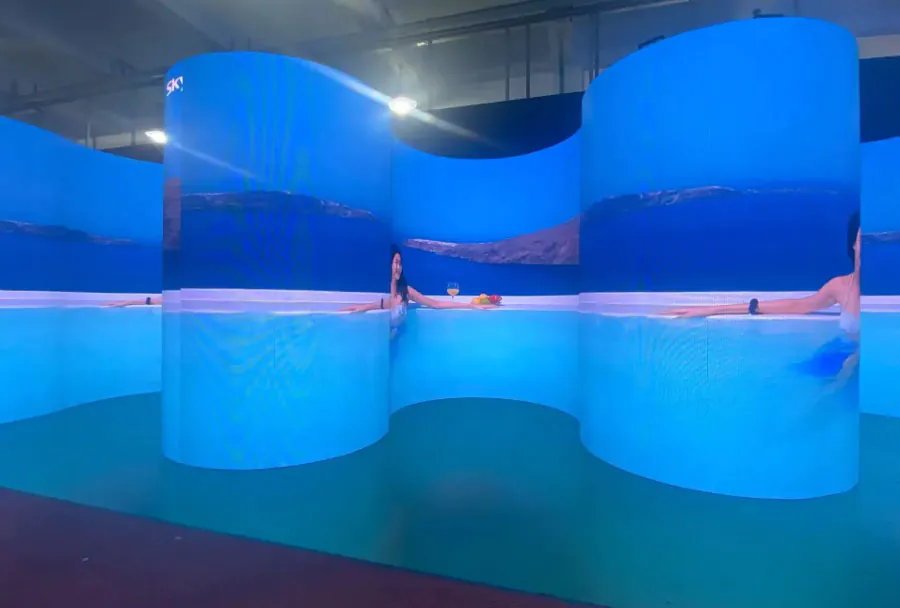
– Immersive Installations: Consider curved or flexible panels, mixed pixel pitches for near/far planes, and real-time content engines (Unreal/Unity) for interactive elements.
Emerging Trends in 2026 That Affect Pricing
– Subscription and OPEX Models: Some providers offer subscription-style pricing or multi-event contracts, shifting costs from CAPEX to OPEX and often lowering per-event rates for repeat clients.
– Improved Portability and Speed: Lighter cabinets and tool-free interlocks reduce labor time and therefore labor costs for installation.
– Cloud-Based Content Delivery: Last-minute content updates via the cloud allow quicker turnarounds but introduce a new line item for cloud transit or remote management services.
– Micro-LED & High-Density Options Becoming More Accessible: Early-adopter premium pricing persists, but costs are falling as supply and manufacturer competition increase.
– Sustainability Premiums: Venues and brands increasingly demand lower power consumption and recyclable packaging; eco-conscious providers may charge a premium for certified gear.
Checklist Before Signing a Rental Agreement
– Confirm exact screen dimensions and pixel pitch in the contract.
– Clarify what happens if the screen goes down mid-event (SLAs, redundancy, credits).
– Ensure labor hours and overtime rates are detailed.
– Confirm delivery windows, storage at venue, and lift/elevator access.
– Verify power requirements and whether the venue supplies distro and cabling.
– Request contact information for onsite technical leads and escalation paths.
– Confirm the vendor’s cancellation and weather policies.
Balancing Cost, Quality, and Risk
In 2026, indoor LED screen rentals are less about buying the cheapest pixels and more about managing a predictable, high-quality experience. Pixel pitch and screen size are the most visible cost drivers, but project risk, technical support, and creative integration are where value is realized—or lost. A clear brief, a line-itemed quote, and the right package tailored to your event’s technical needs and audience expectations will deliver the best ROI.