Affordable Rental Outdoor LED Screen Options for All Budgets

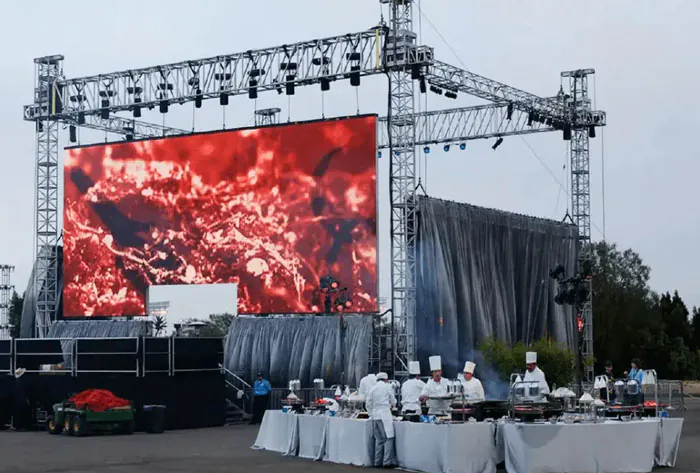
Outdoor events, festivals, advertising campaigns, and municipal announcements increasingly rely on LED screens to deliver vivid content to large audiences. For planners working with tight budgets, renting outdoor LED screens can deliver professional results without the capital expense of a purchase. This guide walks through practical, budget-conscious options, what variables affect rental cost and visual quality, and how to match an LED solution to your audience, venue, and financial constraints.
Why Renting Makes Sense
Renting is ideal when you need flexibility, short-term deployment, or the latest technology without ownership hassles. Advantages include:
– Lower upfront cost and predictable budgeting (daily/event pricing).
– Access to newer, higher-spec panels than a comparable purchased system.
– Included logistics, rigging, and technical support from rental houses (often).
– Scalability: you can pick the screen size and pixel pitch for each event.
However, rental costs vary widely based on pixel pitch, brightness, screen size, installation complexity, and service level—so understanding trade-offs helps you get the best value.
Key Specs That Drive Price and Performance
Understand these terms when evaluating rental quotes:
– Pixel pitch (mm): Distance between pixel centers. Lower numbers (P2, P3) = higher resolution and higher cost; higher numbers (P6–P10) = lower resolution and lower cost.
– Brightness (nits): Outdoor screens usually 4,000–7,000 nits. Higher brightness costs more but is necessary for direct sunlight.
– Cabinet size and modularity: Larger, standard cabinets are faster to rig but may limit viewing distance/resolution choices.
– IP rating: Weatherproofing (IP65+) is essential outdoors; higher-rated gear might cost more.
– Rigging and structural requirements: Ground stacks, scaffolding, or truck mounts add to cost.
– Power consumption and generators: Remote sites may need generators, fueling operational costs.
– Support: Technician hours, content playback hardware, and insurance can be significant line items.
Budget Categories and Recommended Options
– Low-Budget (tightest budgets): P6–P10 rental screens. Ideal for distant viewing (50+ feet), temporary signage, and small community events. Lower resolution is acceptable if the crowd is far from the screen.
– Mid-Range (most events): P3–P5. Good balance of clarity and cost for concerts, corporate events, and outdoor movie nights where viewing distances vary.
– Premium Rental (higher budgets or close viewing): P2–P2.5 fine-pitch displays. Best for premium branding events, product launches, or close-up viewing where high detail matters.
Also consider specialized solutions for particular needs:
– Trailer-mounted LED screens: Quick deployment, integrated power and structure—slightly higher per-day cost but saves rigging time.
– Soft/curtain LEDs: Lightweight and inexpensive to transport, but may require supports and have lower brightness.
– Transparent/facade LEDs: Used for architectural applications; usually costlier and require custom engineering.
Comparative Analysis Table
| Option | Typical Pixel Pitch | Best Use / Viewing Distance | Estimated Rental Cost (per day) | Key Pros & Cons |
|---|---|---|---|---|
| Basic Modular Outdoor | P8–P10 | Large crowds, 100+ ft | $300–$800 | Pros: Cheapest, durable. Cons: Low detail for close viewers. |
| Standard Event LED | P4–P6 | General events, 30–100 ft | $800–$2,000 | Pros: Balanced cost/quality. Cons: Moderate rigging needs. |
| Fine-Pitch Rental | P2.5–P3 | Concerts, corporate, 10–50 ft | $2,000–$5,000 | Pros: High clarity. Cons: Higher rental and setup costs. |
| Trailer-Mounted LED | P6–P10 (often) | Rapid-deploy signage, street events | $1,000–$3,000 | Pros: Fast setup, integrated power. Cons: Less customizable size. |
| Soft/Curtain LED | P4–P10 | Stage backdrops, irregular structures | $600–$1,800 | Pros: Lightweight, easy transport. Cons: Lower brightness, structural needs. |

Note: Rental prices above are illustrative averages and vary by region, season, rental house, included services, and whether delivery, rigging, tech support, and power are included.
How to Choose the Right Option for Your Budget
1. Define audience distance and expectations: If your viewers are 50–100 feet away, a P6 screen might look great; if they’re 10–20 feet away, aim for P3 or better.
2. Prioritize brightness: For daytime outdoor use, ensure screens are rated for 5,000+ nits. Cheaper screens with low brightness will wash out in direct sun.
3. Factor in total event cost, not just screen rental: Rigging, permits, power, transport, tech labor, and insurance often add 30–70% on top of the base rental.
4. Ask about included services: Some houses include operator and content playback, others charge hourly. Check response time for tech issues.
5. Choose standard cabinet sizes where possible: Standardization reduces assembly time and labor charges.
6. Get a site survey: Complex sites may require additional structural or permitting costs; a professional survey identifies hidden expenses early.
Money-Saving Strategies
– Right-size the screen: Bigger isn’t always better. Use sightline analysis to pick the smallest screen that meets visibility goals.
– Optimize content: High-contrast designs and large fonts improve perceived clarity on lower-resolution screens—saving you money on pixel density.
– Book off-peak or bundle days: Rentals often cost less on weekdays or when booked for consecutive days.
– Rent locally: Reduce shipping and labor by sourcing a local rental company with a proven track record.
– Negotiate package deals: Combine delivery, tech labor, and playback hardware into one quote for easier comparison and often lower total cost.
– Use trailer-mounted screens for fast deployments: Saves rigging time and personnel expenses in short-run events.
Technical and Logistical Considerations
– Power planning: Confirm on-site power capacity. LED Video Walls can draw significant current—ask the rental house for load specs and recommended generator sizes if needed.
– Weather contingency: Ensure panels are rated IP65 or higher, and have a teardown plan for extreme weather. Clarify what the rental house’s policy is for weather-related downtime.
– Content formats and playback: Confirm compatibility between your media players and the screen’s control system. Prepare assets in recommended resolutions and codecs.
– Permits and structural engineering: Large screens may trigger permits or engineering reviews for public safety—factor time and fees into planning.
– Backup plan: For critical events, arrange for a backup screen or redundancy in content playback to avoid downtime.
Working with a Rental Company—Questions to Ask
– What is included in the quoted rate (delivery, setup, teardown, tech operator)?
– What are the exact screen specs (pixel pitch, brightness, cabinet size, IP rating)?
– Who handles permits and engineering if required?
– What is the crew size and estimated setup/teardown time?
– What are the insurance and liability requirements?
– What’s your weather/force majeure policy?
– Do you provide on-site technical support during the event?
– Can I see recent references or projects similar to mine?
Case Examples
– Community movie night (tight budget): A P6 modular screen rented for the evening, center-mounted on scaffolding, with simple stereo sound. Cost kept low by using volunteer setup and local rental.
– Corporate outdoor launch (mid-budget): A P3 screen with daylight brightness, professional rigging, and operator included—provides crisp product video and live presenters.
– Multi-day festival (variable budgets): Large P6 screens for far-field audience areas combined with a P3 main stage screen. Bundling multiple days and multiple screens reduced per-day pricing.
Renting an outdoor LED screen offers great flexibility and access to high-quality visual solutions across budgets. The right choice balances pixel pitch, brightness, screen size, and logistics with your audience’s viewing distance and event goals. Use the table above to match common options to use cases, and follow the money-saving tips to stay within budget.