Indoor LED Screen Rental for Weddings Parties and Trade Shows

Indoor LED screens have become an essential element for modern events — from intimate wedding receptions to high-energy parties and polished trade show booths. They offer vivid visuals, flexible content options, and the ability to deliver messaging that elevates the guest experience. This article will guide event planners, couples, venue managers, and exhibitors through the practical and creative aspects of renting indoor LED screens: key technical specifications, venue considerations, content strategies, cost expectations, vendor selection tips, and a comparative analysis to help you choose the right solution.
Why Rent an Indoor LED Screen?
LED screens outperform many traditional display options in several areas:
– Brightness and color: High brightness and deep contrast make LED ideal for locations with ambient light, while accurate color reproduction enhances photos, branding, and video content.
– Seamless scalability: LED panels can be tiled into almost any shape and size, allowing for custom backdrops, stage walls, or freestanding installations.
– Viewing distance adaptability: With different pixel pitches available, screens can be optimized for close-up viewing (e.g., wedding photo walls) or long-distance visibility (e.g., trade show halls).
– Reliability: Commercial led displays are designed for long runs and continuous operation during multi-hour events without overheating or burn-in.
– Impact: LED provides an immersive visual focal point, encouraging social sharing, stronger brand recall, and a memorable guest experience.
Key Technical Terms You Should Know
– Pixel pitch (mm): The distance between two LED pixels. Smaller pixel pitches (1.2–2.5 mm) are better for close viewing; larger pitches (3 mm and above) work for longer viewing distances.
– Resolution: The total pixel count of the assembled screen. Higher resolution leads to sharper images.
– Brightness (nits): Measures luminance. Indoor LED screens usually range from 800 to 3,000 nits; choose brightness based on ambient light.
– Refresh rate (Hz): Determines motion smoothness. For video, 3,840 Hz or higher is preferred to avoid flicker in camera capture.
– Aspect ratio and physical size: Determine how content will be produced and scaled.
– Front or rear service: For venue constraints, front-service panels allow maintenance from the front.
Practical Considerations for Weddings, Parties, and Trade Shows
Weddings
– Mood and aesthetic: LED screens can display dynamic backdrops, slideshows, or subtle animated textures that match the couple’s theme.
– Ceremonial focus: Use a high-resolution screen behind the head table or stage for vows, live camera feeds, and close-ups so every guest can see.
– Photo opportunities: An LED Video Wall becomes an interactive photo backdrop; consider softer motion and color palettes for flattering portraits.
Parties
– Concert-style visuals: For DJs and live acts, high-brightness LED with high refresh rates enhances lighting effects and video playback.
– Motion and synchronization: Sync LED visuals with lighting and audio for immersive experiences.
– Safety and layouts: Ensure dance-floor sightlines and avoid obstructive stands.
Trade Shows
– Brand clarity: Large LED screens draw attention and convey polished brand messaging, product demos, and dynamic presentations.
– Modular setups: Trade shows often require quick assembly and disassembly; choose panels designed for fast rigging.
– Camera-friendly refresh rates: If your booth will be livestreamed or photographed, request high refresh rate screens.
Vendor Selection: What to Ask and Inspect
– Portfolio and references: Ask for examples of similar events they’ve serviced.
– Technical spec sheet: Confirm pixel pitch, brightness, refresh rate, power requirements, and safe load capacity.
– Onsite support: Will technicians be present during setup, runtime, and tear-down?
– Insurance and safety certifications: Verify company insurance and UL/CE certifications for the equipment.
– Content support: Do they offer media servers, video processors (scalers), and content design services?
– Rigging and venue compliance: Ensure panels can be rigged to your venue’s structural limits and meet fire codes.
Installation and Logistics
Successful LED rentals hinge on planning:
– Site survey: A pre-event site visit allows the vendor to assess rigging points, power access, and sightlines.
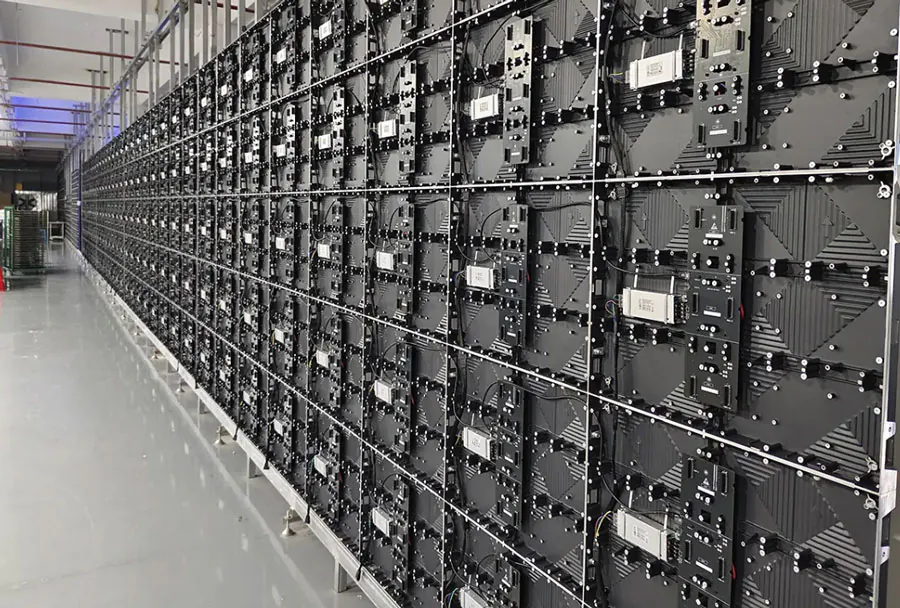
– Power and cabling: LED walls demand stable power and adequate circuits. Share venue power maps with the vendor beforehand.
– Timing: Allow sufficient time for test runs and content checks. Typically, 4–8 hours for medium setups; larger installations may require a day.
– Load-in access: Confirm freight elevators, doors, and stairways can accommodate panels.
– Foot traffic and safety: Use protective barriers if the screen is near guests during setup and tear-down.
Content Strategy and Playback
– Content resolution: Provide files at the native resolution or aspect ratio to avoid scaling artifacts.
– File formats: Vendors typically accept MP4 (H.264 or H.265), ProRes, and image sequences. Confirm codec compatibility.
– Playback systems: Many vendors provide a media server with playlist scheduling and live-input switching for on-the-fly cues.
– Graphic design: For weddings, create elegant lower-third titles and photo transitions; for trade shows, prioritize short, loopable demo reels and clear CTAs.
– Live feeds and cameras: Live camera feeds should go through a video processor to match color and scale for the LED screen.
Budget and Cost Drivers
Costs vary widely by screen size, pixel pitch, event length, and geographic market. Key cost drivers:
– Screen size and pixel pitch: Smaller pixel pitch and larger screen area increase cost.
– Rental duration: Multi-day rentals might have discounted daily rates; however, setup and tear-down fees may apply.
– Transportation and labor: Heavier panels and complex rigs increase labor costs.
– Technical extras: Media servers, live switching, and content creation services add to the total.
Below is an analysis table to compare recommended setups across event types.
| Use Case | Recommended Pixel Pitch (mm) | Typical Screen Size (ft2) | Recommended Brightness (nits) | Estimated Rental Price (per day) |
|---|---|---|---|---|
| Wedding ceremony/backdrop | 1.5 – 2.5 | 24 – 80 | 800 – 1,200 | $800 – $3,000 |
| Wedding reception/photo wall | 1.2 – 2.0 | 12 – 40 | 800 – 1,500 | $600 – $2,000 |
| Private party / DJ stage | 2.0 – 4.0 | 40 – 160 | 1,500 – 2,500 | $1,200 – $5,000 |
| Trade show booth (standard isle) | 2.0 – 3.9 | 12 – 48 | 1,500 – 3,000 | $700 – $3,500 |
| Trade show booth (island / large) | 1.5 – 3.0 | 48 – 200 | 1,500 – 3,000 | $2,000 – $10,000+ |
Note: Prices are ballpark estimates; actual rates depend on market, vendor, and logistics.
How to Match Pixel Pitch to Viewing Distance
A practical rule of thumb: multiply the pixel pitch (mm) by 3 to 4 to get the recommended minimum viewing distance in meters. For example:
– 1.2 mm pixel pitch: 3.6–4.8 meters (~12–16 feet) minimum viewing distance.
– 3.0 mm pixel pitch: 9–12 meters (~30–40 feet) minimum viewing distance.
For weddings and parties where guests are often close, choose pixel pitches between 1.2 and 2.5 mm. For trade shows with longer viewing distances or higher mounting, 2.5–4 mm is usually cost-effective.
Content Ideas by Event Type
Weddings
– Romantic cinematic footage and slow-moving patterns as ambience.
– Live camera feed for vows and speeches to help distant guests.
– Personalized content: couple’s photos, timeline animations, and OK-to-cue slides for MCs.
Parties
– High-energy visuals synchronized with music: beat-driven motion graphics, animated artist branding, and social media walls.
– Real-time effects: integrate motion-tracking or VJ software for live shows.
– Interactive elements: QR codes, live polls displayed on screen.
Trade Shows
– Short, repeatable product demo loops with clear benefits highlighted.
– Interactive wayfinding or schedules for multi-session booths.
– Call-to-action content: appointment scheduling links and QR codes for lead capture.
Common Pitfalls and How to Avoid Them
– Underestimating brightness: Indoor venues with large windows or strong ambient lighting require higher-nit screens.
– Wrong pixel pitch: Choosing too coarse a pitch for close-up viewing leads to visible pixel structure.

– Poor content preparation: Low-resolution assets scaled up will look blurry or pixelated.
– Insufficient power planning: Not accounting for power draw can cause outages or blown circuits.
– Late or incomplete testing: Always perform a full content and playback test before doors open.
Case Study Examples (Short)
– Wedding: A bride and groom used a 24-ft2 LED backdrop (1.6 mm) behind the head table showing soft animated florals and a live feed of speeches. Result: improved photo lighting, delighted guests, and a social media spike.
– Party: A corporate holiday party used a 120 ft2 LED stage wall (3 mm) with synced visuals and a DJ feed. Result: energy levels rose, and the screen enabled multiple immersive set moments.
– Trade show: A 10×5 ft LED display (2.5 mm) at a trade show booth looped product demos and live demo feeds. Result: booth traffic doubled compared to prior shows with static signage.
Checklist for Your Rental Day
– Confirm final screen size, pixel pitch, and mounting method with the vendor.
– Share final content files at least 48 hours ahead in the requested format and resolution.
– Schedule a site visit or provide accurate venue schematics and power maps.
– Secure vendor insurance and a clear service-level agreement (SLA) for on-site technical support.
– Allocate time for a rehearsal with presenters, lighting, and sound engineers.
– Confirm teardown and load-out times with venue management to avoid overtime fees.
Environmental and Safety Considerations
– Heat dissipation: Ensure adequate airflow around the display to prevent overheating.
– Electrical safety: Use circuit breakers and ground fault protection; avoid daisy-chaining power strips.
– Fire codes: Check with the venue about flame-retardant requirements and egress pathways.
– Structural load: Confirm truss and rigging capacities when suspending screens.
Maximizing ROI and Guest Impact
– Encourage social sharing: Design visuals and photo moments that invite guests to take and post pictures.
– Use data capture: Integrate QR codes, live voting, and lead capture forms for trade shows.
– Cross-sell services: Offer bundled packages with sound, lighting, and content creation to create a seamless experience and often reduce total cost.
– Measure engagement: Track dwell time, social mentions, and lead conversions to evaluate success.
Indoor LED screen rental is a powerful way to elevate weddings, parties, and trade shows. Choosing the right pixel pitch, brightness, and screen size — and partnering with an experienced vendor who provides onsite support and media services — will ensure your visuals delight attendees and meet your event goals. From creating intimate, romantic backdrops at weddings to commanding attention at trade shows, LED screens turn static moments into memorable experiences. Plan early, prepare professional content, and treat the screen as a key element of your event design to get the best return on your rental investment.
If you’re preparing to rent an indoor LED screen, start by determining viewing distances, the mood you want to create, and your budget. Then contact vendors for site surveys and quotes, and request references or past event examples to validate their capabilities. With the right planning and execution, an LED screen becomes more than a display — it becomes the central storytelling canvas for your event.