How to Choose the Best Outdoor Rental LED Screen

Outdoor events put special demands on LED screens. Whether you’re renting for a concert, sports broadcast, corporate activation, drive-in movie, or political rally, the display is often the focal point of the audience experience. The right screen maximizes visibility, ensures reliability in changing weather, simplifies logistics, and protects your budget. Choosing poorly can create readability issues, risk downtime, and inflate costs through extra labor or replacement rentals.
This guide walks you through practical, technical, and logistical factors to help you choose the best outdoor rental led screen for your event. It highlights key specifications, decision criteria, and a comparative analysis table to simplify vendor conversations and technical checks.
Understand Your Event and Audience
Start with the event profile. The screen you need depends primarily on:
– Venue type: open field, stadium, street, rooftop.
– Audience size and distribution: numbers, seating vs. standing, viewing arcs.
– Typical viewing distance: the nearest and farthest seats from the screen.
– Content: live camera feeds, video playback, slides, or text-heavy graphics.
– Duration and timing: single-evening event vs. multi-day festival; daytime vs. nighttime use.
A screen that performs well in a small nighttime theater can be ineffective for a daytime festival where daylight visibility and viewing angles are crucial.
Key Technical Specifications
– Pixel Pitch: Pixel pitch (mm) defines the gap between pixel centers. Lower pitch = higher resolution and closer viewing capability. For outdoor rentals:
– P2.6–P4.8 often used for close-to-medium distances (but normally more expensive).
– P6–P10 is common for general outdoor events where viewers are farther back.
– Brightness: Measured in nits (cd/m2). Outdoor daytime events generally require 5,000–7,000 nits; nighttime events can use 1,000–3,000 nits. Look for adjustable brightness and automatic ambient light sensors.
– Refresh Rate and Processing: A refresh rate of 3,000 Hz or higher reduces flicker and camera strobing, important for live broadcast. Good image processors handle color calibration, scaling, and input latency.
– Viewing Angle and Contrast: Wide viewing angles and high contrast ratios maintain image quality across large crowds. Outdoor LED cabinets should offer uniform brightness across angles up to 140° horizontally and vertically when possible.
– Weatherproofing (IP Rating): An IP65 rating is a common minimum for outdoor cabinets (dust-tight and protected against water jets). For extreme weather, higher ingress protection and corrosion-resistant materials are essential.
– Cabinet Size and Resolution: Choose cabinet sizes that allow flexible arrays for various event sizes. Module resolution affects overall screen resolution when panels are tiled.
Practical Considerations for Rental Use
– Modularity and Transportability: Rental screens should be modular for easy transport, fast rigging, and scalable sizing. Lightweight cabinets speed setup and reduce labor costs.
– Setup Time and Labor: Ask vendors for rigging diagrams, crew requirements, and average setup/teardown times. Faster deployments reduce labor costs and lessens risk during limited setup windows.
– Power Requirements and Redundancy: Identify per-module power draw and total amperage. For critical events, require redundant power feeds and backup generators or UPS systems for control servers.
– Mounting Options: Look for flexible mounting—ground stacks, trussing, flying points, mobile trailers. The vendor should provide safe-load calculations and certified rigging hardware.
– Warranty, On-site Support, and Spares: Rental companies should provide on-site technicians, spare modules, and full technical support. Ask about SLAs for resolution of failures during the event.
Environmental and Safety Factors
– Wind Load and Structural Safety: Outdoor screens function as sails and require wind-load calculations. For elevated or flown screens, ensure certified rigging, guying systems, and compliance with local codes.
– Temperature and Heat Management: LEDs and power supplies produce heat; proper ventilation or active cooling extends life and reliability. Verify operating temperature ranges.
– Sunlight Readability and Anti-Glare: High brightness plus anti-reflective coatings/materials improve daylight readability.

– Local Regulations and Permits: Flown displays, large structures, and long-duration events may need permits. Verify local noise, lighting, and safety regulations.
How to Match Screen Specs to Viewing Distance
A simple rule: comfortable viewing distance (in meters) ≈ pixel pitch (in mm) × 1,000 × k, where k is a factor that describes visual acuity—commonly 1.5–3. Here is a more practical guideline:
– Pixel pitch 2–3 mm: viewing distance 2–6 m (close viewing, premium content).
– Pixel pitch 4–6 mm: viewing distance 5–12 m (medium-distance).
– Pixel pitch 6–10 mm: viewing distance 10–20 m (general outdoor events).
– Pixel pitch 10–16 mm: viewing distance 20–40+ m (very large festivals, stadium screens).
Match resolution with content: high-resolution feeds or text-heavy content need finer pixel pitch.
Analysis Table: Comparing Common Outdoor Rental LED Screen Types
| Screen Type | Typical Pixel Pitch | Brightness (nits) | Typical Viewing Distance | Best Use Cases |
|---|---|---|---|---|
| Fine Pitch Outdoor | P2.5–P4 | 2,000–5,000 | 3–12 m | Corporate events, close-stage activations, premium broadcasts |
| Standard Outdoor | P6–P10 | 5,000–7,000 | 10–30 m | Music festivals, outdoor cinemas, street events |
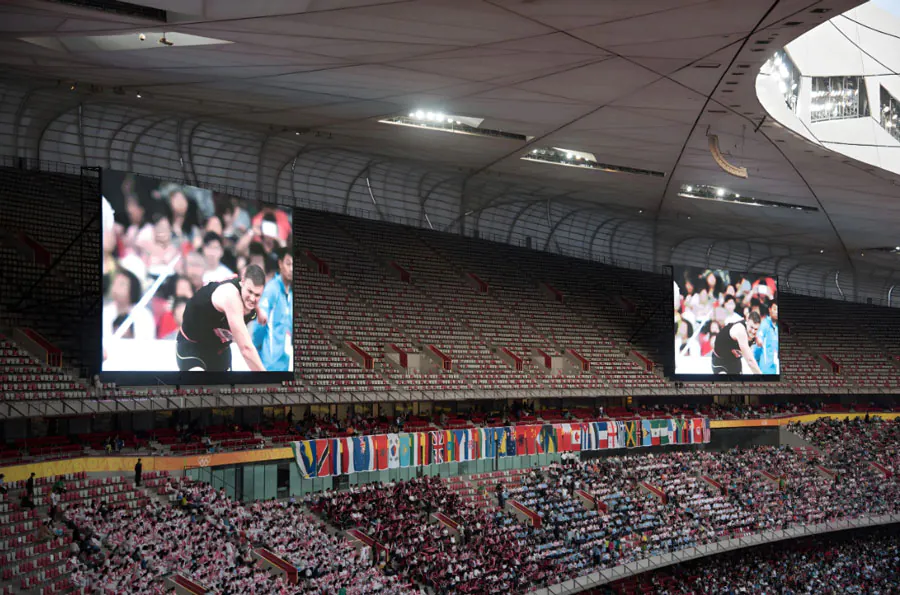
| High-Brightness Stadium | P10–P16 | 7,000–10,000+ | 20–100 m | Sports arenas, large public squares, highway advertising |
| COB/Seamless Outdoor | P3–P8 | 4,000–7,000 | 5–25 m | High-humidity or anti-reflective needs, premium rental installs |
| Transparent/Architectural | P6–P16 | 3,000–8,000 | 10–50 m | Facade displays, glass-front events, branded backdrops |
Why Brightness and Pixel Pitch Are Not Independent
High brightness helps daylight readability, but if pixel pitch is too large for viewing distance, the image will appear blocky regardless of brightness. Conversely, ultra-fine pitch panels with insufficient brightness will look washed out in sunlight. Balance both specs for the audience and location.
Provider Selection: Questions to Ask Rental Companies
– What is the exact pixel pitch, brightness, refresh rate, and cabinet size?
– Can you provide rigging drawings, weight/load data, and wind-load calculations?
– What is your IP rating and operating temperature range?
– What on-site support, spare parts, and redundancy do you offer during the event?
– Can you supply a show report and references from similar events?
– What are power requirements, and do you provide distribution and backup power?
– How fast is your setup and teardown crew, and what are labor rate estimates?
– What visual processors and control systems do you use (including scaling and HDR)?
Content, Resolution, and Signal Chain
Quality on-screen content depends on the signal chain:
– Source resolution must match screen capability (avoid upscaling low-res content on fine-pitch screens).
– Use broadcast-friendly refresh rates and select processors that support camera-friendly frame interpolation.
– Ensure cabling, signal redundancy (tertiary feeds), and tested conversion for live mixes or multiple inputs.
Ask for a test loop or a site mockup before event day so you can preview color fidelity, scaling, and latency.
Budgeting and ROI for Rentals
Cost drivers:
– Screen size and pitch: finer pixel pitches cost more.
– Brightness and specialized tech (COB, high-refresh processors) increases price.
– Transportation and crew: heavier systems raise logistics costs.
– On-site support hours and spare parts: essential but often billed separately.
– Permits and rigging engineering fees.
Evaluate ROI: a slightly higher spend on reliability and brightness can prevent revenue loss from poor visibility or downtime. For brand-sensitive events, invest in color fidelity and resolution.
Operational Checklist Before Booking
– Confirm audience sightlines and measure nearest/farthest viewing distances.
– Choose pixel pitch and size that meet readability and resolution needs.
– Verify brightness (nits) for day/night conditions and auto-dimming capability.
– Ask for IP rating, heat management strategy, and operating temps.
– Ensure vendor provides load-rated rigging, wind calculations, and structural drawings.
– Contract service-level guarantees for technician presence and spare modules.
– Confirm power distribution, backup power plan, and total amperage.
– Plan cable runs, signal redundancy, and testing timeline.
– Request insurance certificates and compliance documents.
Common Mistakes and How to Avoid Them
– Mistake: Choosing too coarse a pixel pitch for close viewing. Solution: Measure viewing distance and opt for a finer pitch where text or close-up detail matters.
– Mistake: Underestimating brightness needs for daytime. Solution: Require minimum nits based on ambient light tests or vendor recommendations.
– Mistake: Ignoring wind-load and structural safety. Solution: Require certified rigging diagrams and engineer sign-off for flown screens.
– Mistake: Skipping on-site tech support. Solution: Include guaranteed technician hours and spare modules in contract.
– Mistake: Neglecting content resolution. Solution: Prepare high-resolution assets and test them on the actual screen.
Choosing the best outdoor rental LED screen requires balancing technical specs with practical constraints: audience distance, content types, environmental conditions, logistics, and budget. Prioritize brightness for daytime events and pixel pitch for close viewing. Demand modular, well-documented equipment from rental partners and insist on on-site support and redundancy. Finally, use the checklist and table above when vetting vendors to avoid surprises on event day.