Indoor LED Screen Rental Complete Guide for Corporate Events

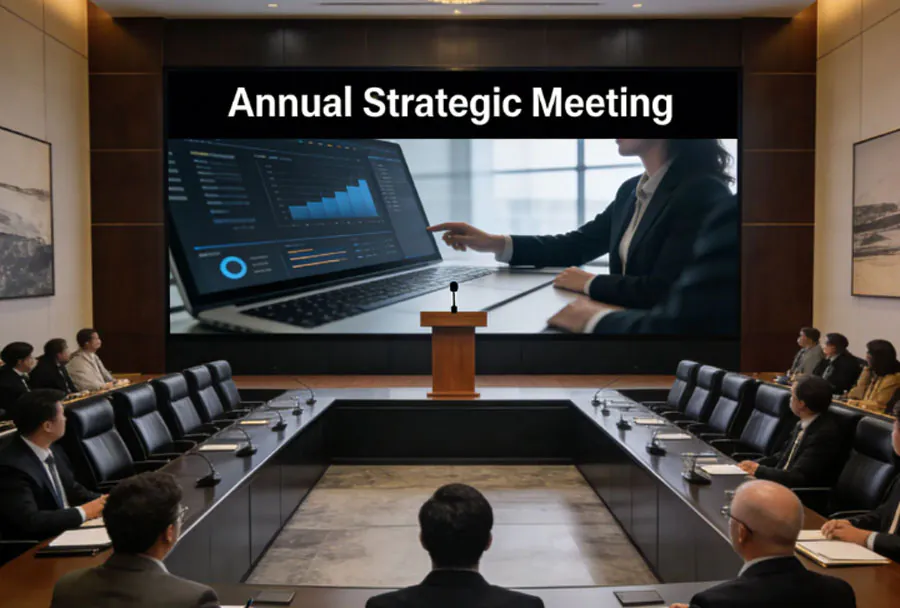
Indoor LED screens have become a cornerstone of modern corporate events — from product launches and conferences to AGM presentations and gala dinners. They deliver brightness, color accuracy, and flexibility that traditional projectors and printed backdrops can’t match. This guide walks event planners, AV technicians, and corporate stakeholders through everything needed to rent the right indoor LED screen: sizing, pixel pitch, mounting, power and rigging considerations, content preparation, budget planning, and on-site support. Whether you’re planning a small executive briefing or a large industry conference, these best practices will help you get predictable results and avoid costly last-minute problems.
Why Choose an Indoor LED Screen?
Image quality and brightness
LED panels deliver high brightness and contrast suitable for well-lit ballrooms and convention halls. Unlike projectors that rely on ambient light control and throw distance, LEDs provide consistent color and sharpness regardless of room lighting.
Scalability and modularity
LED screens are modular — you can build almost any size or aspect ratio by combining cabinets. This makes them ideal for bespoke stage designs or filling odd-shaped spaces.
Reliability and redundancy
Professional rental LED systems include redundant power and signal routing options. If a single pixel module or PSU fails, many setups are designed to keep the show running without noticeable interruption.
Key Specifications to Consider
Pixel pitch (resolution)
Pixel pitch — the distance between LED centers — determines perceived resolution. Common indoor pitches:
– P1.2–P1.9: for close viewing (boardrooms, interactive displays)
– P2.5–P3.9: for medium-distance viewing (conference stages, meeting rooms)
– P4.8–P6.9: for larger rooms with longer viewing distances
Match pixel pitch to typical viewer distance. A simple rule: viewing distance (in meters) ≈ pixel pitch (mm) × 1.5–2. For example, P2.5 is appropriate for viewers from roughly 3.5–5 m.
Brightness and contrast
Indoor LED brightness typically ranges 800–3,000 nits. For well-lit corporate venues, aim for 1,200–2,000 nits. Contrast ratio influences perceived depth and legibility of graphics and text.
Refresh rate and color calibration
Choose panels with high refresh rates (≥ 3,840 Hz) for camera-friendly operation (avoids flicker in livestreaming). Make sure rental providers offer color calibration to match brand colors and presenter materials.
Planning and Sizing Your Screen
1. Define objectives and content
Start with content type: full-motion video, PowerPoint slides, live cameras, or mixed media. Motion and broadcast require higher refresh rates and consistent color calibration.
2. Audience distance and sightlines
Map attendee seating and determine the closest and furthest viewing distance. Use this to pick pixel pitch and screen height. Ensure the bottom of the screen is high enough for unobstructed sightlines (typically 1.2–1.8 m off the floor depending on seating).
3. Aspect ratio and stage integration
Decide whether you need a standard 16:9 screen or a custom wide/asymmetric layout. Remember that custom aspect ratios may require additional content editing to avoid letterboxing or cropping.
Logistics, Rigging, and Power
Rigging and weight
LED cabinets are heavy and require rated trusses, motors, and certified riggers when flown. Never attempt to fly a screen without a professional engineer’s load calculation and venue approval. For ground-stacked installations, use manufacturer-recommended stacking frames and safety chains.
Power requirements
Calculate total power draw per cabinet (often 300–800W peak). Always plan for peak load plus 20–30% overhead. Distribute power across multiple circuits to avoid tripping breakers.
Venue coordination
Provide the venue with a technical rider that lists rigging points, floor loading limits, access times, and the number of crew. Confirm dock access and elevator dimensions for cabinet transport.
Content Preparation and Playback
File formats and resolutions
Provide content in native resolution matching the screen or in a high-resolution scalable format. Common formats: H.264/H.265 MP4 for video, PNG/JPEG for images, and layered PSDs or AI files for complex layouts. If possible, export 16:9 masters and provide letterboxed assets for custom aspect ratios.
Media servers and playback options
Rental providers often supply media servers (Watchout, Resolume, Brompton, Novastar) that manage multi-zone playback, edge blending, and real-time scaling. Confirm codec support, multizone mapping, and backup playback strategies.
Test and rehearse
Schedule a content rehearsal on the actual screen. Color, text legibility, and timing can differ from your laptop display. Make incremental adjustments and retain original editable files.
Onsite Support and Staffing
Recommended crew
– Site technician(s): setup, calibration, monitoring
– Video operator: manages media server and live feeds
– Riggers and electricians: for flown or complex installs
– Stage manager: coordinates cues and timing
Service level agreements
Negotiate an SLA for response times, spare parts, and technician availability during the event. Confirm what constitutes additional charges for overtime or emergency replacements.
Budgeting and Cost Drivers
Costs vary by screen size, pixel pitch, rental duration, and support level. Typical price drivers:
– Pixel pitch: finer pitches cost more
– Size: larger surfaces increase cabinet count and rigging needs
– Additional equipment: media servers, distribution, camera feeds
– Labor and logistics: transport, setup, and on-site technicians
– Insurance and venue fees: may be required by venue
Below is a concise analysis table comparing typical indoor LED options to help plan budgets and technical needs.
| Screen Type | Typical Pixel Pitch | Recommended Use | Typical Cost Range (USD/day) | Pros / Cons |
|---|---|---|---|---|
| Fine Pitch Rental | P1.2 – P1.9 | Close-viewing stages, boardrooms, product demos | $800 – $2,500 | Very sharp for close viewers; high cost per m2 and heavier data demands |
| Mid Pitch Rental | P2.5 – P3.9 | Conference stages, general sessions | $500 – $1,500 | Balanced cost and clarity; versatile for many venues |
| Standard Pitch Rental | P4.8 – P6.9 | Large halls, trade show walls | $300 – $900 | Cost-effective for large surfaces; lower detail at close range |
| Curved/Flexible Panels | P2.5 – P6.0 | Creative stages, immersive experiences | $700 – $2,000 | Unique shapes possible; more complex installation and higher rental cost |
| Transparent/Window LED | P2.5 – P4.0 (effective) | Storefronts, atriums, where see-through is needed | $900 – $2,200 | High design impact; reduced brightness and higher cost |
Common Pitfalls and How to Avoid Them
Underestimating content legibility
Presenters often design slides for a laptop screen, not an LED wall. Use larger fonts (minimum 36–44 pt for headline text) and high-contrast color palettes. Always test on the actual screen.
Poor cabling and signal planning
Long runs of HDMI without proper distribution cause signal loss. Use signal extenders, fiber, or SDI-to-LED processing where needed. Plan signal routing diagrams in advance.
Ignoring venue rules
Many venues have strict rules about rigging points, floor loading, and curfew times. Share your technical rider early and get approvals in writing.
Technical Checklist for Event Day
– Confirm arrival and setup window with venue and vendor
– Verify load-in path and staging area dimensions
– Confirm rigging points, truss capacity, and engineer sign-off if flown
– Verify power circuits, distribution boxes, and cable runs
– Load media onto the server in final formats; keep master files and backups
– Calibrate color and gamma with the event lighting
– Run a full dress rehearsal with live presenters and camera feeds
– Have spares: power supplies, data cables, control laptop, replacement modules
– Document signal chain and control passwords for quick troubleshooting
Livestreaming and Camera Considerations
If you plan to livestream or capture video, ensure the LED screen’s refresh rate is high and compatible with your cameras. Use broadcast-grade LED processors to prevent rolling bands or flicker. Provide camera operators with sightline maps so they don’t inadvertently capture presenter reflections or stage equipment.
Insurance and Risk Management
Ask vendors for proof of liability insurance and equipment insurance. Confirm who is responsible for damage during setup, event runtime, and teardown. If the screen is flown, ensure the rigging company carries proper certificates and that the venue accepts them.
Vendor Selection and Contracts
Choose a rental partner with:
– Strong portfolio of similar corporate events
– On-site technical staff and spare equipment
– Clear pricing with transparent line items (setup, power, labor, transport)
– Service-level guarantees and contingency planning
Negotiate a detailed contract specifying delivery times, setup/dismantle windows, payment milestones, cancellation policies, and responsibility for permits.
Case Studies and Quick Scenarios
– Small executive briefing (50–100 people): P1.9–P2.5 LED, 3–4 m wide, ground-stacked or wall-mounted. Minimal rigging, single technician for setup and playback.
– Large conference keynote (500+ people): P2.5–P3.9 LED, 6–12 m wide, flown screen or wide stage wall, redundant media servers, dedicated video operator and technicians.
– Product launch with livestream: Fine-pitch LED for product close-ups, high refresh rate, carefully coordinated camera placements and confidence monitors.
Wrap-Up and Best Practices
Renting an indoor LED screen for corporate events requires balancing technical specifications, venue constraints, content preparation, and budget. Start planning early: lock in the vendor, confirm the pixel pitch and exact dimensions, allow time for rehearsals, and secure the correct staffing. Prioritize a rental partner who provides clear communication, on-site support, and spares. With the right planning and vendor, an LED screen will elevate your event, deliver memorable visuals, and communicate your brand with maximum impact.