LED Display for home theater: buying guidance and tips

LED Display for home theater setups have become a popular choice among enthusiasts seeking superior image quality and immersive viewing experiences. According to Futuresource Consulting, the global LED display market for home use is expected to grow steadily, driven by advances in LED technology and consumer demand for high-definition visuals.
Table of Contents
- 1. Understanding LED Display Technology for Home Theater
- 2. Choosing the Right Size and Resolution
- 3. Optimizing Brightness and Contrast Settings
- 4. Connectivity and Compatibility Considerations
- 5. Maintenance and Longevity Tips
- 6. Comparison of LED Display Features for Home Theater
- 7. LED Display OR projector
- What is the difference between LED and OLED displays for home theaters?
- Can I mount an LED display for home theater on different wall types?
- How does ambient light affect LED display performance?
- Are LED displays energy efficient for home theater use?
- What should I do if my LED display shows image retention or burn-in?
- Conclusion
Many users face challenges choosing the right LED display due to technical jargon, varying features, and cost considerations. This article reveals 5 best secrets that actually work to help you select, install, and optimize an LED display for home theater, ensuring you get the most value and performance from your investment.
1. Understanding LED Display Technology for Home Theater
LED screen for home theater technology uses light-emitting diodes to produce bright, vibrant images with excellent contrast ratios. Unlike traditional LCDs, LED displays can offer better color accuracy and deeper blacks, which are critical for a cinematic experience.
Industry surveys highlight that LED technology can provide up to 30% higher brightness levels compared to older display types, enhancing picture clarity even in rooms with ambient light.
Consider the difference between direct LED and edge-lit LED displays: direct LED provides more uniform backlighting, reducing hotspots and improving overall image consistency. For home theaters, this uniformity is essential to avoid distracting brightness variations on large screens.
How to apply this: When shopping for an LED screen for home theater, prioritize models with full-array local dimming and high contrast ratios to achieve deeper blacks and vivid images.
2. Choosing the Right Size and Resolution
Selecting the appropriate size and resolution is key to maximizing your home theater setup with an LED display for home theater. The ideal screen size depends on your room dimensions and seating distance. According to THX, a reputable authority in audiovisual standards, the optimal viewing distance is roughly 1.5 to 2.5 times the diagonal screen size for 4K displays.
4K resolution (3840×2160 pixels) is becoming the industry standard for home theaters, offering four times the pixels of Full HD for sharper details. If your room allows for a bigger display, a 4K LED display will deliver a more immersive experience.
A common scenario involves users choosing a screen that’s too large for their space, causing eye strain or requiring excessive head movement. Measuring your room and seating layout before purchasing can prevent this.
How to apply this: Measure your viewing distance and select an LED display size that fits within THX’s recommended ratios for comfortable, high-quality viewing.
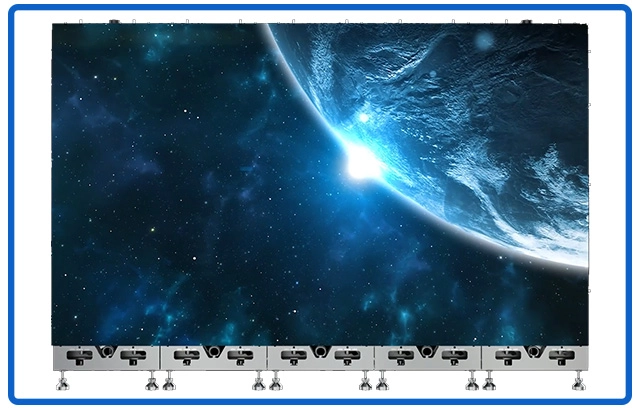
P0.9 COB LED display with 4K resolution. Screen size: 163′, resolution: 3840×2160
3. Optimizing Brightness and Contrast Settings
Proper brightness and contrast settings are essential when using an LED display for home theater to significantly affect the viewing experience. A well-calibrated LED display can reveal subtle shadow details and maintain vibrant colors without washing out images.
Many professional calibrators use tools like the Datacolor SpyderX to fine-tune displays for optimal brightness and contrast. According to the Imaging Science Foundation, proper calibration can improve perceived image quality by balancing peak brightness around 100-200 nits in dark rooms and higher in ambient light conditions.
Consider a home theater with controlled lighting: reducing brightness and increasing contrast enhances dark scenes without introducing noise.
How to apply this: Use calibration tools or professional services to adjust your LED display’s brightness and contrast, matching your room’s lighting environment.
4. Connectivity and Compatibility Considerations
Connectivity is crucial when integrating an LED screen for home theater into your setup to ensure seamless communication between devices. Modern home theaters rely on seamless connectivity between displays and media sources. Ensure your LED display supports HDMI 2.1, which enables higher bandwidth for 4K at 120Hz and HDR formats like Dolby Vision and HDR10+.
In one case, a user upgraded to an LED display with HDMI 2.1 ports and noticed significant improvements in gaming and streaming clarity due to better color depth and refresh rates.
Additionally, check for compatibility with audio systems and smart home integrations. Many LED displays now include support for voice assistants and wireless casting technologies.
How to apply this: Verify your LED display has up-to-date HDMI ports and supports the media formats you use. Test connectivity with your existing devices before finalizing your purchase.
5. Maintenance and Longevity Tips
Maintenance is key to preserving the performance of your LED screen for home theater over time. LED displays are durable but require proper maintenance to ensure longevity. Dust accumulation on the screen or vents can impair performance and cause overheating.
According to the Consumer Technology Association, regular cleaning with microfiber cloths and ensuring adequate ventilation can extend a display’s lifespan by several years.
A practical tip is to avoid prolonged static images, which can cause image retention on LED displays. Most modern units include pixel-shifting technologies to mitigate this, but manual precautions help.
How to apply this: Establish a cleaning routine and avoid static content on your LED display for home theater to maintain picture quality and device health.
6. Comparison of LED Display Features for Home Theater
| Feature | What it Tells You | Action to Take |
|---|---|---|
| Panel Type | Affects brightness and contrast uniformity | Choose full-array local dimming panels |
| Resolution | Determines image sharpness | Opt for 4K or higher for clarity |
| HDR Support | Enhances dynamic range and color accuracy | Confirm support for Dolby Vision/HDR10 |
| Connectivity Ports | Compatibility with devices | Ensure HDMI 2.1 and audio output ports |
| Refresh Rate | Smoothness for fast motion content | Select 60Hz+ for movies, 120Hz for gaming |
| Calibration Options | Ease of achieving optimal picture settings | Look for factory calibration or tool compatibility |
The LED Display for home theater offers superior brightness and color accuracy compared to traditional screens. Choosing the right LED Display for home theater depends on resolution, size, and refresh rate.
You can mount an LED Display for home theater on drywall, brick, or concrete with the proper mounting hardware. Always follow guidelines to securely install your LED Display for home theater.
7. LED DISPLAY OR projector
The right winner is the display that meets your room’s light, geometry, content, and service constraints.
LED Screen vs Projector for Home Theater should be decided with a room-first checklist rather than a simple brightness or resolution label. The ITU-R BT.2020 recommendation provides a UHDTV baseline of 3,840 × 2,160 pixels, but that standard does not tell you whether the image fits your wall or looks comfortable at night.
| Factor | Direct-view LED | Projector | Immediate check |
|---|---|---|---|
| Bright room | Usually stronger | Needs light control | Test with lights on |
| Large image | Fixed or modular size | Adjustable by lens distance | Measure wall and throw |
| Black level | Panel and processor dependent | Room and screen dependent | Watch dark scenes |
| Installation | Wall, processor, service access | Mount, screen, cable path | Get an itemized quote |
| Gaming | Check lag, VRR, ports | Same; model-specific | Verify measured tests |
| Maintenance | Modules and controller | Filter or light source | Read warranty terms |
Use the matrix to mark each factor as a must-have, acceptable, or deal-breaker. LED Screen vs Projector for Home Theater becomes easier when one unacceptable constraint—such as uncontrolled daylight or insufficient throw distance—eliminates an option early.
Choose direct-view LED when you need consistent daytime visibility and a permanent display wall. Choose a projector when you have light control, want a flexible image size, and value a traditional cinema presentation.
How to apply this: Complete the table with your room measurements and source requirements, then reject any system that fails a must-have condition.
Frequently Asked Questions About LED Display for home theater
What is the difference between LED and OLED displays for home theaters?
LED displays use backlit LEDs for illumination, offering high brightness and durability, while OLED panels emit light per pixel for deeper blacks and better contrast. LED displays tend to be more affordable and brighter, making them suitable for rooms with ambient light. Your choice depends on room conditions and budget when considering an LED display for home theater.
Can I mount an LED display for home theater on different wall types?
Yes, LED displays can be mounted on drywall, brick, or concrete walls using appropriate mounts. Always check the manufacturer’s weight and mounting guidelines. For heavier LED displays, securing to studs or using professional installation is recommended to ensure safety.
Ambient light can diminish the image quality of an LED Display for home theater by reducing contrast. Using blackout curtains improves the performance of your LED Display for home theater.
LED Display for home theater units consume less energy than older technologies, making them cost-effective. However, larger LED Display for home theater models with higher brightness settings use more power.
How does ambient light affect LED display performance?
Ambient light can wash out colors and reduce perceived contrast on LED displays. Using blackout curtains or dimming room lights enhances viewing quality. Some LED displays have higher peak brightness to combat ambient light, which is beneficial in non-dark rooms.
Ambient light can significantly impact the visibility of an LED screen for home theater. Using blackout curtains improves the performance of an LED Display for home theater.
An LED Display for home theater is more energy efficient than traditional plasma screens. Choosing the right brightness setting optimizes energy use on an LED Display for home theater.
Are LED displays energy efficient for home theater use?
LED displays are generally more energy-efficient than older LCD or plasma models due to lower power consumption of LEDs. However, larger sizes and higher brightness settings increase energy use. Monitoring and adjusting settings can optimize efficiency without sacrificing quality.
What should I do if my LED display shows image retention or burn-in?
Image retention on LED displays is rare but can occur with static images left too long. Most modern LED displays include pixel-shifting features to prevent this. If it happens, power cycling the display and avoiding static content can help. Regular use of varied content reduces risk when using an LED display for home theater.
Conclusion
Choosing and optimizing an LED display for home theater involves several important factors:
– Understanding LED technology ensures better image quality and contrast.
– Selecting the right size and resolution improves comfort and immersion.
– Proper brightness and contrast calibration enhance visual details.
– Ensuring modern connectivity maintains device compatibility.
– Routine maintenance extends the lifespan of your display.
Start by measuring your room and researching LED displays with full-array dimming and 4K resolution. Then, calibrate settings to your environment and verify connectivity with your media sources. Taking these steps will help you enjoy a powerful home theater experience with your LED display.