

Bendable LED Displays for Stage, Exhibition and Retail Applications

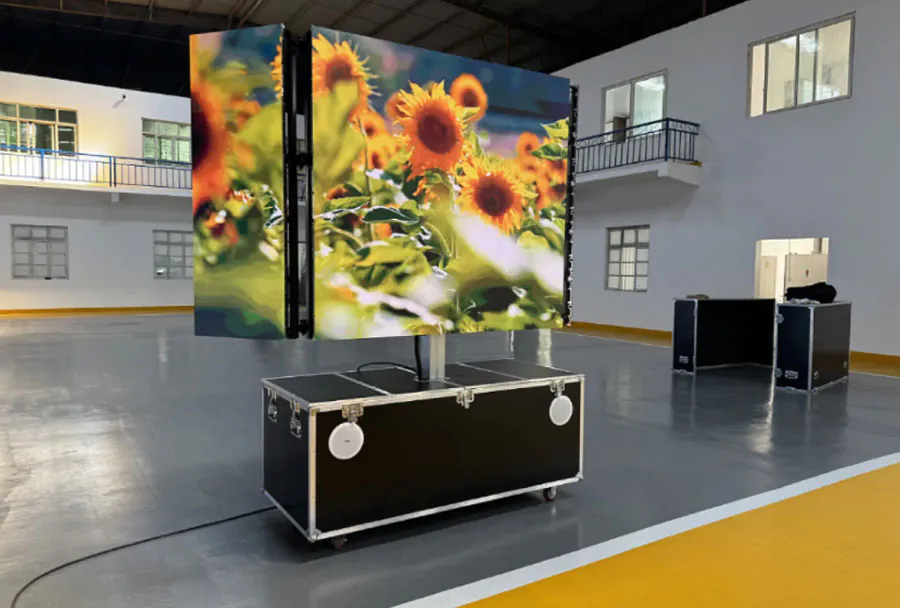
Bendable LED Displays for Stage, Exhibition, and retail applications are among the most flexible visual tools a designer can specify today. Unlike rigid LED tiles, bendable modules can curve around pillars, stage risers, and shop windows without custom brackets or awkward seams.
Table of Contents
- What Is a Bendable LED Display?
- Define Bendable vs. Flexible vs. Foldable LED Displays Correctly
- What Makes a Bendable LED Display Different From Standard Panels?
- Stage and Event Applications: How Curved LED Walls Change the Show
- Exhibition and Trade Show Installations: Wrapping Content Around Structures
- Retail Environments: Immersive Storefronts and Interior Displays
- Key Technical Specifications and Compatibility Considerations
- How do I transport a bendable LED display without damaging the curve?
- Can bendable LED displays be used outdoors for retail or stage?
- How do I align content on a curved LED display without distortion?
- What is the typical lifespan of a bendable LED module compared to rigid panels?
- Are bendable LED displays harder to service than flat LED walls?
- Conclusion
Industry surveys consistently report that curved and flexible LED installations hold viewer attention longer than flat screens, though exact gains vary widely by content and setting. The challenge is knowing which specifications, control tools, and installation practices actually matter before you commit budget.
This article breaks down five honest, practical facts about bendable LED displays, from stage backdrops to retail storefronts, and gives you actionable steps you can use immediately.
Front desk screen made by TW VISION-size can be customized.
What Is a Bendable LED Display?
A bendable screen is a modular LED display that can curve in one or more dimensions without compromising image uniformity or structural integrity. Unlike rigid LED panels, bendable screens typically use thinner, lighter modules and flexible mounting systems that allow for convex and concave curvature, cylindrical wraps, and freeform shapes.
Define Bendable vs. Flexible vs. Foldable LED Displays Correctly
A precise definition is your first spec tool. Most spec sheets blur the three terms, so you need a clear mental model.
– Bendable: formed into a static curve during manufacturing; not designed for repeated movement.
– Flexible: can be dynamically bent many times, but only within a specified minimum radius.
– Foldable: can fold along a tight crease, similar to a book, with integrated hinge mechanics.
In practice, bendable vs. flexible vs. foldable LED displays can look identical in a showroom because a curved video wall and a foldable phone screen both show a non-flat surface. The difference is in how many times the panel can move and how tight that movement can be. Patent records from the U.S.
The best choice among bendable vs. flexible vs. foldable LED displays is the one that matches your physical radius and budget, not the one with the most advanced demo. A fixed-curve video wall may only need a bendable panel, while a wearable needs a flexible panel, and a compact phone needs a foldable design.
| Display Type | Typical Minimum Bend Radius | Best Use Case | Cost Signal | What to Check |
|---|---|---|---|---|
| Bendable | Wide static curve, project-specific | Curved video walls, automotive dash | Lower | One-time form guarantee |
| Flexible | Dynamic bend, spec varies | Wearables, rollable prototypes | Medium-high | Cycle count at radius |
| Foldable | Tight crease, near 1R-2R | Phones, laptops, compact displays | Highest | Hinge and crease warranty |
Analysts at Omdia consistently describe foldable panels as the most expensive display category per square inch, with costs falling slowly as yields improve. A fixed-curve panel often avoids the hinge and cycle-life costs entirely.
How to apply this: Build a two-column requirement sheet: minimum bend radius and maximum cycle count. If either number is missing, do not quote the panel.
Stage and Event Applications: How Curved LED Walls Change the Show
On stage, a curved LED wall creates a sense of depth that flat panels cannot match. A Bendable LED Display for Stage, Exhibition and Retail Applications lets lighting and video designers wrap visuals around performers, reducing the need for multiple camera angles and making the stage feel larger than it is.
Event designers report that curved backdrops improve audience immersion, though the effect depends heavily on content that follows the curve. A common approach is to use software like MadMapper to map video content onto the curved surface before load-in. MadMapper lets you simulate the exact curvature and adjust content so it does not stretch or distort at the edges.
For a Bendable LED Display for Stage、Exhibition and Retail Applications in a touring production, many video teams use Resolume Arena as a media server because it supports multi-output, low-latency playback and works well with curved LED walls. You can download a trial from Resolume to test your content pipeline.
How to apply this: pre-visualize your stage layout in MadMapper or Resolume before you rent or buy panels.
Exhibition and Trade Show Installations: Wrapping Content Around Structures
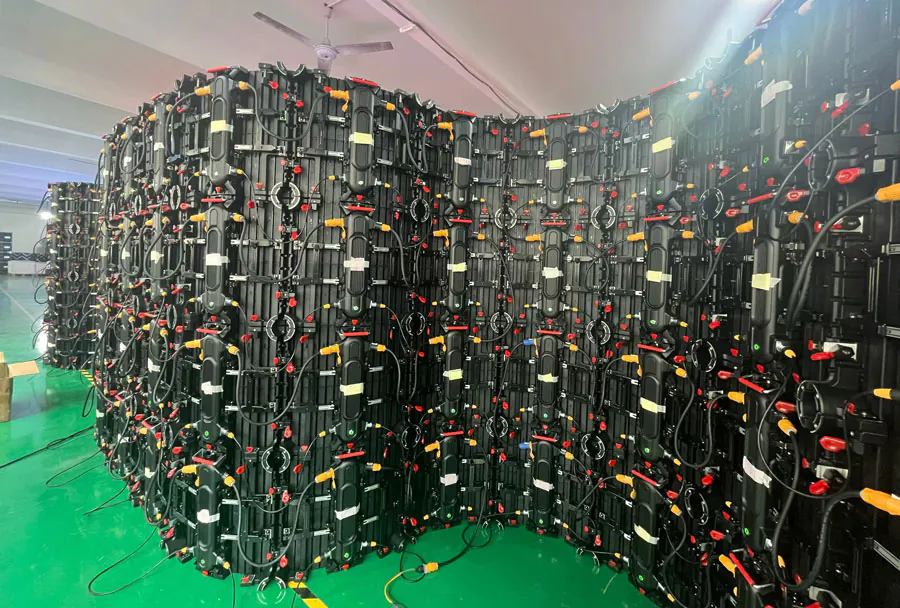
Trade show booths, product launches, and museum exhibits often need displays that wrap around columns, arches, or curved trusses. A Bendable LED Display for Stage, Exhibition and Retail Applications solves this by conforming to the structure instead of forcing the structure to conform to a rectangle.
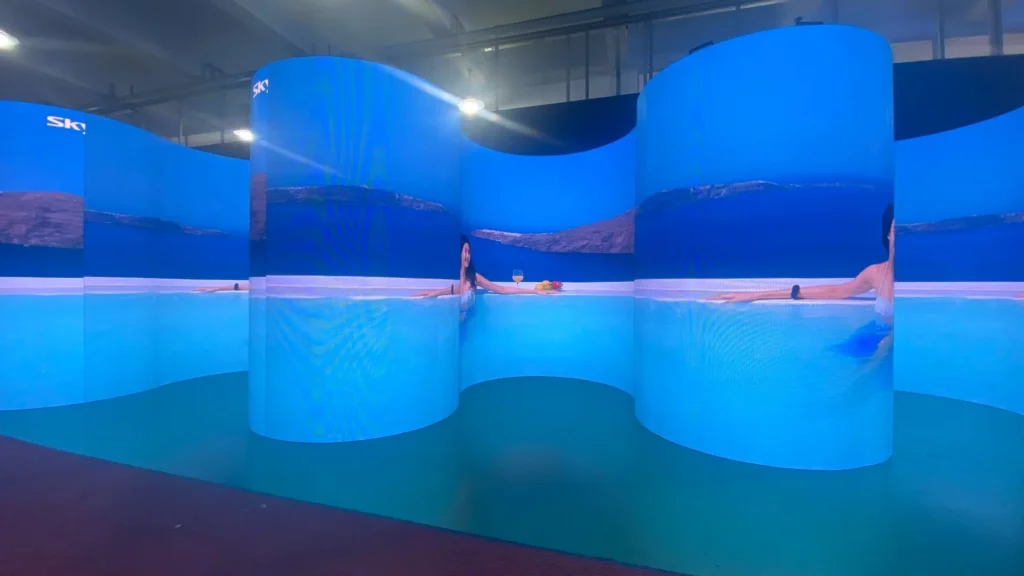
Exhibition designers consistently observe that curved LED elements attract more foot traffic than flat banners, but measured dwell time depends on booth placement and content quality. In one common scenario, a cylindrical LED column at a show entrance uses bendable panels wrapped in a seamless 360-degree arc, so visitors see moving visuals from every approach angle.
Pixel mapping for a Bendable LED Display for Stage, Exhibition and Retail Applications in an exhibition is easier when you use a media server that supports multiple curved outputs. Resolume and MadMapper both allow you to slice a single video source across several panels and align the pixel space to the physical curve.
How to apply this: before installing on site, build a digital mockup of the curve and test your content at actual resolution.
Retail Environments: Immersive Storefronts and Interior Displays
Retailers use bendable LED displays to turn store windows, pillars, and ceiling coves into immersive brand moments. A Bendable LED Display for Stage, Exhibition and Retail Applications can follow the architecture of a store without blocking sightlines or requiring expensive custom joinery.
The Digital Signage Federation notes that flexible LED displays are increasingly specified for retail because they adapt to non-flat surfaces while maintaining a clean, modern look. In one case, a flagship retail store wrapped a central pillar with a bendable LED panel to create a 360-degree product showcase, so customers could see dynamic content from any aisle.
Brightness is critical in retail. A window display facing direct sunlight needs a panel with a high nit rating, often several thousand nits, while an interior Bendable LED Display for Stage, Exhibition and Retail Applications can use lower output without losing contrast.
How to apply this: measure the ambient light level at the installation spot and ask the supplier for a brightness recommendation in nits before you order.
Key Technical Specifications and Compatibility Considerations
Before specifying a Bendable LED Display for Stage, Exhibition and Retail Applications, check four technical factors: pixel pitch, refresh rate, brightness, and control system compatibility.
Pixel pitch drives the minimum viewing distance. A tighter pitch, such as P2.5 or smaller, is better for close-up retail and exhibition use, while a wider pitch works for large stage backdrops viewed from a distance.
Refresh rate matters for camera work; most professional panels specify a rate high enough to eliminate on-camera flicker, but always confirm the exact figure if the display will be filmed. Control hardware is another compatibility point. Many bendable LED panels work with processors from companies like Novastar, which provides LED control systems used in stage and commercial installations.
Verify that the panel’s receiving card matches your processor brand and firmware version before purchase for a Bendable LED Display for Stage、Exhibition and Retail Applications you intend to integrate with existing equipment.
How to apply this: download the manufacturer’s spec sheet and check pixel pitch, refresh rate, and processor compatibility side by side.
| Application | Key specification to check | Action to take |
|---|---|---|
| Stage backdrop | Minimum bending radius | Ask for concave and convex values before rental |
| Exhibition column | Seamless magnet alignment | Inspect panel edges before install |
| Retail window | Brightness in nits | Choose a panel rated for direct sunlight |
| Indoor retail close-up | Pixel pitch | Pick P2.5 or tighter for short viewing distances |
Frequently Asked Questions About Bendable LED Display for Stage、Exhibition and Retail Applications
How do I transport a bendable LED display without damaging the curve?
Transporting a Bendable LED Display for Stage, Exhibition and Retail Applications requires careful packing. Always use the original flight cases with foam cutouts that match the module shape. If you must ship without original cases, lay modules flat and avoid stacking more than a few units.
In one scenario, a rental house wraps each panel in anti-static foam and uses rigid dividers to prevent flexing beyond the specified radius during transit.
Can bendable LED displays be used outdoors for retail or stage?
Yes, but you need an outdoor-rated model with a high IP rating, often IP65 or higher for rain and dust protection. A Bendable LED Display for Stage、Exhibition and Retail Applications designed for outdoor use also needs higher brightness to compete with sunlight. However, outdoor bendable panels are less common than indoor versions, and the bending radius may be more limited.
Always confirm the weatherproofing and brightness specs before an outdoor install.
How do I align content on a curved LED display without distortion?
Use a mapping tool like MadMapper or Resolume to create a virtual model of the curve, then set the output resolution to match the panel’s physical pixel count. A Bendable LED Display for Stage, Exhibition and Retail Applications may have a non-rectangular pixel grid, so standard 16:9 content will stretch at the edges.
In practice, designers slice the video into strips and map each strip to a segment of the curve.
What is the typical lifespan of a bendable LED module compared to rigid panels?
Most LED manufacturers rate their modules for tens of thousands of hours of use, and flexible modules often have similar lifespans to rigid panels when handled correctly. A Bendable LED Display for Stage, Exhibition and Retail Applications will fail earlier if it is repeatedly bent beyond its minimum radius or stored improperly.
One common exception is rental inventory, where the mechanical stress of frequent setup and teardown can reduce usable life.
Are bendable LED displays harder to service than flat LED walls?
Serviceability depends on the module design. Many bendable panels use magnetic front-service modules, so you can replace a single module from the front without removing the whole wall. A Bendable LED Display for Stage, Exhibition and Retail Applications with rear-access only may be harder to service when installed on a curved structure.
Ask the supplier for the service access method before you finalize the installation plan.
Conclusion
Bendable LED displays offer a practical way to create curved, immersive visuals for stages, exhibitions, and retail spaces. Here are the key takeaways:
– A Bendable LED Display for Stages, Exhibition and Retail Applications uses flexible PCBs and magnetic mounts to conform to non-flat surfaces.
– Minimum bending radius, pixel pitch, brightness, and control compatibility are the four specs you must compare before buying or renting.
– Tools like MadMapper, Resolume, and Novastar help you map, control, and manage curved content reliably.
– Outdoor use and serviceability require extra checks on IP rating and module access.
Your next step: download spec sheets from at least two suppliers, build a digital mockup of your curved surface, and test content alignment in MadMapper or Resolume before committing budget.
