Battery Powered LED Display: Portable & Mobile Digital Signage


Battery Powered LED Display: Portable & Mobile Digital Signage gives you a bright, movable message without a permanent mains connection. The surprising fact is that portability shifts the engineering problem from mounting to energy: brightness, animation, temperature, battery chemistry, and idle draw can determine whether the sign lasts through an activation.
Table of Contents
- 1. Choose the Right Display Architecture
- Separate the layers before comparing prices
- 2. Size the Battery for Real Runtime
- Convert capacity into usable energy
- 3. Make It Safe for Outdoor and Mobile Use
- 4. Build a Reliable Content and Control Workflow
- Design an offline-first playlist
- 5. Measure Results and Meet Operating Rules
- Can it be used inside a moving vehicle?
- How does cold weather affect runtime?
- Can solar charging run the sign all day?
- Are scrolling or flashing messages accessible?
- When is e-paper a better choice?
- Conclusion
Many buyers compare panel prices but overlook the sending card, playback controller, enclosure, charging method, wheels, handles, and total packed weight. The result can be a heavy unit that runs for less than a shift, loses visibility in daylight, or shows stale information when connectivity fails.
A practical buying path starts with the display architecture, converts measured wattage into usable watt-hours, checks weather and transport risks, builds an offline-first content workflow, and defines honest performance metrics. These principles apply to events, retail, campuses, construction sites, and other locations where fixed signage is impractical.
1. Choose the Right Display Architecture
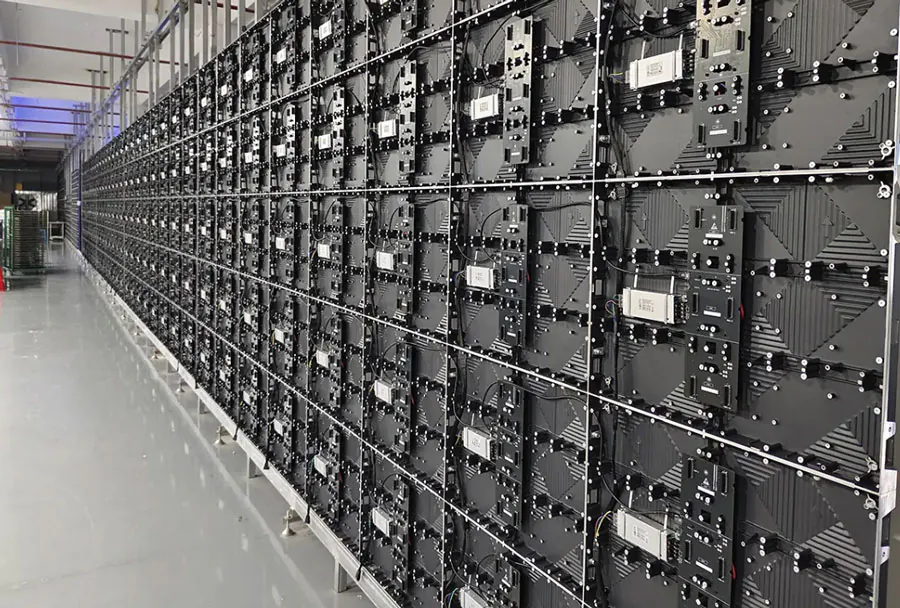
A portable LED sign is a coordinated system made of LED modules, receiving electronics, a controller, a battery pack, an enclosure, and a support structure. Battery Powered LED Display: Portable & Mobile Digital Signage performs reliably only when these parts are specified as one electrical and mechanical system.
Separate the layers before comparing prices
Check each layer separately:
– Display surface: Confirm pixel pitch, viewing distance, viewing angle, resolution, brightness, and indoor or outdoor rating.
– Control hardware: Identify the sending card, receiving cards, media player, input types, and offline playback capability.
– Power system: Request nominal voltage, typical wattage, peak wattage, charger type, battery chemistry, and battery-management details.
– Mechanical package: Verify enclosure material, handles, casters, support legs, center of gravity, and total operating weight.
LED efficiency helps, but it does not make every sign low power. The U.S.
Department of Energy states, “LED bulbs use at least 75% less energy, and last up to 25 times longer, than incandescent lighting.” That is a general-lighting comparison, not a promised runtime for a complete display, because controllers, power supplies, fans, and brightness settings remain part of the load.
Consider a pop-up retailer that needs a sign moved between indoor and outdoor locations. An outdoor-rated cabinet may solve weather exposure but add mass, while a lighter indoor poster may be easier to transport but unsafe or unreliable outdoors.
A buyer assessing Battery Powered LED Display: Portable & Mobile Digital Signage should request a complete system specification rather than a panel-only quote.
How to apply this: Put display, electronics, battery, enclosure, and packed-weight requirements on one comparison sheet before requesting prices.
2. Size the Battery for Real Runtime
Runtime is usable watt-hours divided by average load, after conversion losses and the reserve needed for delays or changing conditions. Battery Powered LED Display: Portable & Mobile Digital Signage should be sized from measured average and peak demand, not from the battery label alone.
Convert capacity into usable energy
Use this basic relationship:
Watt-hours = nominal volts × amp-hours
Then account for the battery-management system’s cutoff, inverter or DC-to-DC efficiency, battery aging, cold conditions, and the reserve required by your operating plan. A battery advertised in amp-hours is not meaningful without its voltage.
Consider a 12.8-volt, 100-amp-hour battery pack. Its nameplate capacity is 1,280 watt-hours; if an illustrative design assumes 90% conversion efficiency and keeps 20% as reserve, the usable planning energy is about 922 watt-hours. At a measured average load of 240 watts, the estimated runtime is roughly 3.8 hours, not the 5.3 hours suggested by dividing nameplate capacity by load.
Peak draw also matters because startup demand can trip an inverter or protection circuit even when average consumption looks acceptable. Measure the sign during the brightest content, startup, transitions, and normal playback rather than relying on a low-brightness menu screen.
Before approving Battery Powered LED Display: Portable & Mobile Digital Signage, record average watts, peak watts, charging time, battery state at startup, and battery state at shutdown.
How to apply this: Run a full content cycle with a power meter, then replace every planning assumption with measured operating data.
3. Make It Safe for Outdoor and Mobile Use
Outdoor reliability comes from weather sealing, mechanical stability, visibility control, and safe battery handling—not from the LED panel alone. Weather protection matters for Battery Powered LED Display: Portable & Mobile Digital Signage because rain, dust, heat, glare, and movement affect both electronics and content visibility.
The International Electrotechnical Commission’s IP Code uses two characteristic numerals. Under IEC 60529, the first numeral in IP65 indicates a dust-tight enclosure, while the second indicates protection against water jets.
An IP rating does not automatically certify structural stability, battery safety, connector protection, or performance with an open service door. Cable glands, access panels, vents, and poorly sealed charging ports can become the weakest points.
Use practical safeguards:
– Add cable glands, strain relief, and drip loops where appropriate.
– Keep vents clear and prevent the battery compartment from overheating.
– Use ambient-light control or scheduled brightness reductions to limit power draw.
– Secure casters, handles, legs, and battery mounts before moving the unit.
Mobility also creates transport rules. The Federal Aviation Administration’s PackSafe guidance states that spare, uninstalled lithium batteries and power banks must be carried in carry-on baggage rather than checked baggage when air travel rules apply.
If the unit will be used near vehicles, crowds, or walkways, review tipping risk, cable routing, emergency access, and local sign requirements before deployment.
For Battery Powered LED Display: Portable & Mobile Digital Signage, run a site check at the actual mounting height and in the brightest expected ambient light.
How to apply this: Photograph every connector, support point, and battery mount during the first safety inspection and correct exposed weaknesses before public use.
4. Build a Reliable Content and Control Workflow
A reliable workflow uses local playback when connectivity is uncertain and centralized management when updates must reach multiple sites. Battery Powered LED Display: Portable & Mobile Digital Signage should always have a known fallback state so a network outage does not create a blank or stale screen.
Design an offline-first playlist
Create these content states:
– Primary playlist: The approved content for normal operation.
– Fallback playlist: A local loop that continues when the network or cloud service is unavailable.
– Emergency notice: A simple message that can be shown during a closure, evacuation, or service problem.
Use a dedicated player when timing, reboot behavior, and offline playback matter. BrightSign provides dedicated digital signage players designed for local media playback and scheduled presentations.
A cloud CMS is useful when staff need to update several screens from one place. ScreenCloud provides cloud-based digital signage software for managing content and screens, but network dependence still makes a local fallback valuable.
| Control approach | Strength | Risk | Action |
|---|---|---|---|
| Local USB/player | Works offline | Stale files | Verify version before deployment |
| BrightSign player | Scheduled local playback | Adds hardware draw | Include it in the power budget |
| ScreenCloud CMS | Central updates | Network dependence | Test offline behavior |
| Live web page | Fast-changing data | Page or network failure | Cache a fallback screen |
Record the upload timestamp, approved version ID, playback start, and last health check. For Battery Powered LED Display: Portable & Mobile Digital Signage, that small audit trail makes it easier to distinguish a content problem from a power or network problem.
How to apply this: Disconnect the network during testing and confirm that the correct fallback content appears without manual intervention.
5. Measure Results and Meet Operating Rules
Measure a mobile sign by uptime, delivered content, power behavior, and audience action—not by panel size alone. Battery Powered LED Display: Portable & Mobile Digital Signage should have a test record that shows what played, for how long, under which power conditions, and with what result.
Record the date, location, brightness mode, content version, battery state at start and finish, average and peak power, faults, and maintenance actions. For QR-driven campaigns, use a unique destination URL with campaign parameters so traffic from each screen location can be separated.
In Google Analytics, open the GA4 Reports > Engagement > Events report and review event count alongside total users for QR-driven visits. A high event count with comparatively few users can indicate repeat scans, testing, or automated activity; it should not be presented as a count of unique viewers.
If third-party web advertising appears on the display, follow the applicable publisher and ad-network rules. Google’s invalid-traffic guidance covers activity that artificially inflates advertiser costs or publisher earnings, including repeated manual clicks and automated sources.
The IAB Tech Lab’s ads.txt standard lets a publisher declare authorized digital sellers for web advertising inventory. It can support a browser-based advertising supply chain behind a screen, but it does not prove that a person viewed a physical LED loop.
For Battery Powered LED Display: Portable & Mobile Digital Signage, also confirm local sign permits, electrical requirements, accessibility needs, and battery transport rules before commercial deployment.
How to apply this: Create a one-page test report and require measured uptime, power, content, and campaign evidence before expanding to more locations.
Frequently Asked Questions About Battery Powered LED Display: Portable & Mobile Digital Signage
Can it be used inside a moving vehicle?
Usually, but only when the sign is secured and does not block the driver’s view, controls, mirrors, lights, or required markings. Battery Powered LED Display: Portable & Mobile Digital Signage is better treated as cargo than loose equipment; vibration can loosen connectors and turn a stable setup into a hazard.
A delivery van that parks for events may be suitable, while a passenger vehicle in motion may not be. Check vehicle and local road rules.
How does cold weather affect runtime?
Cold can reduce available battery capacity and may trigger battery-management protections, especially during high-current starts. Battery Powered LED Display: Portable & Mobile Digital Signage used at a winter event should follow the battery maker’s operating and charging temperatures, not a generic internet rule. A pack stored overnight in an unheated trailer may need conditioning before charging.
Keep the display sheltered and log runtime at the actual site temperature.
Can solar charging run the sign all day?
Sometimes, but solar must produce more energy than the display consumes, plus charging losses and cloudy-day reserve. Battery Powered LED Display: Portable & Mobile Digital Signage can work well for daytime, low-duty-cycle notices, yet a bright animated screen may outdraw a small panel. A solar designer should size the panel, charge controller, battery, and load from local insolation data.
Test across poor-weather days before promising continuous service.
Are scrolling or flashing messages accessible?
Treat motion as an accessibility and safety decision, not merely a design choice. Battery Powered LED Display: Portable & Mobile Digital Signage showing web content should follow the applicable accessibility standard; WCAG 2.2 includes requirements for moving content that can be paused, stopped, or hidden in relevant cases.
A public-facing display near a roadway may also need local restrictions on flashing. Provide a static alternative and review the installation.
When is e-paper a better choice?
E-paper is often better for static, low-refresh messages where sunlight readability and long untethered operation matter more than color, video, or rapid updates. Battery Powered LED Display: Portable & Mobile Digital Signage may be the stronger choice for motion, distance viewing, and timed promotions.
A parking notice that changes twice daily suits e-paper; a live event schedule with animations does not. Compare total power, contrast, refresh behavior, and enclosure needs.
Conclusion
Choosing Battery Powered LED Display: Portable & Mobile Digital Signage is less about buying the brightest panel and more about matching energy, structure, content, and measurement to the site. The strongest design remains readable, safe, serviceable, and honest about what a “view” means.
Keep these decisions aligned:
– Match the display and enclosure to the environment.
– Calculate usable watt-hours from measured power.
– Maintain local fallback content for network failures.
– Document battery, transport, accessibility, permit, and advertising requirements.
Start with a fully instrumented field test under real brightness, weather, movement, and content conditions. Use those results to approve the final battery and enclosure before purchasing a larger fleet.