

How to choose a reliable outdoor LED screen supplier for rental applications

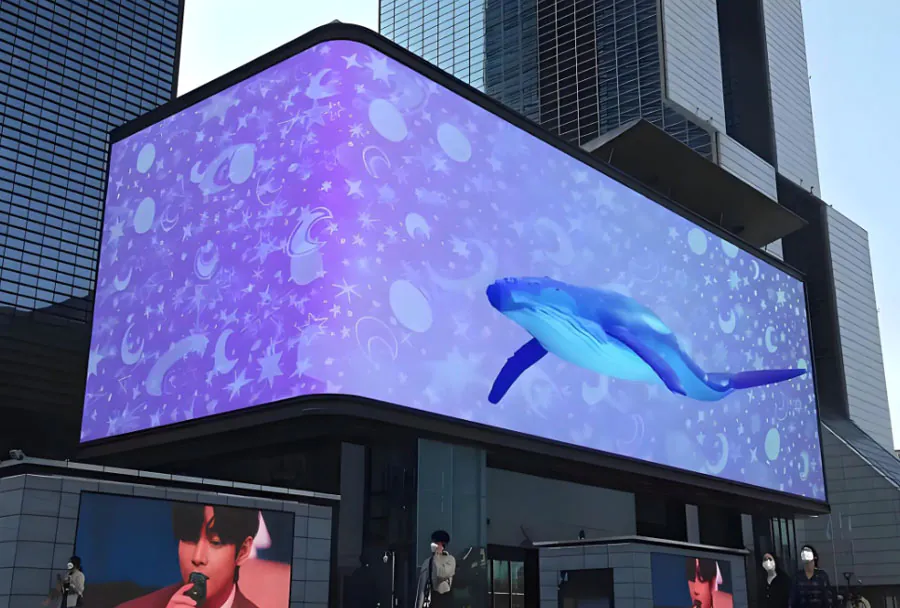
Choosing a reliable outdoor LED screen supplier for rental applications can make or break your next event. A single failed panel during a paid activation can cost thousands, and rental fleets live or die on uptime. The problem? Most buyers compare price per square meter and nothing else.
Table of Contents
- Start With Panel Quality, Not Price Lists
- Vetting a Rental LED Display Supplier the Right Way
- Service Contracts and Spare Parts: Where Rentals Get Saved
- Test Before You Commit: Samples and Site Trials
- Understand Total Cost of Ownership, Not Unit Price
- What certifications should a rental LED screen supplier hold?
- How do I verify pixel pitch claims before ordering?
- What spare-parts percentage should I budget for?
- Can I mix panels from two different suppliers in one fleet?
- How long should a rental LED panel realistically last?
- Conclusion
That approach ignores batch consistency, spare-part pipelines, and the service terms that actually protect your revenue. This guide covers five decision areas — panel quality, vendor vetting, service contracts, real-world testing, and total cost of ownership — so you can shortlist suppliers with confidence.
Followed is the YOUTUBE video about TW VISION outdoor LED Screen rental.
Start With Panel Quality, Not Price Lists
The first filter is the hardware itself. Rental LED panels take far more abuse than fixed installations: they are rigged, struck, trucked, and dropped weekly. Ask any supplier how they handle batch consistency, because mismatched LED bins cause visible color shifts when you combine panels from different production runs.
According to market research published by Statista, the global LED display market has grown steadily for years, which means many new factories have entered the space — and quality variance has grown with them.
Focus on these three specs before anything else:
– Pixel pitch range: rentals usually need 2.6mm to 4.8mm for indoor/outdoor crossover work.
– Refresh rate: 3,840Hz or higher avoids banding on camera, which broadcast clients demand.
– Cabinet material: die-cast aluminum resists warping better than steel after repeated handling.
| Category | Why It Matters | Key Question to Ask | Minimum Spec | Recommended Spec |
|---|---|---|---|---|
| Pixel Pitch | Determines image clarity for closest viewers | What is the pixel pitch and ideal viewing distance? | P6–P8 for distant viewing | P2.9–P4 for close/mid-range viewing |
| Brightness (Nits) | Visibility in daylight; prevents washed-out visuals | What is peak and average brightness? Any auto-dim? | 4,000–5,000 nits | 6,000–8,000 nits (sunny conditions) |
| Weatherproofing (IP Rating) | Protection from rain, dust, and humidity | What is the IP rating and sealing method? | IP54 (limited protection) | IP65 or higher |
| Refresh Rate | Reduces camera flicker and improves video quality | What is the refresh rate and scan technology? | ≥1,920Hz | ≥3,840Hz (ideal for broadcast) |
| On-site Support | Minimizes downtime and handles live issues | Number of technicians, response time, and spares? | Technician during setup only | Full-time on-site tech + spare parts |
Ask for the LED bin code and the driver IC model in writing. A supplier who cannot name them is reselling, not manufacturing.
How to apply this: request a spec sheet with bin codes and driver ICs for the exact batch you would receive, not a generic catalog PDF.
Batch consistency decides whether panels match on camera under mixed lighting, so inspect diodes, drivers, and housings before comparing quotes. Understanding How to Choose a Reliable Outdoor LED Screen Supplier for Rental Applications begins with rejecting suppliers who cannot document batch testing.
Fleet clients and touring references reveal whether a company truly understands rental duty cycles and rapid turnaround demands. How to Choose a Reliable Outdoor LED Screen Supplier for Rental Applications means demanding named case studies, not glossy brochures.
Vetting a Rental LED Display Supplier the Right Way
Once specs check out, vet the company behind them. A rental-focused outdoor LED screen supplier should show evidence of fleet clients, not just one-off installs. Look for case studies from touring companies, event production houses, or AV rental firms — these buyers stress-test panels far harder than a fixed install ever will.
Use real verification tools rather than trusting a homepage. Google Business Profile reviews reveal service patterns over time, and third-party inspection services like SGS can audit a factory if your order size justifies it.
Red flags to watch for:
– No physical factory address or refusal to allow a video walkthrough.
– Warranty terms that exclude “rental use” in the fine print.
– No named spare-parts program or stocked modules.
A supplier who handles rental fleets will talk openly about dead-on-arrival rates and how they resolve them. One production company we know of switched vendors after discovering their previous supplier’s warranty voided coverage the moment panels were used on tour — a clause buried in an annex.
How to apply this: ask for two rental-client references and call them directly; ask specifically about failure rates and response times.
Spare parts availability within 24 hours often separates a smooth festival run from a cancelled show. How to Choose a Reliable Outdoor LED Screen Supplier for Rental Applications includes reading service contracts line by line before signing anything.
Site trials expose connector failures, cabinet flex, and color shift that spec sheets never mention. How to Choose a Reliable Outdoor LED Screen Supplier for Rental Applications requires testing panels through your own rigging and transport workflow.

Service Contracts and Spare Parts: Where Rentals Get Saved
Service terms matter more in rental than in any other LED application. A dead panel at a fixed installation can wait until Monday. A dead panel at a festival cannot.
When comparing a rental LED screen supplier, insist on these contract elements:
– Response time SLA: documented hours, not “as soon as possible.”
– Spare parts ratio: many rental buyers request 3-5% spare modules per order.
– Module-level replacement: panels should be serviceable without removing entire cabinets.
The table below shows what to check and why.
| Contract Element | What It Tells You | Action to Take |
|---|---|---|
| Response SLA | Real service commitment | Get it in writing with penalties |
| Spare parts stock | Downtime risk | Confirm local warehouse exists |
| Module swap design | Field repair speed | Request a repair demo video |
| Warranty scope | Hidden exclusions | Read the rental-use clause |
| Batch traceability | Color consistency | Ask for bin codes per batch |
| Training included | Crew readiness | Book onboarding session |
How to apply this: send your contract template to two shortlisted suppliers and compare how each responds to the SLA and spare-parts clauses.
Resale value and repair labor quietly reshape fleet economics across a three-year rental cycle. How to Choose a Reliable Outdoor LED Screen Supplier for Rental Applications means calculating total cost of ownership instead of chasing the lowest unit price.
Physical measurement across a known distance quickly exposes inflated or “virtual” pixel pitch claims. How to Choose a Reliable Outdoor LED Screen Supplier for Rental Applications demands verifying pitch on a sample before committing to volume orders.
Test Before You Commit: Samples and Site Trials
Never buy a rental fleet from a catalog alone. Request a sample panel and run it through your actual workflow — rig it, strike it, transport it, and power it up again.
Practical tests that reveal real quality:
- Power-cycle the panel 20+ times and watch for flicker.
- Photograph it with a phone camera at various shutter speeds to check refresh.
- Compare color against an existing panel from your fleet.
- Check cabinet weight against the spec sheet — some suppliers underreport.
Industry guidance from organizations like InfoComm (AVIXA) consistently emphasizes verification testing before large AV purchases, and rentals are no exception. Ask the supplier whether they will support a paid trial period with a defined pass/fail checklist.
How to apply this: build a one-page test checklist and score every sample panel against it before you sign anything.
Mixing brands risks visible seams on camera, since LED bins and brightness curves rarely align perfectly. How to Choose a Reliable Outdoor LED Screen Supplier for Rental Applications includes deciding whether combined fleets are worth the client complaints.
Three to five years of touring typically precedes rising failure rates, depending on heat, humidity, and handling. How to Choose a Reliable Outdoor LED Screen Supplier for Rental Applications means asking vendors for realistic lifespan data, not marketing estimates.
Understand Total Cost of Ownership, Not Unit Price
Cheap panels are expensive fleets. Total cost of ownership for rental LED screens includes purchase price, spare parts, freight, repair labor, and resale value after two to three years.
Costs that surprise first-time buyers:
– Freight and duties on replacement modules shipped mid-season.
– Storage and flight case costs for growing panel counts.
– Crew training every time a new panel model enters the fleet.
– Depreciation curve — rental panels lose value faster than fixed ones.
A supplier who helps you plan a three-year replacement cycle is worth more than one who simply quotes the lowest price per cabinet. Ask for their historical data on panel lifespan under rental conditions, and cross-check it with peers in your market.
How to apply this: build a simple three-year spreadsheet including spares, freight, and resale, then compare suppliers on total cost rather than sticker price.
How to Choose a Reliable Outdoor LED Screen Supplier for Rental Applications means calculating total fleet costs and requires comparing long-term value.
Frequently Asked Questions About How to Choose a Reliable Outdoor LED Screen Supplier for Rental Applications
What certifications should a rental LED screen supplier hold?
Look for CE, RoHS, and FCC marks at minimum, plus ISO 9001 for manufacturing quality. For outdoor events in some regions, fire-retardant certification on cabinet materials is also required. Ask for certificate numbers and verify them with the issuing body rather than accepting photocopies.
Any supplier dodging this request while you learn how to choose a reliable outdoor LED screen supplier for rental applications is likely hiding something.
How do I verify pixel pitch claims before ordering?
Measure a sample panel physically — count pixels across a known distance and compare with the stated pitch. Some suppliers quote “virtual pitch” numbers that do not match the physical LED spacing. Order one sample, measure it, and only then scale to a fleet. This one test has saved rental companies from costly misorders more than once.
How to Choose a Reliable Outdoor LED Screen Supplier for Rental Applications involves verifying pixel pitch claims.
How to Choose a Reliable Outdoor LED Screen Supplier for Rental Applications means measuring physical LED spacing.

What spare-parts percentage should I budget for?
Most rental operators keep 3-5% spare modules on hand, though touring fleets with heavy handling often go higher. The right number depends on your failure history, transport distance, and how critical zero-downtime is for your clients.
When evaluating how to choose a reliable outdoor LED screen supplier for rental applications, ask whether they stock spares locally or ship from overseas, because lead time changes your buffer requirement.
Can I mix panels from two different suppliers in one fleet?
Technically yes, but color and brightness will drift because LED bins differ. Mixing brands usually creates visible seams on camera and frustrates clients. If you must combine, dedicate each supplier’s panels to separate stages or zones. Consistency is one reason experienced buyers consolidate with a single rental LED screen supplier rather than chasing the lowest quote per order.
How to Choose a Reliable Outdoor LED Screen Supplier for Rental Applications helps avoid mixing incompatible panels and prevents visible color seams.
How long should a rental LED panel realistically last?
Under regular touring conditions, most rental panels deliver solid performance for three to five years before failure rates climb. Heat, humidity, and handling speed all shorten that window. Ask your supplier for failure-rate data from comparable fleets, and plan replacements around your busiest season rather than waiting for panels to fail mid-event.
Documented maintenance history also protects resale value when you refresh.
How to Choose a Reliable Outdoor LED Screen Supplier for Rental Applications means asking about panel lifespan.
How to Choose a Reliable Outdoor LED Screen Supplier for Rental Applications requires understanding realistic durability.
Conclusion
Choosing a supplier for rental LED screens comes down to five habits: verify panel specs with bin codes, vet the company with real references, lock service SLAs into contracts, test samples under real conditions, and calculate total cost rather than unit price.
Key takeaways:
– Batch consistency prevents color mismatches across your fleet.
– Spare-parts stock and response SLAs protect event revenue.
– Physical sample testing catches spec-sheet exaggeration early.
– Three-year cost modeling reveals the true cheapest option.
Your next step: build a one-page supplier scorecard covering the five areas above, send it to three candidates, and compare written responses before you place any order. Doing that once will teach you more about how to choose a reliable outdoor LED screen supplier for rental applications than any catalog ever will.
