How to Specify LED Displays for Hospitals: Viewing Distance, Readability, and maintenance

How to Specify LED Displays for Hospitals: Viewing Distance, Readability, and maintenance start with measured sightlines, not a vendor’s pixel-pitch chart. One overlooked fact: the 2010 ADA Standards for Accessible Design limit wall-mounted objects between 27 and 80 inches above the floor to a 4-inch projection into circulation paths, with specific exceptions.
Table of Contents
- 1. Measure Viewing Distance and Select Pixel Pitch
- Map Real Sightlines
- Calculate Character Angle
- 2. Validate Readability Under Hospital Lighting
- Use Contrast as a Content Baseline
- Specify Non-Glare Performance
- 3. Design Content for Fast, Accessible Decisions
- Separate Information by Purpose
- Keep Required Static Signage
- 4. Specify Cleaning Access and Serviceability
- Match Materials to Disinfectants
- Interpret IP Ratings Correctly
- 5. Build a Maintainable System and Acceptance Plan
- Specify the Complete Signal Chain
- Measure Maintenance Performance
- How should hospital displays handle patient privacy?
- What changes when an LED display is near an MRI suite?
- How should an outdoor ambulance-bay display be specified?
- Should a hospital lease or purchase its LED display system?
- What should happen if a display fails during an emergency?
- Conclusion
Hospital teams must balance readability, infection prevention, accessibility, electrical safety, uptime, and total ownership cost. A screen that looks sharp in a showroom may become unreadable under lobby lighting or difficult to service above an occupied nurses’ station.
The following specification process connects viewing geometry with measured contrast, content design, cleanability, and maintenance planning. It also identifies acceptance tests you can place in tender documents so suppliers must demonstrate performance under real hospital conditions rather than rely on unverified claims.
1. Measure Viewing Distance and Select Pixel Pitch
Start by measuring the nearest, typical, and farthest viewing positions before selecting display resolution or pixel pitch.
Map Real Sightlines
Measure from likely eye positions, including seated visitors, standing staff, wheelchair users, and people approaching from side corridors. A Leica DISTO laser distance meter can record these distances more consistently than estimating from architectural drawings.
A sound approach to How to Specify LED Displays for Hospitals: Viewing Distance, Readability and Maintenance also checks physical obstructions. Columns, registration kiosks, doors, ceiling signs, and waiting-room furniture can shorten the usable viewing window.
Calculate Character Angle
Use geometry rather than assuming that one pixel-pitch rule works everywhere:
`Angular height = 2 × arctan(character height ÷ 2 × distance)`
At a 10-metre viewing distance, a 100-millimetre-tall character subtends approximately 0.57 degrees. This calculation describes visual size, but it does not guarantee comprehension because font weight, contrast, glare, language, and viewer ability still matter.
Consider a lobby display viewed from 3 to 18 metres. Select pitch for acceptable close-range pixel structure, then size destination names for the farthest decision point rather than filling the screen with smaller lines.
How to Specify LED Displays for Hospitals should therefore include a scaled sightline plan and an on-site text mockup.
How to apply this: Mark three viewing positions on the floor today, measure each distance, and photograph the display location from normal eye level.
2. Validate Readability Under Hospital Lighting
Readable hospital displays require controlled glare, sufficient text-background contrast, legible typography, and testing under actual lighting conditions.
Use Contrast as a Content Baseline
The W3C Web Content Accessibility Guidelines 2.2 specify a contrast ratio of at least 4.5:1 for normal text and 3:1 for large text in digital content. WCAG does not certify LED hardware, but these ratios provide a useful baseline for screen templates.
The free TPGi Colour Contrast Analyser samples foreground and background colours and reports their WCAG contrast. It cannot account for reflected light on the physical screen, so follow software testing with measurements and observation on site.
| Readability factor | What to check | Action to take |
|---|---|---|
| Contrast | Text-to-background ratio | Test every template |
| Glare | Reflections at eye level | Change angle or finish |
| Brightness | Day and night conditions | Set timed presets |
| Type size | Farthest decision point | Test full-scale text |
| Motion | Reading interruption | Pause key messages |
Specify Non-Glare Performance
The ADA Standards state: “Characters and their background shall have a non-glare finish.” Apply that principle to enclosures, protective covers, bezels, and nearby finishes, not only to the image itself.
How to Specify LED Displays for Hospitals: Viewing Distance、Readability and Maintenance must avoid treating maximum brightness as the primary quality metric. Excessive output in a dim corridor can reduce comfort and make camera-based brightness control unstable.
In one case, a daylight-facing lobby may need a different brightness preset from the same display after sunset. Require independent day, evening, and emergency modes instead of one fixed setting.
Include measured contrast, reflection control, and full-scale template trials when documenting How to Specify LED Displays for Hospitals: Viewing Distance、Readability and Maintenance.
How to apply this: Load one real wayfinding screen onto a sample cabinet and review it at the brightest and darkest operating times.
3. Design Content for Fast, Accessible Decisions
Hospital content should communicate one decision at a time with stable layouts, plain language, recognizable symbols, and accessible alternatives.
Separate Information by Purpose
Do not combine queue numbers, emergency instructions, donor messages, and detailed maps in one constantly changing composition. Assign each screen a primary function and define which content may interrupt it.
How to Specify LED Displays for Hospitals: Viewing Distance、Readability and Maintenance should establish a message hierarchy:
- Emergency and life-safety instructions
- Clinical or operational notices
- Wayfinding and queue information
- General announcements
Use motion only when it supports orientation or draws attention to a changed state. Avoid scrolling critical directions because people who look up mid-cycle may miss the destination or arrow.
Keep Required Static Signage
Digital displays generally should not replace required tactile, permanent, or code-regulated signs. Section 703 of the ADA Standards addresses raised characters and contracted Grade 2 Braille, which a visual LED screen cannot provide.
A common scenario is a digital room directory beside an elevator. It can show department changes, but permanent room identification, exit markings, and accessible-route signs may still require compliant physical signage.
The content portion of How to Specify LED Displays for Hospitals: Viewing Distance、Readability and Maintenance should define approved fonts, arrow styles, abbreviations, languages, line limits, ownership, and emergency override authority.
Acceptance testing should use task-based questions such as, “Which corridor leads to Imaging?” Record completion time, wrong turns, and requests for staff help rather than asking whether participants like the design.
How to apply this: Give five first-time users a destination task and revise any message that requires explanation from a staff member.
4. Specify Cleaning Access and Serviceability
Choose an enclosure that tolerates the hospital’s approved cleaning process and allows safe component replacement without contaminating occupied areas.
Match Materials to Disinfectants
Ask infection-prevention staff for the facility’s approved products, concentrations, application methods, and contact times. The US Environmental Protection Agency explains that users must follow the disinfectant label, including directions for use and contact time.
Do not accept a general claim such as “chemical resistant.” Require written compatibility for the exact polycarbonate, coating, gasket, adhesive, mask, and cabinet finish exposed to cleaning.
How to Specify LED Displays for Hospitals: Viewing Distance、Readability and Maintenance must also address joints where liquid and soil can collect. Minimize horizontal ledges, exposed fasteners, open ventilation paths, and inaccessible gaps.
Interpret IP Ratings Correctly
IEC 60529 defines the IP code used to classify protection against solid objects and water. The first digit addresses solid-particle ingress, while the second addresses water; an IP rating does not establish resistance to disinfectants or repeated wiping.
Consider a display near a handwashing station. Its water-ingress risk differs from that of a sealed lobby wall, but neither location should be approved without reviewing mounting penetrations, ventilation, drainage, and cleaning procedures.
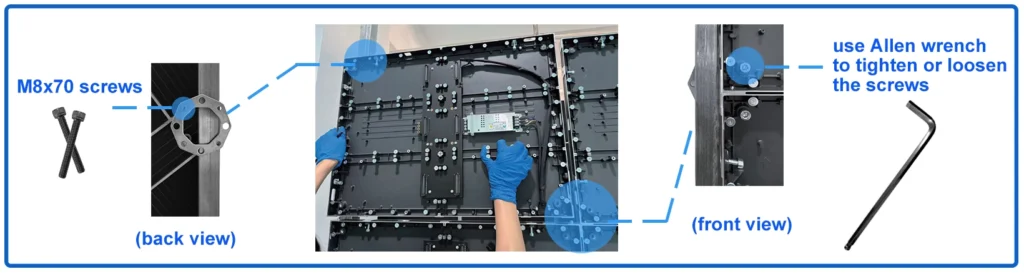
For practical How to Specify LED Displays for Hospitals: Viewing Distance、Readability and Maintenance, require front-service access where rear clearance is unavailable. Specify how technicians isolate power, remove modules, protect nearby patients, and contain dust or tools.
How to apply this: Send shortlisted suppliers your approved disinfectant list and request signed material-compatibility statements before technical evaluation.
5. Build a Maintainable System and Acceptance Plan
A maintainable LED system needs monitored components, documented spares, controlled software access, and measurable recovery targets.
Specify the Complete Signal Chain
List every dependency between the content source and illuminated pixels:
– Content-management platform
– Media player
– Network connection
– Video processor
– Sending and receiving hardware
– Power supplies
– LED modules
– Brightness sensor
– Mounting and cooling systems
How to Specify LED Displays for Hospitals: Viewing Distance、Readability and Maintenance should define who monitors each component and which fault conditions generate alerts. Manufacturer platforms such as Brompton Technology provide processing and management functions for compatible LED systems, but the chosen monitoring method must match your actual hardware and support model.
Measure Maintenance Performance
Track availability as:
`Availability = operating time ÷ scheduled operating time × 100`
Also record mean time to repair, repeat failures, dead pixels or modules, temperature alarms, communication losses, and spare-part consumption. These measurements are more useful than an unsupported promise that a product is “maintenance free.”
For How to Specify LED Displays for Hospitals: Viewing Distance、Readability and Maintenance, include at least one approved spare for each critical, site-replaceable component unless the risk assessment supports another quantity. Record firmware versions, configuration backups, cabinet addresses, network settings, and module calibration data.
Before handover, simulate a media-player failure, receiving-card fault, and loss of network communication. Confirm that trained hospital staff can identify the failed layer, use the fallback message, and contact the correct support team.
How to apply this: Create a one-page fault matrix listing each alarm, its owner, the allowed response time, the spare required, and the escalation contact.
Frequently Asked Questions About How to Specify LED Displays for Hospitals: Viewing Distance、Readability and Maintenance
How should hospital displays handle patient privacy?
Avoid showing names, appointment details, room numbers, diagnoses, or other identifiable information unless the clinical workflow and privacy review require it. The HHS HIPAA guidance explains the Privacy Rule’s protections for health information.
How to Specify LED Displays for Hospitals: Viewing Distance、Readability and Maintenance should include privacy screening for queue systems, especially where visitors can photograph or view the screen from adjacent public areas.
What changes when an LED display is near an MRI suite?
Treat the MRI environment as a specialist safety zone because equipment may create projectile, image-quality, or electromagnetic risks. How to Specify LED Displays for Hospitals: Viewing Distance、Readability and Maintenance requires review by the facility’s MRI safety officer before hardware enters a controlled area.
A display suitable for a normal corridor is not automatically suitable near the scanner; approved placement may require remote electronics, non-ferromagnetic components, shielding analysis, or relocation outside restricted zones.
How should an outdoor ambulance-bay display be specified?
Outdoor displays need site-specific assessment for rain, solar loading, temperature, wind, corrosion, night-time brightness, and emergency-vehicle sightlines. How to Specify LED Displays for Hospitals: Viewing Distance、Readability and Maintenance should also check local sign, planning, and traffic requirements.
An enclosure’s laboratory IP classification alone is insufficient because cable entries, mounting penetrations, drainage, and direct sun exposure can change real-world performance after installation.
Should a hospital lease or purchase its LED display system?
Choose based on lifecycle responsibility rather than the initial payment structure. How to Specify LED Displays for Hospitals: Viewing Distance、Readability and Maintenance should compare hardware replacement, software licensing, spare ownership, calibration, preventive maintenance, cybersecurity updates, response times, and end-of-term removal.
Leasing may suit facilities wanting predictable service costs, while purchasing may suit hospitals with trained audiovisual teams and standardized spare parts across multiple buildings.
What should happen if a display fails during an emergency?
Provide a documented fallback that does not depend on the failed display, network, or content-management server. How to Specify LED Displays for Hospitals: Viewing Distance、Readability and Maintenance should define printed wayfinding boards, staffed information points, public-address procedures, and approved mass-notification interfaces.
A commercial display must not be treated as a life-safety system unless its design, power source, supervision, installation, and approvals meet the applicable authority’s requirements.
Conclusion
A hospital LED specification should connect visual performance with accessibility, infection prevention, operational resilience, and measurable acceptance tests. How to Specify LED Displays for Hospitals: Viewing Distance、Readability and Maintenance works best when decisions are based on actual site conditions rather than brochure specifications.
– Measure near, typical, and far viewing positions.
– Test contrast, glare, typography, and brightness on site.
– Verify disinfectant compatibility and safe service access.
– Define monitoring, spares, recovery procedures, and fallback communication.
Your next step is to complete a physical site survey with facilities, infection prevention, accessibility, IT, clinical operations, and audiovisual stakeholders. Turn their findings into pass-or-fail tender requirements, then require the selected supplier to demonstrate compliance before final acceptance and payment.