LED display dead pixels problem: 3 Best : causes and fixes

Introduction
The LED display dead pixels problem is one of the most common issues affecting image quality in digital signage, video walls, retail screens, control rooms, and event displays. Even a few non-functioning pixels can reduce visual consistency, distract viewers, and make an otherwise high-quality screen look unreliable. For businesses that depend on clear, bright visuals, understanding this issue is essential for both prevention and long-term maintenance.
Table of Contents
- Introduction
- What Is the LED display dead pixels problem?
- Common causes of LED display dead pixels problem
- 1. Manufacturing defects
- 2. Aging and component fatigue
- 3. Physical damage
- 4. Moisture and environmental exposure
- 5. Power supply and voltage instability
- 6. Driver IC or signal transmission faults
- 7. Improper maintenance
- How to diagnose LED display dead pixels problem accurately
- Visual inspection
- Pixel mapping and test patterns
- Module swapping
- Power and signal checks
- Thermal inspection
- Software verification
- Repair solutions for LED display dead pixels problem
- Replace individual LEDs
- Replace the LED module
- Repair driver IC or circuit faults
- Recalibrate after repair
- Use warranty or service contracts
- Know when replacement is more economical
- How to prevent LED display dead pixels problem over time
- Choose high-quality manufacturers
- Match the display to the environment
- Ensure proper installation
- Maintain stable power
- Schedule regular cleaning and inspection
- Control temperature and ventilation
- Keep spare parts available
- Train maintenance staff
- FAQ about LED display dead pixels problem
- What causes the LED display dead pixels problem most often?
- Can the LED display dead pixels problem be repaired?
- Are dead pixels covered under warranty?
- How can I test for dead pixels on an LED screen?
- Do dead pixels spread over time?
- Is it better to repair or replace the display?
- Conclusion
In most cases, the LED display dead pixels problem develops because of manufacturing defects, aging components, electrical failures, impact damage, or poor environmental conditions. While some dead pixels remain isolated, others may signal deeper module or driver issues. This article explains the causes, diagnosis methods, repair options, prevention strategies, and maintenance best practices to help you protect display performance and extend system lifespan.
Followed is a YOUTUBE video to tell how the dead pixel fixed step by step from TW VISION.
What Is the LED display dead pixels problem?
The LED display dead pixels problem refers to one or more pixels on an LED screen that stop emitting light or fail to display the intended color properly. In LED displays, each pixel is typically made up of red, green, and blue diodes working together to create a full range of colors. When one diode or the entire pixel stops functioning, the defect becomes visible as a black spot, a missing color, or an abnormal point on the screen.
This issue can appear on indoor LED walls, outdoor billboards, transparent LED displays, rental panels, and fine-pitch screens. The severity of the LED DISPLAY depends on several factors, including pixel pitch, screen size, viewing distance, and content type. A single dead pixel may be hard to notice on a large outdoor board, but on a high-resolution indoor display, even one faulty point can be obvious.
It is also important to distinguish dead pixels from stuck pixels. Dead pixels do not light up at all because the diode or circuit has failed. Stuck pixels, on the other hand, may remain frozen in one color due to signal or transistor issues. Although both reduce image quality, the repair approach may differ.
In professional display environments, pixel defects are often evaluated according to manufacturer tolerances. Some level of pixel failure may be considered acceptable within warranty policies, while larger clusters usually require immediate replacement or repair. Understanding these standards helps buyers make smarter purchasing and service decisions.
Common causes of LED display dead pixels problem
Several technical and environmental factors can lead to the the concept. Knowing the root cause is the first step toward effective troubleshooting.
1. Manufacturing defects
Some dead pixels originate during the production process. Poor soldering, low-quality LED chips, inconsistent encapsulation, or weak bonding between components can result in early pixel failure. Even if the display passes factory testing, hidden defects may appear after installation and regular operation.
2. Aging and component fatigue
LED displays operate for thousands of hours, and over time their components wear out. Heat cycles, electrical stress, and long-term brightness demands can weaken diodes, driver ICs, and connections. As the screen ages, the chance of the the approach increases, especially if the display runs continuously in commercial settings.
Followed is a YOUTUBE video about P1.9 rental led display aging in the factory.
3. Physical damage
Impact during shipping, installation, or maintenance can damage LED modules. Pressure on the display surface may crack solder joints or break tiny electronic parts. Outdoor screens are especially vulnerable when exposed to vibration, accidental hits, or improper handling.
4. Moisture and environmental exposure
Humidity, rain infiltration, dust accumulation, and extreme temperatures can all affect LED performance. Water intrusion may corrode contacts or short internal circuits, eventually causing pixel failure. In outdoor installations, inadequate sealing and poor ventilation often accelerate damage.
5. Power supply and voltage instability
Unstable voltage, poor grounding, power surges, and low-quality power supplies can harm display modules and control systems. If current delivery becomes inconsistent, pixels may stop responding or entire sections may fail intermittently before becoming permanently dead.
6. Driver IC or signal transmission faults
Sometimes the issue is not the LED itself but the electronics controlling it. A faulty driver IC, damaged ribbon cable, or loose connector can interrupt data transmission to a specific pixel or pixel group. In such cases, what appears to be the it may actually be a module communication issue.
7. Improper maintenance
Cleaning with the wrong materials, neglecting dust removal, or performing unsafe repairs can create new defects. Displays require careful maintenance routines, especially in high-use environments. Technicians who lack product-specific training may unintentionally worsen the condition of the screen.

How to diagnose LED display dead pixels problem accurately
A proper diagnosis helps determine whether the led module is isolated, repairable, or part of a larger system failure. Random replacement without testing can waste time and money.
Visual inspection
Start by examining the screen from normal viewing distance and then from close range. Display solid colors such as red, green, blue, white, and black. This makes defective pixels easier to identify. A dead pixel usually appears as a black point against bright colors, while a partially failed pixel may be missing one color channel.
Pixel mapping and test patterns
Many professional LED control systems include pixel test functions. These tools cycle through color patterns to highlight faults and map the exact location of defective points. Pixel mapping is especially useful on large video walls where manual inspection is difficult.
Module swapping
If the issue appears concentrated in one section, technicians may swap modules between positions butf the defect moves with the module, the problem is likely inside that panel. If it stays in the same screen position, the cause may involve receiving cards, cables, or driver electronics.
Power and signal checks
To diagnose the these, check the power supply output, connectors, flat cables, and data ports. Loose connections or unstable voltage often produce symptoms that resemble dead pixels. Measuring electrical values helps confirm whether the defect is due to hardware failure or signal interruption.
Thermal inspection
Overheating can damage LEDs and control components. Using thermal imaging or temperature probes can reveal hot spots around failing modules, power supplies, or driver chips. Excessive heat usually indicates a broader maintenance or ventilation issue that needs correction.
Software verification
Sometimes display software settings, refresh parameters, grayscale configuration, or calibration errors can create abnormal pixel behavior. Although software rarely causes true dead pixels, verifying control settings helps eliminate false positives before hardware replacement begins.
Accurate diagnosis reduces downtime, prevents unnecessary parts replacement, and improves long-term screen reliability.
Repair solutions for LED display dead pixels problem
Once technicians confirm the problem, the next step is choosing the most practical repair method. The best option depends on screen type, pixel pitch, defect size, budget, and service urgency.
Replace individual LEDs
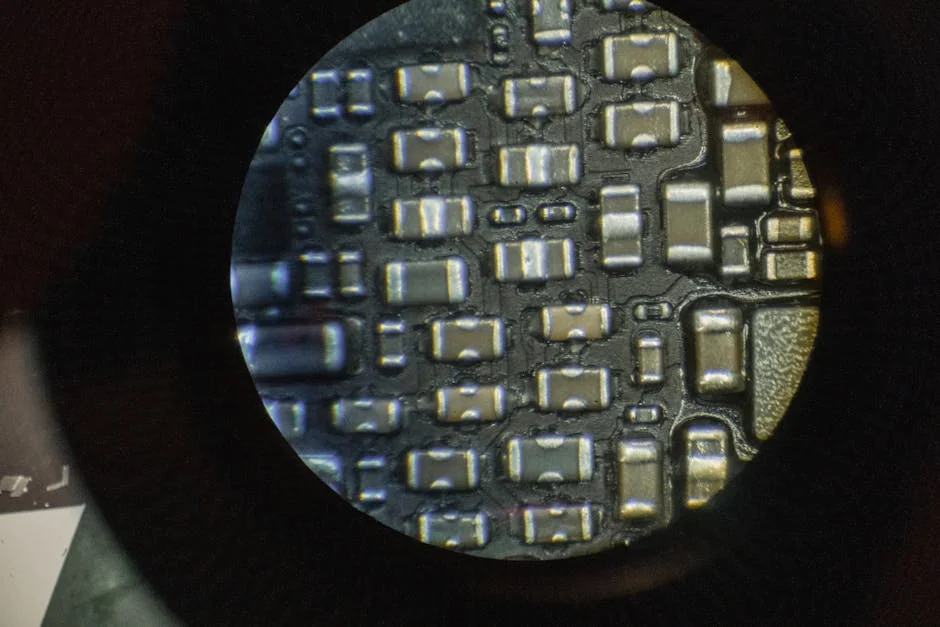
On some displays, especially where service access is possible and skilled technicians are available, it may be feasible to replace a single faulty LED. This process requires soldering tools, precise alignment, compatible replacement parts, and careful color matching. It is usually more practical for high-value fine-pitch displays where replacing an entire module would be costly.
Replace the LED module
For many commercial installations, module replacement is the preferred solution. If multiple pixel defects appear in one panel, replacing the full module is faster and more reliable than repairing each diode separately. This approach often resolves recurring issues linked to internal board damage.
Repair driver IC or circuit faults
When testing shows that the pixel itself is intact, technicians may repair or replace the driver IC, PCB trace, connector, or cable causing the fault. This is common when several pixels fail in a pattern, suggesting control circuitry rather than isolated diode burnout.
Recalibrate after repair
After resolving the the concept, the repaired area may need brightness and color calibration. New LEDs or modules can appear slightly different from older surrounding panels. Calibration ensures a seamless image and avoids visible patching.
Use warranty or service contracts
If the display is under warranty, review the manufacturer’s pixel defect policy before making repairs. Some suppliers provide spare modules, on-site service, or replacement thresholds based on the number and location of faulty pixels. Strong after-sales support can significantly reduce total ownership costs.
Know when replacement is more economical
If a display has widespread defects, aging components, poor brightness uniformity, and frequent service needs, full screen replacement may be more cost-effective than repeated repair. In older systems, the the approach can be a warning sign that broader failure is approaching.
How to prevent LED display dead pixels problem over time
Prevention is always better than emergency repair. Businesses can reduce the risk of the it by following smart purchasing, installation, and maintenance practices.
Choose high-quality manufacturers
Not all LED displays are built to the same standard. Reputable manufacturers use better LED chips, more reliable driver ICs, stricter quality control, and stronger encapsulation methods. Ask for test reports, failure rates, warranty details, and service support before buying.
Match the display to the environment
Indoor and outdoor screens face different operating conditions. Using an indoor-rated display outside or installing an outdoor screen without proper waterproofing can quickly lead to failure. Consider temperature, humidity, dust exposure, and direct sunlight when selecting equipment.
Ensure proper installation
Bad installation practices cause avoidable damage. Modules should be mounted securely, wiring should be protected, and power systems should be correctly grounded. Poor structural support, cable tension, or ventilation design can all increase the likelihood of pixel failure.
Maintain stable power
Use surge protection, voltage regulation, and high-quality power supplies to protect sensitive electronics. Electrical instability is a major contributor to premature display faults. Routine power checks help catch issues before they affect screen performance.
Schedule regular cleaning and inspection
Dust, moisture, corrosion, and connector wear should be monitored routinely. Preventive inspections can identify early warning signs before the LED display dead pixels problem spreads. Cleaning should always follow manufacturer guidelines to avoid static discharge or physical damage.
Control temperature and ventilation
Heat is one of the biggest enemies of LED lifespan. Good airflow, proper cabinet design, and working cooling systems help maintain safe operating temperatures. In tightly enclosed installations, temperature monitoring can prevent hidden thermal stress.
Keep spare parts available
For mission-critical applications such as broadcast studios, transportation hubs, and command centers, having spare modules and matching components on hand speeds up repair and reduces downtime. This is especially important for custom displays where replacement parts may have long lead times.
Train maintenance staff
Displays last longer when handled by trained personnel. Teams should understand safe cleaning methods, module removal procedures, software checks, and basic troubleshooting protocols. Better training means fewer accidental service-related failures.

FAQ about LED display dead pixels problem
What causes the LED display dead pixels problem most often?
The most common causes of the LED display dead pixels problem are component aging, manufacturing defects, heat stress, unstable power, moisture exposure, and physical damage. In many cases, the visible dead pixel is the final result of long-term electrical or environmental stress rather than a sudden event.
Can the LED display dead pixels problem be repaired?
Yes, the LED display dead pixels problem can often be repaired. Depending on the cause, technicians may replace a single LED, swap the full module, repair a driver IC, or fix a signal connection. The right method depends on the display design and the extent of the defect.
Are dead pixels covered under warranty?
Many manufacturers cover the LED display dead pixels problem, but warranty terms vary. Some allow a small number of defective pixels within tolerance, while others offer replacement once defects exceed a specific threshold. Always check the written warranty policy before purchase.
How can I test for dead pixels on an LED screen?
To identify the LED display dead pixels problem, show solid color test screens in red, green, blue, white, and black. This helps highlight dark or color-missing pixels. Professional control software can also run automated test patterns and map exact fault locations.
Do dead pixels spread over time?
A single defect does not always spread, but the LED display dead pixels problem can increase if the root cause is aging, heat, moisture, or unstable electronics. If more pixels begin failing in one area, the issue may involve a module, power supply, or driver board rather than isolated LED failure.
Is it better to repair or replace the display?
If the LED display dead pixels problem is limited to a few points, repair is usually the most cost-effective option. However, if the display is old, has repeated failures, or shows widespread brightness and color inconsistency, full replacement may offer better long-term value.
Conclusion
The LED display dead pixels problem is more than a minor cosmetic defect. It can affect brand image, viewer experience, and the overall reliability of a digital display system. Whether caused by manufacturing flaws, component aging, power instability, environmental exposure, or physical damage, dead pixels should be diagnosed carefully and addressed quickly.
With the right maintenance plan, quality equipment, stable power, and timely repairs, businesses can reduce the risk of the LED display dead pixels problem and extend the service life of their screens. When buyers understand the causes, warning signs, and repair options, they are better prepared to protect their investment and maintain consistent visual performance over time.