Virtual Production LED Display: Applications, Specs & Buying Guide

Virtual Production LED Display: Applications, Specs & Buying Guide helps producers evaluate the screen as part of a camera system, not as ordinary event signage. The surprising detail is that a wall can look excellent to the human eye yet fail on camera because of scan behavior, refresh timing, moiré, color calibration, or genlock.
Table of Contents
- 1. Where Virtual Production LED Displays Add Real Production Value
- Typical applications
- 2. Which LED Specifications Matter Most
- Pixel pitch and viewing distance
- Refresh, scan, and brightness
- 3. How to Match the Wall With Cameras and Real-Time Software
- Camera tests to schedule
- Tracking and rendering
- 4. How to Compare Suppliers, Panels, and Total Cost
- Questions for vendors
- Buy, rent, or hybrid
- 5. How to Test, Calibrate, and Operate the Wall
- Acceptance testing
- Crew and safety
- How does a virtual production wall differ from a standard LED video wall?
- When is a green screen still the better choice?
- Can an LED wall be used with anamorphic lenses?
- What happens if a panel fails during a shoot?
- Is HDR always necessary for virtual production?
- Conclusion
The main problem is specification overload. Pixel pitch, nits, refresh rate, scan mode, HDR, camera tracking, and processing systems all affect the final image, but manufacturers may present them in inconsistent ways.
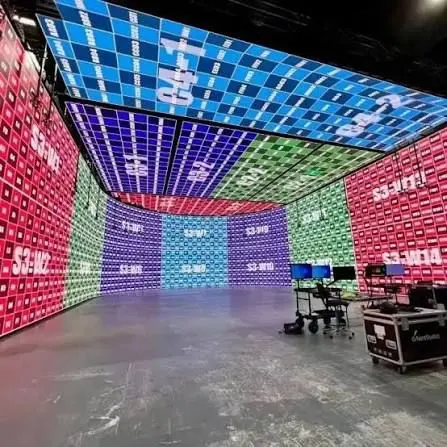
This guide explains where LED stages add value, which specifications matter, how to match a wall to cameras and real-time engines, and how to compare vendors. It also covers practical tests, installation questions, and operational risks so you can create a defensible purchase shortlist.
1. Where Virtual Production LED Displays Add Real Production Value
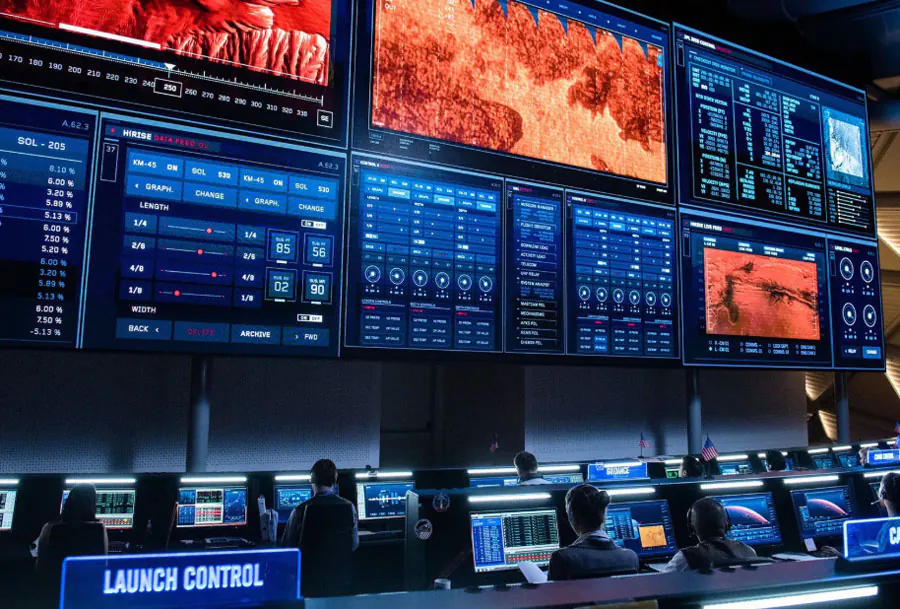
A virtual production LED display creates a controllable background that can show real-time environments, lighting information, graphics, or live feeds during filming. The strongest use cases are scenes that need repeatable lighting, difficult locations, moving cameras, or background continuity.
A common application is an in-camera environment built with Unreal Engine, where the rendered scene changes with camera position. Epic Games describes Unreal Engine as “a complete suite of tools for anyone working with real-time technology,” which explains why it is widely used for interactive environments and stage workflows.
Typical applications
– Film and television: Virtual locations, vehicle interiors, period settings, and scenes that require consistent background lighting.
– Commercial production: Product shots where the environment, reflections, and color need to change quickly.
– Broadcast and live events: Presenter environments, augmented graphics, and repeatable studio backgrounds.
– Automotive work: Controlled reflections on vehicles without moving a full-size product between locations.
– Music and branded content: Fast environment changes with fewer physical set builds.
The Virtual Production LED Display: Applications, Specs & Buying Guide decision depends on whether the wall is mainly a background, a light source, a reflection surface, or all three. A wall used for close-up product shots requires stricter uniformity and color control than one used far behind a presenter.
The practical data point is camera distance relative to pixel pitch: the closer the subject or lens is to the wall, the more visible pixel structure, scan artifacts, and moiré can become. No single pitch works for every lens, sensor, and shooting distance.
How to apply this: List your five most common shot types, then record subject distance, lens range, camera movement, and whether the wall must appear in reflections before requesting quotations.
2. Which LED Specifications Matter Most
The most important Virtual Production LED Display: Applications, Specs & Buying Guide specifications are pixel pitch, refresh behavior, scan architecture, brightness range, color depth, calibration quality, and synchronization support.
Pixel pitch and viewing distance
Pixel pitch is the distance between the centers of adjacent LED pixels. A smaller pitch can reduce visible structure, but it usually increases module cost, processing demand, and the number of pixels that must be driven.
Use the wall’s physical dimensions and camera distance together. A small-pitch panel may still produce moiré if the camera sensor, lens sharpness, and wall pattern interact unfavorably.
Refresh, scan, and brightness
A high advertised refresh number does not automatically eliminate banding or flicker. The panel’s scan design, driving method, camera shutter, frame rate, processor, and synchronization system all influence the captured image.
A useful data point is the difference between display refresh rate and camera synchronization. Refresh describes how the panel updates; genlock and frame-accurate timing determine whether the camera and wall expose the same temporal phase.
| Specification | What it tells you | What to check |
|---|---|---|
| Pixel pitch | Pixel spacing and likely close-up behavior | Test with your lenses |
| Refresh behavior | Risk of scan lines or banding | Shoot at target shutter speeds |
| Brightness range | Exposure and lighting flexibility | Request calibrated minimum output |
| Color depth | Tonal transition capability | Test gradients and shadows |
| Genlock | Timing relationship with cameras | Confirm supported standards |
| Calibration | Uniformity between modules | Inspect gray fields and white balance |
The Virtual Production LED Display: Applications, Specs & Buying Guide process should also examine processing hardware. A panel may support a stated performance level only with a particular receiving card, processor, firmware version, or input format.
How to apply this: Ask every supplier for a full signal-chain diagram showing camera, genlock, media server, LED processor, receiving cards, and panel model instead of comparing panel brochures alone.
3. How to Match the Wall With Cameras and Real-Time Software
Camera compatibility depends on the complete capture chain, including sensor readout, shutter settings, lens characteristics, frame rate, color management, tracking, and LED timing. A technically strong wall can still fail if the camera sees scan artifacts or if the rendered perspective does not match the lens.
Camera tests to schedule
Request a camera test with the exact or equivalent:
– Camera body and sensor mode
– Lens set and filtration
– Frame rates and shutter angles
– ISO and intended exposure range
– Color pipeline and recording format
– Camera tracking system
– LED processor and media-server configuration
The Virtual Production LED Display: Applications、Specs & Buying Guide evaluation should include slow pans, fast pans, rack focus, dim gradients, saturated colors, and dark scenes. These reveal problems that a static test chart may hide.
Tracking and rendering
A real-time engine must receive accurate camera position, orientation, lens data, and projection information. Unreal Engine’s nDisplay documentation covers multi-display rendering and cluster-based configurations used in large LED environments.
Disguise is another established platform for media-server and extended-reality workflows; its official site describes tools for managing real-time content, playback, and stage systems. The right choice depends on your crew, existing pipeline, output requirements, and operator experience.
A measurable test is frame-lock stability over a long take. If the wall and rendered camera perspective drift during a shot, investigate timing, tracking latency, network load, and calibration before changing the panel pitch.
How to apply this: Build a test scene containing a fine grid, moving vertical lines, skin-tone lighting, black-to-gray gradients, and reflective objects, then record it using every planned camera configuration.
4. How to Compare Suppliers, Panels, and Total Cost
The best Virtual Production LED Display: Applications、Specs & Buying Guide purchase is based on tested performance and support, not the lowest price per square meter. The wall, processor, power distribution, structure, calibration, spare parts, content system, installation, and crew training all affect the final budget.
Questions for vendors
Ask suppliers to provide:
– Exact panel model, pixel pitch, LED package, and receiving-card version
– Measured brightness range, not only maximum brightness
– Refresh and scan specifications at the intended input format
– Genlock and frame-lock compatibility
– Color-space and HDR workflow documentation
– Calibration method and recalibration procedure
– Spare-module and spare-power-supply policy
– On-site response time and replacement process
– Power consumption under typical operating conditions
– Structural, ventilation, and rigging requirements
A vendor’s maximum brightness figure is not enough. Virtual production often benefits from controlled output because excessive brightness can reduce lighting flexibility, expose reflections, or force the cinematographer into an unwanted exposure balance.
The Virtual Production LED Display: Applications, Specs & Buying Guide cost comparison should separate capital cost from operating cost. A lower-priced wall may require more frequent calibration, additional processors, specialized technicians, or replacement stock.
Buy, rent, or hybrid
– Buy when the stage has recurring demand and a stable technical team.
– Rent when projects vary widely or the required wall size changes.
– Use a hybrid model when the core wall is permanent but additional panels, tracking, or processors are project-specific.
How to apply this: Score each supplier against image quality, integration, service, spare parts, power, installation, and total ownership cost before reviewing the headline purchase price.
5. How to Test, Calibrate, and Operate the Wall
A production-ready Virtual Production LED Display: Applications, Specs & Buying Guide workflow includes acceptance testing, calibration records, maintenance procedures, and a repeatable pre-shoot checklist.
Acceptance testing
Test the installed wall rather than relying only on factory measurements. Capture full-white, black, gray, red, green, blue, skin-tone, gradient, and fine-pattern images at the intended camera settings.
Look for:
– Bright or dark modules
– Visible seams
– Color shifts between cabinets
– Dead or stuck pixels
– Scan lines at different shutter angles
– Flicker during camera movement
– Moiré with wide and telephoto lenses
– Uneven brightness at the wall edges
– Tracking delay during camera moves
Calibration should be documented by wall area, processor preset, camera configuration, and date. This matters because changing panels, receiving cards, firmware, or processor settings can change the image.
The Virtual Production LED Display: Applications, Specs & Buying Guide operating plan should also include content validation. Verify that the engine output color space, LED processor mapping, camera look, and final recording workflow agree before the first shooting day.
Crew and safety
Operators need clear responsibility for signal routing, color presets, tracking, content playback, and fault response. The physical installation also requires proper rigging, cable management, ventilation, access, and electrical planning.
How to apply this: Create a signed acceptance checklist with reference images, measured settings, known limitations, spare parts, and escalation contacts before the wall enters regular production.
Frequently Asked Questions About Virtual Production LED Display: Applications、Specs & Buying Guide
How does a virtual production wall differ from a standard LED video wall?
A standard video wall is often optimized for viewing from an audience position, while a production wall must perform under camera exposure, motion, lenses, and controlled lighting. In Virtual Production LED Display: Applications、Specs & Buying Guide projects, a rental wall may look fine in person but reveal scan artifacts or moiré when recorded.
Always request camera footage from the intended setup, not only a showroom demonstration.
When is a green screen still the better choice?
Green screen can be preferable when the background must be replaced completely in post-production, when the camera needs extreme movement beyond the wall’s physical volume, or when the project cannot support real-time content creation.
In Virtual Production LED Display: Applications, Specs & Buying Guide planning, compare cleanup, keying, compositing, and reshoot risk rather than treating LED as an automatic replacement for chroma.
Can an LED wall be used with anamorphic lenses?
Yes, but lens distortion, focus falloff, flare, and the wall’s pixel pattern require testing. Anamorphic lenses can interact with the LED structure differently from spherical lenses, especially during focus pulls or when the wall is bright. A Virtual Production LED Display should include the actual anamorphic set, squeeze factor, filtration, shutter, and intended framing.
What happens if a panel fails during a shoot?
A failed module can create a visible dark or bright area, so the stage needs mapped spares and a documented replacement process. Some productions can hide a small fault outside the frame, while others must replace the module immediately because it appears in reflections.
Include Virtual Production LED Display: Applications, Specs & Buying Guide service requirements in the contract, including response times and calibration after replacement.
Is HDR always necessary for virtual production?
HDR can help when the workflow requires a broad brightness range, but it does not solve poor synchronization, calibration, or content mapping. The camera, processor, engine, and recording pipeline must all support the chosen transfer function and color space.
For Virtual Production LED Display: Applications, Specs & Buying Guide decisions, prioritize a tested end-to-end image over an HDR label on a specification sheet.
Conclusion
A successful Virtual Production LED Display: Applications, Specs & Buying Guide decision starts with the shot, camera, and workflow rather than a single panel specification.
– Match pixel pitch and wall size to camera distance and lens behavior.
– Test refresh, scan, genlock, tracking, color, and moiré with real production settings.
– Compare processors, calibration, service, spares, structure, and power alongside panel cost.
– Document acceptance tests and operating presets before the first shoot.
Your next step is to create a camera-test brief containing lenses, frame rates, shutter settings, color workflow, wall dimensions, and tracking requirements. Send the same brief to each supplier, then compare recorded results and total ownership cost using identical criteria.