Roll-Up LED Display Handling Guide: Safe Rolling, Storage and Module Protection

Roll-Up LED Display Handling Guide: Safe Rolling, Storage and Module Protection starts with one rule: a flexible screen must be handled as an electronic assembly, not as fabric. A surprising fact is that an IP rating does not measure flexibility, bend life, impact resistance, or resistance to condensation inside a stored display.
Table of Contents
- 1. Power Down and Inspect Before Rolling
- Follow the correct shutdown order
- Record existing defects
- 2. Roll the Display Without Creasing Modules
- Control direction and alignment
- Keep pressure distributed
- 3. Protect LEDs, Connectors, and Flexible Circuits
- Establish an ESD-controlled work area
- Secure vulnerable components
- 4. Store the Rolled Display in Controlled Conditions
- Monitor the actual environment
- Prevent mechanical loading
- 5. Unroll, Test, and Document Before Reuse
- Use inspection tools for specific purposes
- Run a staged functional test
- How should a roll-up LED display be shipped without its original drum?
- What should you do if a shipping case shows evidence of impact?
- Can a roll-up LED display travel by air with a battery-powered controller?
- Who should approve a field repair to a flexible LED module?
- Why can pixels fail only after the display has warmed up?
- Conclusion
IEC 60529 only classifies an enclosure’s protection against solid objects and water.
The practical problem is that damage often remains hidden until the display is powered again. Over-bending can fracture conductors, pressure can harm LEDs, and trapped moisture can create corrosion or electrical faults.
A safe workflow therefore covers more than rolling technique. You need controlled shutdown, inspection, correct drum geometry, electrostatic-discharge protection, documented storage conditions, and staged recommissioning. The five procedures below help rental teams, installers, warehouse operators, and event crews protect modules while maintaining a clear handling record.
1. Power Down and Inspect Before Rolling
Safe handling begins by isolating power, disconnecting signal lines, and documenting the display’s condition before it moves.
The OSHA electrical safety standard 29 CFR 1910.333 states: “Live parts to which an employee may be exposed shall be deenergized before the employee works on or near them,” except in defined circumstances. This requirement is aimed at worker safety, but it also prevents connectors from being separated under load.
Follow the correct shutdown order
Use the display manufacturer’s shutdown sequence rather than treating the main plug as an on-off switch. A typical workflow is:
- Stop video playback.
- Set the screen to black.
- Shut down processing equipment.
- Switch off display power.
- Isolate the supply and verify de-energization.
- Disconnect data and power cables without pulling on the cable body.
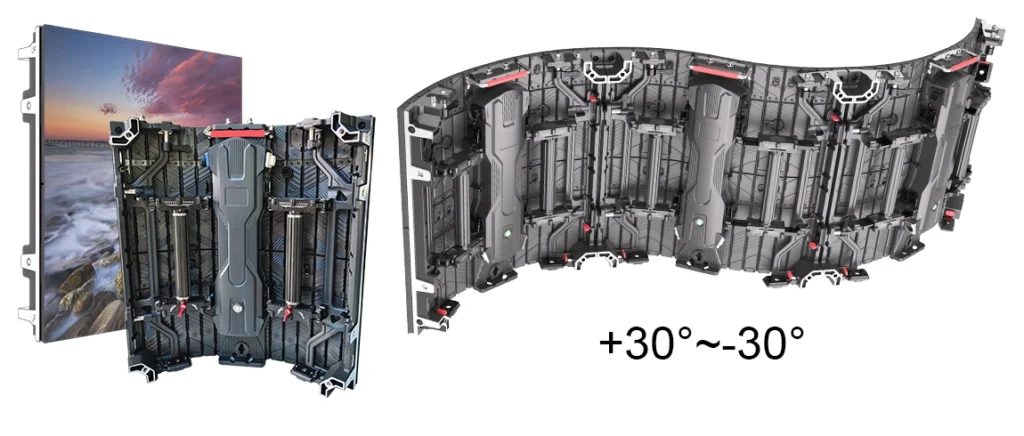
Roll-Up LED Display Handling Guide should also include a pre-roll inspection of LEDs, seams, latches, connectors, edge reinforcement, and rear flex circuits.
Record existing defects
Photograph the full front and rear surfaces under even light. Mark each image with the module position, date, job number, and operator name so later damage is not confused with an older defect.
Roll-Up LED Display Handling Guide: Safe Rolling、Storage and Module Protection works best when inspection records follow the screen through transport and storage. How to apply this: create a shutdown checklist and require one signed inspection record before anyone releases the drum brake.
2. Roll the Display Without Creasing Modules
The display should be rolled evenly around its approved drum, with no folds, twists, dragging, or concentrated pressure on LED faces.
The most important data point is the manufacturer’s minimum bend radius. If the approved minimum radius is `R`, the drum diameter must be at least `2R`; that relationship comes directly from circle geometry. Never estimate the radius from how flexible the panel feels.
Control direction and alignment
Confirm whether the LEDs must face inward or outward. This varies by product because the LEDs, masks, flexible circuit boards, reinforcement layers, and cables occupy different positions in the bending stack.
Roll slowly while keeping both edges aligned. If one edge advances faster, stop and unwind enough material to remove the skew rather than pulling sideways on the lagging edge.
Keep pressure distributed
Do not place hands, knees, tools, or tensioning straps directly on exposed LEDs. Use only the manufacturer-approved protective liner, and keep the liner smooth so it cannot imprint the module surface.
Consider a screen that begins drifting toward one drum flange. Continuing to roll can compress one edge and stretch the other, so the correct response is to stop and realign it.
Roll-Up LED Display Handling requires a designated operator to control motion while another watches both edges. How to apply this: label the drum with its minimum diameter, approved rolling direction, and maximum permitted layer count before the next deployment.
3. Protect LEDs, Connectors, and Flexible Circuits
Module protection depends on controlling electrostatic discharge, impact, contamination, and connector movement throughout handling.
The ESD Association’s ANSI/ESD S20.20 standard covers an electrostatic-discharge control program for sensitive electrical and electronic parts. Its scope addresses devices with defined sensitivity levels, including 100-volt Human Body Model and 200-volt Charged Device Model thresholds.
Establish an ESD-controlled work area
Before touching exposed circuit boards or serviceable modules:
– Use a grounded ESD work surface.
– Wear a tested wrist strap when the manufacturer requires one.
– Keep ordinary plastic film, foam, and adhesive tape away from exposed electronics.
– Hold removable modules by their frames or approved gripping points.
– Place removed parts in static-shielding packaging.
Roll-Up LED Display Handling Guide should distinguish between an anti-static material and a static-shielding enclosure. A material that generates little charge does not automatically block an external electrostatic field.
Secure vulnerable components
Fit connector caps where supplied, close service covers, and immobilize loose power or data tails. Do not let cables become trapped between successive layers on the drum.
A common scenario is a connector that looks secure but swings against the rear of the next module during transport. A soft approved restraint prevents repeated impact without loading the connector socket.
Roll-Up LED Display Handling Guide: Safe Rolling, Storage and Module Protection should treat every exposed connector as a protected component. How to apply this: set up one grounded packing station with tested ESD equipment, connector caps, approved restraints, and static-shielding bags.
4. Store the Rolled Display in Controlled Conditions
A stored roll must remain upright or supported in the manufacturer-approved orientation, isolated from moisture, dust, heat, vibration, and accidental contact.
IEC 60529 uses two characteristic numerals in an IP code: the first relates to protection against solid objects, while the second relates to water ingress. The classification does not certify protection against condensation, corrosive salt, warehouse chemicals, or storage outside the manufacturer’s environmental limits.
Monitor the actual environment
Follow the product manual’s temperature and relative-humidity limits rather than applying a generic warehouse range. Record conditions close to the drum because readings at a distant wall can miss local heat, cold surfaces, or airflow.
Roll-Up LED Display Handling Guide should include:
– Storage date and expected removal date
– Drum or case identification
– Display serial number
– Temperature and humidity records
– Inspection and access history
– Any shock, leak, or pest incident
Prevent mechanical loading
Engage drum brakes, use approved wheel chocks, and maintain a clear no-stacking zone. Do not rest cases, cable trunks, or rigging hardware against the rolled display or its protective cover.
In one case, a dry warehouse can still create condensation when a cold display enters a warm, humid loading area. Keep the unit unpowered until it has stabilized and visible moisture is absent.
Roll-Up LED Display Handling Guide: Safe Rolling, Storage and Module Protection is only reliable when storage conditions are documented. How to apply this: attach a condition log to the case and review its latest temperature, humidity, and incident entries before moving the display.
5. Unroll, Test, and Document Before Reuse
Recommissioning should be gradual: inspect first, unroll under control, test electrical safety, and then increase operating load while watching for faults.
Never energize a display immediately after cold storage, water exposure, a severe impact, or unexplained case damage. Move it to an approved environment, allow it to stabilize according to the manufacturer’s instructions, and escalate suspected moisture intrusion to a qualified technician.
Use inspection tools for specific purposes
Real tools can improve consistency, but they do not replace the display manufacturer’s service limits.
| Tool or method | What it checks | Action to take |
|---|---|---|
| Visual inspection | LEDs and seams | Photograph defects |
| Multimeter | Specified electrical tests | Compare with manual |
| Thermal camera | Uneven heating | Isolate hot areas |
| Test pattern | Pixels and color | Map faulty modules |
| Condition log | Handling history | Review incidents |
A Fluke 117 digital multimeter is designed for electrical measurements, while FLIR ONE thermal cameras attach to compatible mobile devices to show temperature patterns. Use only measurements and test points authorized by the service documentation.
Run a staged functional test
Roll-Up LED Display Handling Guide: Safe Rolling, Storage and Module Protection should require low-stress test content first, followed by normal operating content only after the display remains stable. Check for dead pixels, flicker, intermittent data, color shifts, abnormal sound, odor, and local heating.
Roll-Up LED Display Handling Guide: Safe Rolling、Storage and Module Protection also needs a five-field release record: serial number, date, operator, test result, and supporting image. How to apply this: perform and record one staged test before the display is approved for a live event or permanent installation.
Frequently Asked Questions About Roll-Up LED Display Handling Guide: Safe Rolling、Storage and Module Protection
How should a roll-up LED display be shipped without its original drum?
Do not substitute a small pipe, loose pallet, or folded packing method. Roll-Up LED Display Handling Guide: Safe Rolling, Storage and Module Protection requires a support with the manufacturer-approved diameter, face orientation, edge clearance, and restraint method. If the original drum is unavailable, ask the manufacturer or authorized integrator to approve a replacement in writing.
A custom shipping frame may be acceptable, but only when it preserves the required bend radius.
What should you do if a shipping case shows evidence of impact?
Quarantine the case and document its exterior before opening it. Under Roll-Up LED Display Handling Guide: Safe Rolling, Storage and Module Protection, you should record dents, broken indicators, shifted restraints, wheel damage, and case deformation, then open it with the carrier or responsible party present when possible.
Even if the display looks normal, inspect connectors, edge structures, seams, and drum alignment before unrolling or applying power.
Can a roll-up LED display travel by air with a battery-powered controller?
It may, but the battery must comply with the carrier’s rules and applicable dangerous-goods requirements. Roll-Up LED Display Handling Guide does not override airline restrictions for lithium batteries, spare batteries, or battery-powered control equipment. A controller permitted in passenger baggage may face different conditions when shipped as cargo.
Confirm the battery chemistry, watt-hour marking, packaging, terminal protection, and documentation directly with the carrier.
Who should approve a field repair to a flexible LED module?
A trained technician authorized by the manufacturer or equipment owner should approve it. Roll-Up LED Display Handling Guide: Safe Rolling, Storage and Module Protection does not support improvised soldering, adhesive repairs, or replacement parts with unknown flexibility. A repair that works while the panel is flat may fail during the next rolling cycle.
Record the module location, repair method, part number, technician, and any new bend or storage restriction.
Why can pixels fail only after the display has warmed up?
Heat can reveal an intermittent connector, cracked conductor, marginal solder joint, or component that appears normal when cold. Roll-Up LED Display Handling Guide: Safe Rolling, Storage and Module Protection should therefore include observation after the display reaches stable operation, not just a brief power-on check.
If faults appear with temperature, record the pattern and module location, stop repeated flexing, and give the evidence to a qualified service technician.
Conclusion
Safe handling comes from controlling the entire movement cycle, not merely rolling the screen carefully. Roll-Up LED Display Handling Guide: Safe Rolling、Storage and Module Protection provides a repeatable framework for reducing avoidable mechanical, electrical, and environmental damage.
– De-energize and inspect the display before disconnecting or moving it.
– Respect the specified bend radius and approved rolling direction.
– Control ESD, pressure, connectors, and storage conditions at every stage.
– Recommission gradually and document defects before operational release.
A checklist is most effective when it contains product-specific limits from the current manufacturer documentation. Generic habits should never replace approved drum dimensions, environmental limits, lifting points, service procedures, or electrical tests.
Your next step is to label each drum, prepare a condition log, and run a supervised handling drill before the display’s next shipment or event.
Related Articles
- Rental LED Display Screen for Events with High Brightness Output
- LED Roll Up Screen vs Traditional Rigid Displays Which Suits Your Touring Production Best
- Roll-Up LED Display Reliability: Rolling Cycles, Bend Radius, and Module Protection