Large LED Display Color Consistency: How to Avoid Visible Differences Across Cabinets

Large LED Display Color Consistency: How to Avoid Visible Differences Across Cabinets depends on controlling the entire display system, not merely adjusting brightness until the wall looks acceptable.
Table of Contents
- 1. Set a Measurable Acceptance Standard
- Measure More Than White Balance
- 2. Control Batches, Spares, and Cabinet History
- Build a Matched Inventory
- 3. Measure Under Repeatable Conditions
- Standardize the Measurement Setup
- 4. Calibrate at Pixel and Cabinet Level
- Choose the Appropriate Workflow
- 5. Protect Consistency During Daily Operation
- Monitor Heat, Aging, and Configuration
- Why does the LED wall look consistent to my eyes but uneven on camera?
- Can cabinets with different pixel pitches be calibrated to match?
- Should outdoor LED displays be calibrated in daylight?
- What should I do when a replacement module looks different during a live event?
- Why are cabinet differences most visible in dark gray content?
- Conclusion
A NovaStar calibration manual reports that its full-screen system can achieve brightness variation below 1% and color variation below 0.003 under specified calibration conditions, showing how precise cabinet matching can become when measurement and correction are properly managed. (oss.novastar.tech)
Visible cabinet boundaries usually come from mixed LED batches, inconsistent calibration data, temperature differences, aging, replacement modules, or incorrect processor settings. These problems may appear as pink, green, blue, or gray blocks, especially during low-brightness content and flat test patterns.
The solution is a repeatable workflow covering procurement, measurement, pixel-level correction, operating temperature, and maintenance. The following five practices will help you define objective tolerances, select suitable calibration tools, manage spare cabinets, and detect color drift before viewers notice it.
1. Set a Measurable Acceptance Standard
A consistent LED wall needs documented limits for brightness, chromaticity, color temperature, grayscale tracking, and black-level appearance.
Large LED Display Color Consistency: How to Avoid Visible Differences Across Cabinets cannot be judged reliably with a colorful demo reel. Detailed content can hide cabinet boundaries, while solid gray, white, and primary-color patterns expose them immediately.
Measure More Than White Balance
Your acceptance test should cover:
– Red, green, blue, and white uniformity
– Low, middle, and high grayscale levels
– Color temperature across multiple cabinets
– Brightness deviation between modules
– Color difference using a defined Delta E formula
– Black-surface uniformity when the screen is off
Absen publishes vendor-specific quality targets that include brightness deviation below 2%, module-to-module color-temperature deviation within ±150 K, and ΔE2000 below 3. These figures are not universal standards, but they provide useful reference points when creating a project specification. (absen.com)
The HELIOS user guide states, “A Delta E of less than 1.0 is generally imperceptible.” It also notes that values above 3.0 are visible, although perception still depends on content, brightness, and viewing conditions. (megapixelvr.com)
For Large LED Display Color Consistency: How to Avoid Visible Differences Across Cabinets, record both instrument readings and visual acceptance results instead of relying on one metric.
How to apply this: Create a commissioning sheet listing your permitted brightness, color-temperature, chromaticity, and Delta E ranges before accepting the display.
2. Control Batches, Spares, and Cabinet History
The safest way to prevent cabinet mismatch is to control LED batches and maintain traceable calibration records from the first purchase.
LED emitters from different production batches can have different dominant wavelengths, brightness capabilities, and electrical responses. Calibration can reduce these differences, but it cannot give a weaker emitter the same physical gamut or peak output as a stronger one.
Build a Matched Inventory
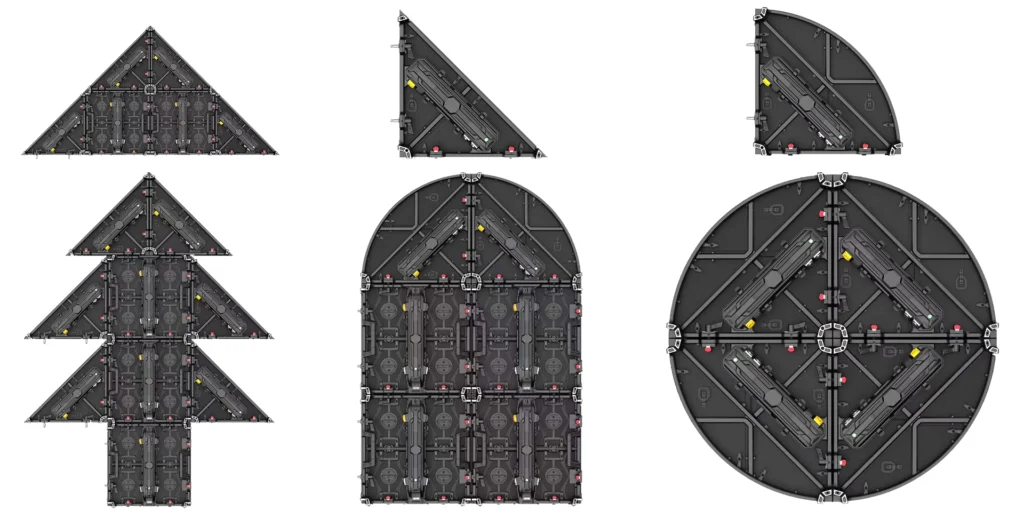
ROE Visual recommends purchasing expansion panels from the same batch when possible. The company also notes that older panels may need customized calibration because LED output changes with use. (roevisual.com)
Your asset records should identify:
– Cabinet and module serial numbers
– LED batch or bin information
– Receiving-card and firmware versions
– Original calibration date
– Operating hours where available
– Repairs and module replacements
– Current coefficient-file location
As an example of manufacturing traceability, Absen states that its material records are retained for 10 years. Your retention period may differ, but the principle is important: color problems are easier to diagnose when cabinet history is available. (absen.com)
Large LED Display Color Consistency: How to Avoid Visible Differences Across Cabinets becomes harder when rental stock is mixed without records. Group cabinets by batch and operating history before applying calibration corrections.
If different batches must be combined, establish the least capable cabinet as the practical brightness and gamut reference. Large LED Display Color Consistency: How to Avoid Visible Differences Across Cabinets is usually improved by bringing stronger cabinets down to a common target rather than overdriving weaker units.
How to apply this: Label every cabinet and spare, then create a searchable register linking each unit to its batch, calibration profile, repairs, and operating history.
3. Measure Under Repeatable Conditions
Accurate calibration requires controlled light, camera positioning, display temperature, test patterns, and processor settings.
A measurement made in changing ambient light cannot be compared reliably with one made in a dark room. Reflections, stray light, camera exposure changes, and inconsistent viewing angles can produce correction coefficients that make the wall worse.
Standardize the Measurement Setup
NovaStar’s cabinet-calibration manual recommends a sealed darkroom with low-reflectance black surroundings. It gives a preferred production-line camera distance equal to the pixel pitch multiplied by 1,500, while allowing a wider range based on the display and camera configuration. (oss.novastar.tech)
Consider a 2.6 mm display. Applying the recommended multiplier gives a starting distance of approximately 3.9 meters, subject to the camera, lens, wall dimensions, and manufacturer’s instructions.
Before measuring, verify that:
- Every cabinet uses the same processor configuration.
- Calibration effects and test patterns are applied consistently.
- Automatic camera exposure and white balance are disabled.
- Cabinets have reached a stable operating temperature.
- The camera is square to the display.
- Ambient light remains unchanged.
Large LED Display Color Consistency: How to Avoid Visible Differences Across Cabinets also requires identical brightness, gamma or EOTF, color-space, and color-temperature settings during every measurement pass.
Photograph the setup and save instrument settings with the report. This makes Large LED Display Color Consistency: How to Avoid Visible Differences Across Cabinets reproducible after repairs, processor replacement, or inventory expansion.
How to apply this: Mark the camera position, lock exposure settings, warm the wall under normal content, and save a reusable calibration checklist.
4. Calibrate at Pixel and Cabinet Level
Pixel-level measurement and correction are more dependable than manually adjusting entire cabinets by eye.
Manual RGB gain changes can hide a large cabinet mismatch, but they may create errors at other grayscale levels. Proper calibration measures individual LEDs or modules, calculates correction coefficients, and applies those corrections through compatible receiving cards and processors.
Choose the Appropriate Workflow
Three real systems commonly used for professional LED calibration are:
– NovaStar NovaCLB-Screen, which measures and corrects full-screen brightness and color uniformity.
– Brompton Hydra, which captures panel measurements for Dynamic Calibration and supports measurement positions at 4 or 8 meters.
– Megapixel HELIOS OptiTune, which provides separate linearity and uniformity workflows using supported meters or cameras. (oss.novastar.tech)
| Method | Best use | What to check |
|---|---|---|
| Visual RGB adjustment | Temporary correction | Gray ramps |
| Cabinet calibration | Factory or rental stock | Cabinet borders |
| Full-screen calibration | Installed walls | Viewing position |
| Linearity profiling | Grayscale accuracy | RGB tracking |
| Module correction | Replaced modules | Local transitions |
| Dynamic calibration | Processor-managed walls | Valid panel data |
Large LED Display Color Consistency: How to Avoid Visible Differences Across Cabinets improves when calibration addresses both high-brightness uniformity and low-gray behavior. Brompton’s PureTone documentation explains that different RGB-channel nonlinearities can create color casts in dark image areas. (bromptontech.com)
After calibration, test Large LED Display Color Consistency: How to Avoid Visible Differences Across Cabinets with flat fields, grayscale ramps, skin tones, saturated colors, and real content.
How to apply this: Run pixel- or module-level calibration first, then use manual cabinet adjustments only for minor field corrections that remain.
5. Protect Consistency During Daily Operation
Color consistency must be maintained because LED output changes with temperature, operating time, repairs, and configuration updates.
A wall that matches when cold may show cabinet patterns after running bright content. Temperature affects LED colors differently, so uneven cooling, blocked ventilation, or swapped modules can create warm and cool areas.
Monitor Heat, Aging, and Configuration
Brompton reports that heating a red LED by 10 degrees can typically reduce its output by about 10%, while other colors may respond differently. This unequal change can produce visible thermal color patterns across cabinets. (bromptontech.com)
Megapixel also identifies panel aging as a cause of brightness differences and provides module-level red, green, blue, and intensity adjustments in HELIOS. The company recommends using flat-field patterns during these corrections. (support.megapixelvr.com)
Your maintenance routine should include:
– Inspecting airflow, fans, and cabinet temperatures
– Checking receiving-card and processor settings
– Testing replacement modules before installation
– Keeping verified backups of calibration coefficients
– Running low-gray and white test patterns regularly
– Recalibrating mixed-age cabinets as a group
Large LED Display Color Consistency: How to Avoid Visible Differences Across Cabinets should be evaluated at normal operating temperature, not immediately after power-up. Avoid pushing brightness beyond calibrated limits because overdrive can reduce uniformity and create visible artifacts. (bromptontech.com)
Treat Large LED Display Color Consistency: How to Avoid Visible Differences Across Cabinets as preventive maintenance rather than a one-time commissioning task.
How to apply this: Schedule a uniformity inspection after major events, module replacements, firmware changes, cooling problems, or significant operating-hour differences.
Frequently Asked Questions About Large LED Display Color Consistency: How to Avoid Visible Differences Across Cabinets
Why does the LED wall look consistent to my eyes but uneven on camera?
Cameras can reveal refresh interactions, low-gray nonlinearities, spectral differences, and subtle color errors that viewers may not notice directly. Large LED Display Color Consistency: How to Avoid Visible Differences Across Cabinets therefore requires both visual and camera-based testing for broadcast or virtual production.
A wall may look acceptable during an event yet show colored blocks when filmed with a particular camera, shutter angle, ISO setting, or white balance.
Can cabinets with different pixel pitches be calibrated to match?
Calibration can align brightness, white point, and color behavior, but it cannot remove structural differences caused by unequal pixel pitch, LED package design, or viewing geometry. Large LED Display Color Consistency: How to Avoid Visible Differences Across Cabinets is especially difficult when two product families appear within one continuous image.
They may be matched adequately as separate surfaces, but a seamless transition is not guaranteed at short viewing distances.
Should outdoor LED displays be calibrated in daylight?
Daylight may be useful for evaluating real viewing performance, but measurement calibration normally requires controlled ambient conditions. Large LED Display Color Consistency: How to Avoid Visible Differences Across Cabinets can be distorted by sunlight, reflections, clouds, and changing sky color. An outdoor wall should usually be measured under stable conditions, then visually checked at representative daytime brightness.
Permanent shading or architectural reflections may require a separate operational preset.
What should I do when a replacement module looks different during a live event?
Start with a verified module from the same product and production batch, then confirm that the correct calibration coefficients were loaded. Large LED Display Color Consistency: How to Avoid Visible Differences Across Cabinets may require a temporary module-level RGB and intensity correction when full recalibration is impossible.
Avoid making broad whole-screen adjustments to hide one module because that can disturb cabinets that are already correct.
Why are cabinet differences most visible in dark gray content?
Low-gray content exposes differences in driver behavior, minimum current, grayscale linearity, and RGB-channel response. Large LED Display Color Consistency: How to Avoid Visible Differences Across Cabinets may appear acceptable at full white while showing pink, green, or blue blocks near black.
This is not always a white-balance problem; it may require multi-point grayscale correction or processor features designed to compensate for nonlinear LED and driver behavior.
Conclusion
Reliable cabinet matching comes from combining measurable specifications, controlled calibration, traceable inventory, and regular maintenance.
– Define acceptance limits for brightness, chromaticity, Delta E, color temperature, and grayscale behavior.
– Control production batches and maintain cabinet, module, repair, and calibration records.
– Measure consistently using fixed geometry, stable temperatures, controlled light, and locked instrument settings.
– Recheck the wall operationally after repairs, replacements, firmware updates, or cooling changes.
Large LED Display Color Consistency: How to Avoid Visible Differences Across Cabinets is not solved by one RGB adjustment. You need to manage the complete chain from LED selection and calibration data to processor settings and operating temperature.
Your next step is to display flat red, green, blue, white, and low-gray patterns, photograph the wall from the intended viewing position, and document every cabinet that differs before changing any settings.