

stage LED display buying guide: how to choose the right screen

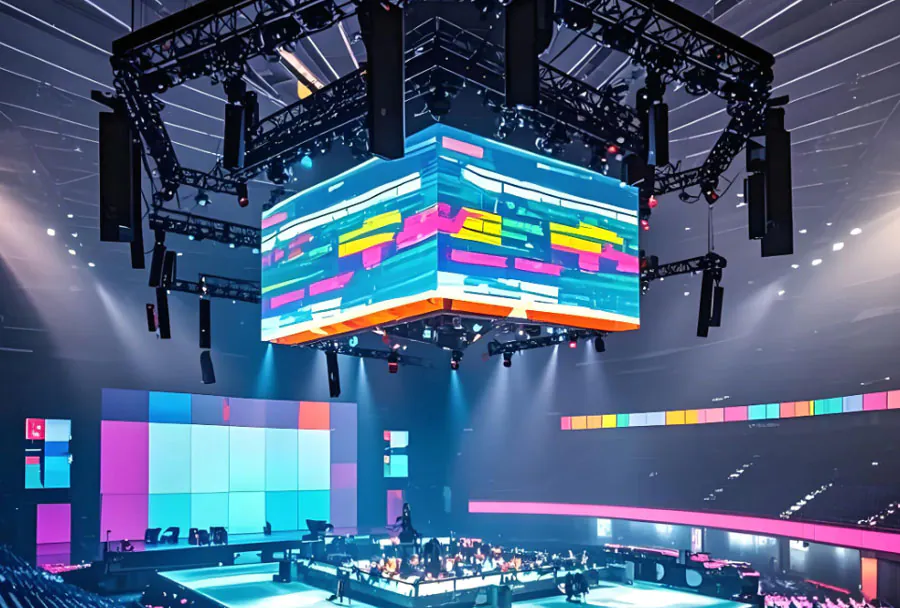
A stage LED display buying guide: how to choose the right screen helps you avoid the most expensive live production mistake: treating every LED panel as interchangeable.
Table of Contents
- Match Pixel Pitch to the Real Viewing Distance
- Set Brightness and Contrast for the Actual Light Level
- Compare Indoor vs Outdoor Panels and IP Ratings
- Evaluate Refresh Rate, Processing, and Camera Performance
- On-Camera Test Checklist
- Verify Rigging, Power, and Serviceability Before You Sign
- Should You Buy or Rent a Stage LED Display?
- Can I use an outdoor LED screen indoors without problems?
- How do I calculate the right screen size for a specific stage?
- What is the difference between rental and fixed-install LED cabinets?
- Does refresh rate matter if no cameras are used?
- What causes LED screen color mismatch after a few months?
- Conclusion
A common planning gap is that a screen looks sharp in a showroom but becomes unreadable on stage because the viewing distance, ambient light, or camera angle was never checked.
Buyers often overpay for pixel pitch they do not need or under-spec brightness for real conditions. The five checks below cover pixel pitch, brightness, build quality, processing, and support before you sign.
Match Pixel Pitch to the Real Viewing Distance
The first step in any stage LED display buying guide: how to choose the right screen is to pin down viewing distance before you compare resolutions.
Pixel pitch is the distance in millimeters between the centers of adjacent LED pixels. It directly determines how close a viewer can stand before the image breaks into visible dots.
Most LED panel manufacturers use a simple rule: multiply pixel pitch in millimeters by 1.5 to find the closest comfortable viewing distance in meters, and by 3 for a distance where fine text stays legible. For a 3.9mm panel, that means roughly 5.85 meters for the nearest viewer and about 11.7 meters for comfortable text.
AVIXA, the Audiovisual and Integrated Experience Association, explains that display sizing decisions should start with the farthest viewer and the content that must remain legible.
Consider a corporate general session where the front row is only 3 meters from the screen. A 3.9mm panel may show visible pixel structure, so a 2.6mm or 2.9mm option is the safer choice.
When you use a stage LED display buying guide: how to choose the right screen, you start with distance, not raw resolution. How to apply this: measure the distance from the first row to the screen and write it on every quote request.
Set Brightness and Contrast for the Actual Light Level
After distance, the next check in a stage LED display buying guide: how to choose the right screen is matching brightness and contrast to the environment.
Brightness is measured in nits. Indoor stages with controlled lighting often work well between 1,000 and 2,500 nits, while outdoor stages in daylight usually need 5,000 nits or more.
Contrast ratio matters more indoors because dark blacks and subtle shadows keep video content readable. In bright sunlight, contrast is often beaten by ambient light, so you need more brightness just to keep the image visible.
In one outdoor festival, a 4,000-nit screen looked washed out on a sunny afternoon until the team adjusted content colors and ran the panel at its rated maximum.
Many spec sheets lead with peak nits, but sustained brightness over long events can be lower because panels derate with heat. A stage LED display buying guide: how to choose the right screen treats brightness as a location decision, not a number copied from a brochure.
How to apply this: take a light meter reading at the actual screen location at the same time of day as the event, then add at least 20% brightness headroom.
TW VISION’s ground stacking system for rental led display usage.
Compare Indoor vs Outdoor Panels and IP Ratings
One of the most overlooked parts of a stage LED display buying guide: how to choose the right screen is the IP rating.
IP ratings tell you how well a cabinet resists solid objects and water. Indoor LED panels are often rated IP20, meaning they are protected only against solid objects larger than 12mm and have no water resistance. Outdoor panels need IP65 or higher on the front and rear faces to survive rain and dust.
| Factor | Indoor recommendation | Outdoor recommendation | What to check |
|---|---|---|---|
| Pixel pitch | 1.9 mm to 3.9 mm | 3.9 mm to 10 mm | Front-row distance |
| Brightness | 1,000–2,500 nits | 5,000 nits and above | Sunlight direction |
| IP rating | IP20 or IP30 | IP65 front and rear | Gasket condition |
| Cabinet | Lightweight die-cast | Sealed, corrosion-resistant | Weight and service access |
| Refresh rate | 1,920 Hz or higher | 1,920 Hz or higher | On-camera flicker |
A common scenario in houses of worship is using a temporary outdoor-rated panel in a bright lobby. It works, but fan noise and low-brightness color shift can be distracting in a quiet service.
A narrower view of this stage LED display buying guide: how to choose the right screen might skip IP rating, but rental failures usually trace back to moisture or dust.
How to apply this: ask for the front and rear IP rating, not just a general “outdoor-rated” label.
Evaluate Refresh Rate, Processing, and Camera Performance
The fourth check in a stage LED display buying guide: how to choose the right screen is whether the display will look stable on camera.
Refresh rates of 1,920 Hz and above are common for camera-facing LED screens. Lower rates can show scan lines or flicker when filmed by broadcast cameras or audience phones. On-camera flicker also depends on shutter speed and frame rate.
Pairing the screen with a processor such as Brompton Technology Tessera gives you per-panel calibration and HDR control. Many operators use NovaStar controllers for mapping, monitoring, and receiving card configuration.
On-Camera Test Checklist
– Use the camera and lens you will actually use for the show.
– Set shutter speed and frame rate to the live production values.
– Look for dark bands, color shift, or scan lines.
– Record a clip on a phone as a second check.
When a touring band tests an IMAG feed, the difference between a 1,920 Hz and 3,840 Hz panel often appears as rolling dark bands on camera.
A thorough stage LED display buying guide: how to choose the right screen includes a live camera test because the spec sheet does not predict on-camera behavior.
How to apply this: ask your vendor to run a live camera test with the exact camera and shutter speed before you commit.
Verify Rigging, Power, and Serviceability Before You Sign
The final check in any stage LED display buying guide: how to choose the right screen is how the wall will hang, power up, and get repaired.
Wall-mounted and flown screens need engineering drawings that account for cabinet weight, rigging bars, and wind load if outdoors. Venues often require stamped structural calculations.
Power is another hidden factor. A large LED wall may need multiple 208V or 240V circuits, and without redundancy one failed power supply can darken part of the image.
Front-access cabinets save space when the screen is tight to a wall. Rear-access cabinets are easier to service when there is a catwalk or enough depth behind the screen.
Before finalizing a purchase, one rental house reviews the cabinet’s spare module count and the manufacturer’s local support response time.
A complete stage LED display buying guide: how to choose the right screen treats serviceability as a total cost, not a post-sale detail.
How to apply this: request the full installation drawing, power schedule, and spare parts list in writing before paying the deposit.

Should You Buy or Rent a Stage LED Display?
Should you buy or rent a stage LED display? Start with the total cost per show day. Rental invoices often bundle freight, rigging, processing, spare modules, and a technician into one day rate. A purchase quote usually covers only panels, and the buyer absorbs the rest.
As AVIXA, the Audiovisual and Integrated Experience Association, advises, total cost of ownership must include storage, spares, processing, and labor—not just panel invoice. A panel purchase can still be profitable when utilization is high, but a low-use owner may pay more per event than the rental rate.
What to Include in a Total Cost Model
– Panel cost or rental day rate
– Video processor and signal distribution
– Rigging, clamps, and support structure
– Spare modules and repair labor
– Flight cases, storage, and transport
– Insurance and firmware update support
Consider a regional production company evaluating 180 panels for a one-day corporate keynote. The rental quote includes a per-panel day rate plus labor, while buying requires the full panel purchase, processor, spare kit, and road cases before any revenue. If the same panels sit for 11 months, the per-event cost of ownership climbs.
| Cost factor | Buying a stage LED display | Renting a stage LED display | Action to take |
|---|---|---|---|
| Upfront capital | High; panel cost plus processing and spares | Low; deposit and day rate only | Compare first-year cash outlays |
| Storage and transport | Ongoing; case storage and trucking | Included by rental house | Check warehouse space available |
| Maintenance | You buy spares and pay labor | Provider replaces failed modules | Request service-level agreement |
| Pixel pitch risk | You keep aging tile until sold | You can choose newest pitch each event | Review current client specs |
Should you buy or rent a stage LED display if low utilization is likely? Rental will usually keep your per-show cost lower.
How to apply this: Build a 5-year cost model in a spreadsheet or track rental quotes against owned asset costs in Current RMS.
Event Frequency and Utilization Are the Real Decision Drivers
When should you buy or rent a stage LED display? Your annual event calendar usually matters more than the panel price. A purchased LED wall adds value only when it is deployed, maintained, and crewed. Low utilization is the main reason owned video panels sit in a warehouse rather than producing revenue.
Utilization tracking tools like Flex Rental Solutions help AV companies see which assets are booked, available, or in need of service. The software prevents the classic mistake of buying twelve more panels for one busy quarter that never repeats.
How to Model Event Days
– Count confirmed and probable events for 24 months
– Separate peak season from offseason
– Estimate your panel rental day rate per event
– Add freight, labor, and cross-rental backup costs
– Compare annual rental spend to depreciated purchase cost
A common scenario is a house of worship that rents a flown LED wall for Easter and Christmas, but buys a permanent 2.9 mm wall for the main sanctuary if weekly services use it. Buying only works when the calendar shows repeated deployment.
Should you buy or rent a stage LED display? The answer changes at the point where annual rental invoices exceed ownership cost.
How to apply this: Create a 24-month event forecast before requesting a purchase or rental quote, and update it after each booking season.
Maintenance, Labor, and Hidden Costs Most Buyers Miss
Should you buy or rent a stage LED display after considering maintenance? Many owners overlook that LED upkeep never stops. A rental house spreads maintenance across many shows; an owner pays for every failed module, tangled cable, and cracked flight case. LED panels need regular cleaning, module recalibration, and occasional replacement.
One hidden cost is spare stock. Rental providers carry spare modules as a normal part of the kit. A buyer must purchase extras for each panel model. Another cost is labor: setup, alignment, pixel mapping, and teardown happen every event, not once.
Consider an AV team that completed a 20-show tour and then found that replacing cracked corner caps and re-tensioning module magnets became a monthly warehouse task. The purchase price was only the first expense.
Should you buy or rent a stage LED display when hidden labor is added? The answer often tilts toward rental for infrequent use.
How to apply this: Ask for a service-level agreement that states replacement time for failed LED modules. If you buy, keep at least one spare module case per panel type and schedule maintenance in Flex Rental Solutions.
Technology Lifecycle and Pixel Pitch Risk
Should you buy or rent a stage LED display when pixel pitch changes quickly? A purchase locks you into a specific resolution; a rental lets you match each event’s viewer distance. Pixel pitch matters. A 3.9 mm tile may be fine for outdoor viewing at distance, but corporate clients with close camera shots might demand 2.6 mm or finer.
Buying a panel with a coarser pitch can lose resale value as finer-pitch stock becomes common in rental houses. A production company that bought 3.9 mm indoor panels for conferences now faces clients who request 2.6 mm fine-pitch tiles for close camera work. HDCP, HDR, and low-latency input standards also evolve.
Should you buy or rent a stage LED display if you expect client demands to shift? Renting may hedge that risk.
How to apply this: Before buying, ask the manufacturer how long firmware updates and replacement modules will remain available. If you rent, confirm the current pixel pitch in the provider’s inventory.
Rental Logistics, Availability, and Lead Times
Should you buy or rent a stage LED display if your event date is less than two weeks away? Rental availability can decide for you. Popular panel brands often sell out during festival season, trade show weeks, and public holidays. The closer to an event, the fewer options remain for pixel pitch, cabinet type, and brand.
Cross-rental is common. A provider may source panels from another rental house to fulfill a large order. That can add freight costs, different road cases, and extra programming time.
A corporate AV team found that its city had a short inventory of one brand during a major trade show week, forcing a cross-rental from another state and extra freight. Booking earlier or owning overflow inventory would have avoided the last-minute cost.
Frequently Asked Questions About Stage LED Display Buying Guide: How to Choose the Right Screen
Can I use an outdoor LED screen indoors without problems?
You can use an outdoor LED screen indoors, but the experience often changes. A high-brightness outdoor panel may need to be dimmed so much that color shifts and gray levels become uneven. Fan noise from sealed cabinets can also distract in a quiet theater.
If you are following a stage LED display buying guide: how to choose the right screen, treat an outdoor-to-indoor conversion as a temporary option, not a permanent install.
How do I calculate the right screen size for a specific stage?
Start with the farthest viewer. A common planning guideline is to divide the farthest viewing distance in meters by 8 to find a comfortable screen height, then use your aspect ratio to find width. A viewer 24 meters away may need a screen roughly 3 meters tall.
A practical stage LED display buying guide: how to choose the right screen also checks ceiling height, trim, and side sightlines before locking size.
What is the difference between rental and fixed-install LED cabinets?
Rental cabinets have corner protectors, quick locks, and road cases. They are built to be set up and struck repeatedly. Fixed-install cabinets can be lighter and easier to calibrate for a single location, but they may not survive repeated handling.
If you rent, a stage LED display buying guide: how to choose the right screen should include truck pack, labor, and on-site spare modules.
Does refresh rate matter if no cameras are used?
Yes, refresh rate still matters in some live settings. Human eyes rarely see flicker above 1,920 Hz, but LED walls can interact with certain lighting dimmers or phone cameras in the audience. A lower refresh rate can also produce banding if a camera appears unexpectedly.
A practical stage LED display buying guide: how to choose the right screen accounts for phone footage even without a broadcast camera.
What causes LED screen color mismatch after a few months?
LED bins and modules can drift as they age. Replacing a failed module without recalibrating the surrounding panels often creates visible color patches. Heat, humidity, and operating brightness can accelerate drift.
If you follow a stage LED display buying guide: how to choose the right screen, ask whether the processor supports per-module calibration and whether your vendor will recalibrate after repairs.
Conclusion
Buyers often rush to pixel pitch or resolution, but the real decisions live in viewing distance, light, protection, processing, rigging, power, and service. Keep these checks close before approving any quote:
– Confirm pixel pitch against the nearest and farthest viewer.
– Match brightness and IP rating to the actual venue conditions.
– Test the panel on camera and confirm processor support for calibration.
– Require drawings, power schedule, spares, and service terms in writing.
Use this stage LED display buying guide: how to choose the right screen as a pre-purchase checklist, and ask your vendor for an on-site demo before you commit.
