Led Screen Rental Columbus For Trade Shows And Exhibitions

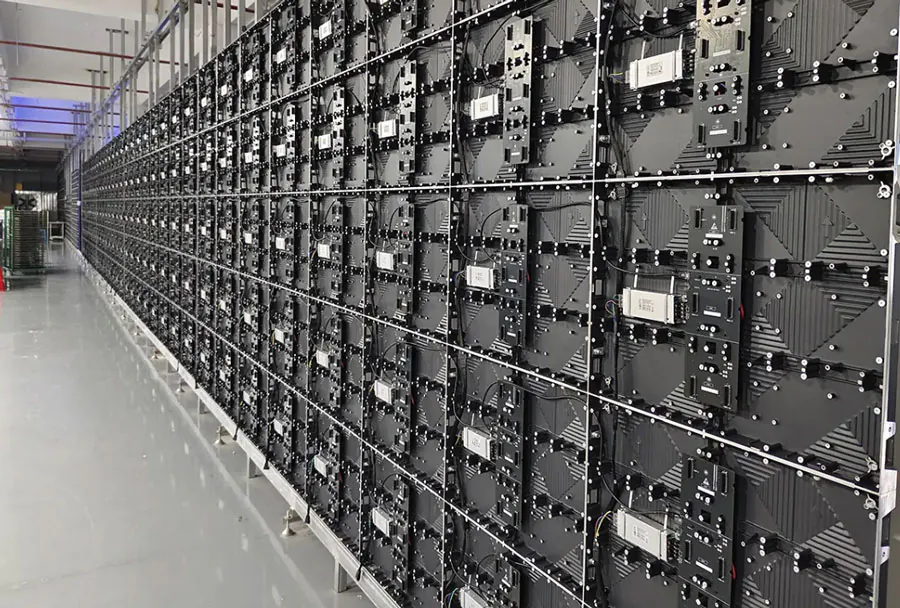
LED screen rental in Columbus for trade shows and exhibitions has become an essential service for brands that want to attract attention, communicate clearly, and create memorable experiences on the show floor. As exhibition environments grow more competitive, booth visibility, dynamic content, and flexibility in presentation are critical. LED screens deliver high brightness, excellent viewing angles, and seamless video playback—features that outpace older technologies like projection and LCD in many trade show contexts. For event managers, marketers, and exhibit designers operating in Columbus, understanding how to select the right rental partner and technical specs can dramatically influence engagement and ROI.
Why LED Screens Matter at Trade Shows
LED screens provide visual impact that drives foot traffic. Bright, crisp displays communicate professionalism and innovation—attributes exhibitors want to project. Furthermore, LED’s modularity allows custom shapes and sizes that integrate with booth architecture. When used effectively, LED walls can:
– Attract visitors from across aisles with motion and brightness.
– Deliver multi-format content: video, live feeds, product demos, data visualizations.
– Enable real-time updates during the show (schedules, live polling, leaderboards).
– Reinforce brand identity through color-accurate imagery and large-format logos.
Columbus Market Considerations
Columbus is a mid-sized convention market with venues like the Greater Columbus Convention Center and various expo centers. Key local considerations include:
– Venue constraints: Many Columbus venues have specific rigging, power, and access rules. A rental partner familiar with these venues saves time and avoids penalties.
– Seasonal demand: Peak exhibition months can strain inventory—reserve early.
– Local service and logistics: Choosing a Columbus-based rental supplier reduces shipping costs and allows faster on-site support.
– Audience profile: Columbus trade show audiences vary from manufacturing and logistics to tech and healthcare—content and screen choices should match audience distance and readability needs.
Common Use Cases at Columbus Exhibitions
– Headline display: A large LED wall above a booth to showcase hero videos and attract traffic.
– Product demo stations: Smaller, high-resolution displays for detailed product walkthroughs.
– Wayfinding and schedules: Entrance or aisle screens for event information and session times.
– Interactive installations: Touch-enabled or integrated kiosk displays for lead capture and self-service demos.
Types of LED Screens and How to Choose
Selecting the right LED screen for a trade show depends on several variables: viewing distance, content type, booth size, indoor vs. outdoor use, and budget.
Pixel Pitch and Viewing Distance
Pixel pitch (the distance between LED pixels) determines image sharpness at given distances. Typical rental options:
– P1.2–P1.8: Ultra-fine pitch for close-up demos and small booths where viewers stand near the screen.
– P2.5–P4.0: Common for general booth walls and product showcases where audiences are several feet away.
– P6.0–P10.0: Best for large, distant viewing scenarios or outdoor signage.
Rule of thumb: required viewing distance (in feet) roughly equals pixel pitch (in mm) multiplied by 3–4 to maintain visual fidelity.
Indoor vs. Outdoor Screens
Indoor LED screens prioritize fine pixel pitch and aesthetic framing. Outdoor led displays focus on higher brightness (nits), weatherproofing (IP ratings), and anti-glare finishes. For Columbus outdoor events, check venue permissions and protect electrical connections from unpredictable weather.
Technical Specifications That Matter
When evaluating rental options, confirm these technical specs:
– Brightness (nits): Higher brightness for bright halls or outdoor use.
– Refresh rate: 3,840Hz or higher preferred to avoid flicker in video capture or live streaming.
– Color calibration and LUT support: For brand-accurate color reproduction.
– Seamless seams and module flatness: Important for large walls to avoid visible joins.
– Control system compatibility: Ability to run from common media players, live inputs, and broadcast sources.
Power and Data Requirements

LED walls require stable power distribution and often dedicated circuits. Data distribution for control and synchronization should use robust cabling (Ethernet or fiber in many cases). Your rental partner should provide load sheets and technical riders that match venue requirements in Columbus.
Rental Process, Pricing, and Budgeting
Working with a rental supplier typically follows a predictable process: needs assessment, proposal and quote, design and mockup, delivery and installation, on-site support, and strike/pack-out.
Cost Components to Expect
– Screen rental fee (per square foot or per module).
– Shipping or local delivery.
– Installation and rigging labor.
– Control hardware and media server rental.
– Technical support and operator fees.
– Insurance and damage waivers.
– Optional content services (design and playback programming).
Below is an analysis table comparing common LED rental options and decision factors:
| Screen Type | Best For | Typical Pixel Pitch | Estimated Cost Range (per day) | Key Considerations |
|---|---|---|---|---|
| Fine-Pitch Indoor (Close Viewing) | Product demos, close-up audiences | P1.2–P1.8 | $1,000–$3,000 | High visual fidelity; higher rental cost; limited size options |
| Standard Indoor Wall | General booth backdrops, brand videos | P2.5–P4.0 | $700–$1,800 | Balanced price/quality; modular and scalable |
| Large-Format Indoor/Outdoor | Headline displays, distant viewing | P4.0–P10.0 | $1,200–$4,000 | High impact; requires strong rigging and power |
| Outdoor High-Brightness | Open-air promotions, entrance signage | P6.0–P10.0 | $1,500–$5,000 | Weatherproof; high brightness; venue permits needed |
| Interactive/Kiosk LED | Touch demos, lead capture | P1.5–P2.5 (depending) | $500–$1,500 | Integrated interactivity; needs durable frame and power |
Note: Costs vary widely depending on rental duration, local labor rates in Columbus, and additional services like content creation and technicians.
Logistics, Installation, and On-Site Support
An effective deployment involves pre-event planning and strong coordination with the venue. Key steps include:
– Site survey: Measure booth space and confirm rigging points, floor loading limits, and power access.
– Mockups and renderings: Visualize screen size and sightlines to ensure maximum impact.
– Access windows: Delivery and installation windows at Columbus venues are often strict—coordinate with show management.
– Safety and compliance: Follow local electrical codes and venue-specific rules. Ensure truss and rigging are certified and installed by qualified technicians.
– On-site technicians: Rent with a package that includes an onsite technician for the show opening and troubleshooting.
Typical Installation Timeline
– 2–4 weeks before event: Finalize order and content delivery format.
– 3–7 days before event: Delivery and staging in advance, if allowed.
– Day-of setup: Rigging and calibration 4–12 hours before show opens (varies by complexity).
– During event: Technician on standby for content swaps and troubleshooting.
– Strike: Screen dismantled per venue rules; plan for crew and transport.
Content Strategy: Making the Most of LED Real Estate
The screen is only as effective as the content it displays. High-impact content design is critical for converting attention into leads.
Content Best Practices
– Design for distance: Use large type and high-contrast visuals for readability from aisle distance.
– Loop structure: Curate 60–90 second loops with clear calls to action spaced evenly.
– Motion hierarchy: Avoid constant rapid motion; lead with a hero image/video, then support with animations.
– Live feeds and social integration: Use live demos, feeds, or UGC to create urgency—ensure moderation for user-generated content.
– Synchronization: If multiple screens are used, synchronize content timing and transitions for a cohesive experience.
Technical Delivery Formats
Most rental suppliers accept common codecs (H.264, ProRes, etc.) and will provide playback specifications. For large walls or multi-zone setups, use a professional media server to manage scaling, warping, and bezel correction.
Measuring Impact and ROI
Measuring the return on LED screen rental involves both quantitative and qualitative metrics:
– Lead volume and quality: Track leads captured at the booth or via integrated forms.
– Dwell time: Observe or use sensors to measure how long attendees engage with content.
– Traffic lift: Compare foot traffic to adjacent booths with and without LED presence.
– Social lift: Monitor social media mentions and content impressions during the show.
– Brand recall: Post-event surveys help quantify memorability and message retention.
To tie LED investments to sales, attribute leads to subsequent conversions and calculate cost-per-lead metrics against rental and production spend.
Choosing a Rental Partner in Columbus
Selecting the right vendor is as important as choosing the right screen. Consider these factors:
– Local experience: Vendors with Columbus show experience understand venue rules and logistics.
– Inventory depth: Ability to scale up or change specs if your needs shift.
– Technical expertise: On-site technicians and control system proficiency.
– Creative services: Do they offer content creation and playback programming?
– Insurance and safety: Confirm liability coverage and equipment protection options.
– References and case studies: Ask for examples of similar trade show installations.
Questions to Ask Potential Suppliers
– Can you provide venue-specific load and power sheets for the Greater Columbus Convention Center?
– What is your typical installation crew size and timeline for a 20×20 or 30×30 booth?
– Do you offer content services or integrate with our media server?
– What are your contingencies for equipment failure?
– Can you provide color calibration and test footage before load-in?
Sample Case Studies and Practical Examples
– Tech Startup at Columbus Expo: A 20×20 booth used a P2.5 LED wall as a backdrop for product demos. The wall ran a looped sequence of product teasers and a live demo feed. Result: a 40% increase in booth traffic vs. previous shows and 150 qualified leads in two days.
– Manufacturing Supplier at Industry Trade Show: Used a P4.0 modular LED display to show large machinery in operation, paired with safety and specs overlays. Result: Better far-aisle visibility and several pre-scheduled meetings with enterprise buyers.
– Outdoor Entrance Activation: For a weekend expo in Columbus, an outdoor high-brightness LED display displayed schedules, sponsor messages, and live event highlights. Result: Improved attendee flow and sponsor satisfaction.
Checklist: Preparing for LED Screen Rental in Columbus
– Book rental inventory early and confirm delivery windows.
– Provide content in vendor-specified formats at least 7–14 days before the event.
– Confirm venue power availability and request load-in details.
– Secure event insurance and review liability coverage.
– Plan for on-site technical support and media operator hours.
– Test calibration and playback during staging or pre-show setup.
– Prepare backup content and a contingency plan for hardware issues.
Maximizing Trade Show Impact with LED Screens
LED screen rental in Columbus for trade shows and exhibitions is a high-impact investment when planned and executed properly. By understanding pixel pitch, brightness, installation logistics, content strategy, and local venue rules, exhibitors can significantly increase visibility and engagement. Choosing an experienced local rental partner, investing in tailored content, and measuring performance will help convert visual impact into measurable business results. Whether a small booth needs a crisp demo screen or a large enterprise seeks a headline LED wall, Columbus offers capable vendors and venues—when exhibitors prepare and coordinate early, LED screens become a powerful extension of brand storytelling on the trade show floor.