Affordable Flex Screen Price Options for All Budgets

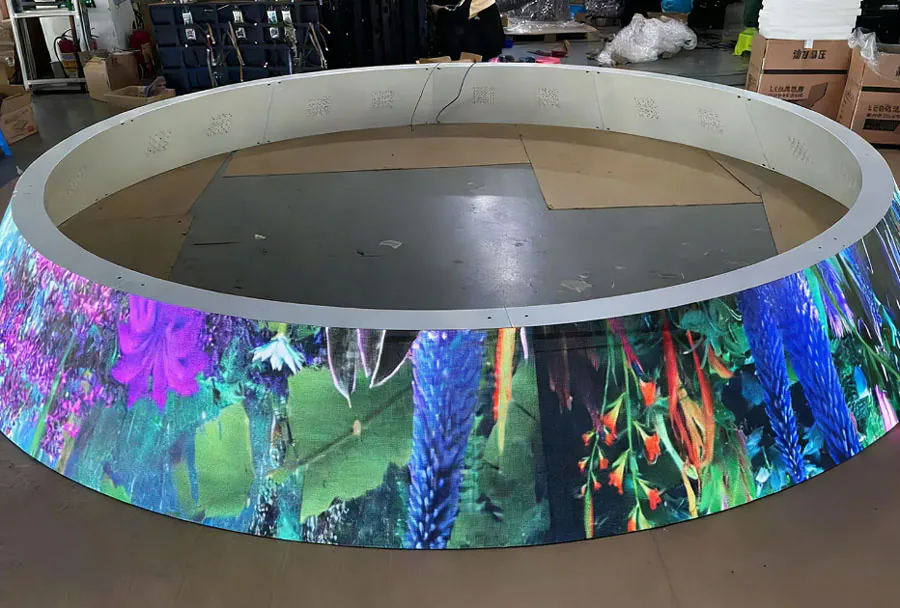
Flexible screens ( flex screens) are no longer niche components reserved for high-end consumer electronics. Over the past decade, improvements in manufacturing, materials, and supply chain scale have pushed flexible display technology into a wide range of products — from affordable wearable devices and flexible smartphones to rollable signage and industrial HMI panels. As adoption widens, buyers face a growing set of choices: different sizes, resolutions, touch options, ruggedization levels, and mounting methods. These differences create a substantial price spread.
This article provides a practical, budget-aware guide to flex screen pricing for all types of buyers — hobbyists, small businesses, integrators, and enterprise procurement teams. You’ll find an analysis table that summarizes common price tiers, a breakdown of the cost drivers, recommendations for getting the best value, and real-world examples of how to match a flex screen to your project’s budget and performance needs.
Overview of Typical Price Tiers
Flex screen pricing varies widely depending on the display technology (OLED, AMOLED, flexible LCD variants), size, resolution, touch layer inclusion, ruggedization, and volume of purchase. Below is a consolidated view of common price bands you’ll encounter in the market:
– Entry-level: small, low-resolution panels or off-brand modules suitable for prototyping and wearables.
– Budget/value: slightly larger sizes or better color/resolution, often intended for DIY products and low-cost consumer devices.
– Mid-range: commercially grade panels with reliable supply, touch integration, and longer lifetimes.
– Premium: high-resolution, high-refresh, thin and highly flexible screens for flagship devices or high-end signage.
– Commercial/Enterprise: purpose-built rugged or certified panels with long support, bulk pricing, and custom engineering.
Five-Column Analysis Table: Price Tiers and Use Cases
| Price Range (USD) | Screen Type / Typical Size | Best For | Key Features | Estimated Lifespan (hours) |
|---|---|---|---|---|
| $10 – $60 | Flexible OLED modules or small TFT flex (0.9″–2.8″) | Wearables, micro-GUIs, prototypes, hobby projects | Low resolution, basic driver boards, sometimes no touch, limited color accuracy | 10,000 – 20,000 |
| $60 – $200 | Small-to-medium flex OLED/AMOLED/PLCD (2.8″–6.5″) | Low-cost consumer devices, budget phones, smart accessories | Improved color, optional touch, basic protective layers | 20,000 – 30,000 |
| $200 – $700 | Medium flex OLED / rollable LCD (6.5″–12″) | Tablets, premium wearables, automotive accents, mid-range signage | Higher resolution, touch integration, better brightness and lifetime | 30,000 – 50,000 |
| $700 – $2,500 | Large flex OLED / advanced rollable displays (12″–30″) | Flagship devices, commercial rollables, high-end signage | High refresh, excellent color, full touch, thin films, custom curvature | 40,000 – 70,000 |
| $2,500+ | Custom industrial/automotive flex panels (30″+) or certified rollables | Industrial HMIs, POS, digital signage networks, automotive dashboards | Ruggedization, certifications, long-term support, customization, integrated controllers | 50,000 – 100,000+ |
Key Cost Drivers Explained
Understanding what drives flex screen prices helps you avoid paying for features you don’t need and focus budget where it matters most.
– Materials and display technology: OLED and AMOLED panels generally cost more than flexible LCD variants because of emission layers and manufacturing complexity. Premium organic materials and encapsulation technologies add to cost.
– Size and resolution: Larger screens and higher pixel densities require more precise fabrication and quality control, increasing reject rates and the cost of production.

– Touch and interactivity: Integrating capacitive or haptic touch layers, along with controllers and firmware, raises unit price and testing requirements.
– Bend radius and durability: Screens engineered to survive small radii, repeated folding, or rolling cycles use advanced substrates and adhesives that command a premium.
– Brightness and color accuracy: High-brightness, wide color gamut panels require better backplane control and calibration, which increases testing and manufacturing expense.
– Certification and ruggedization: Waterproofing, automotive-grade temperature ranges, EMI/RFI compliance, and industrial certifications add engineering and testing costs.
– Volume and supply chain: Unit price drops significantly with larger orders. Small-batch or custom orders incur higher per-unit tooling and setup fees.
– Integrated electronics and controllers: Bundled driver boards, flex PCBs, and integrated connectors add value and cost.
– Warranty and support: Longer and broader warranties, and firm vendor support, increase price but lower total cost of ownership for critical deployments.
How to Choose the Right Option for Your Budget
Selecting the right flex screen is about balancing performance, longevity, and total cost. Here’s a straightforward decision path:
1. Define the use case and environment:
– Is the display for indoor consumer electronics, outdoor signage, or a harsh industrial environment?
– Does it need to fold/roll frequently or stay curved permanently?
2. Identify the must-have features:
– Touch? Haptic feedback? High brightness? Wide color gamut?
– Which certifications are required (e.g., IP67, automotive AEC-Q, MIL-STD)?
3. Set a realistic budget range and plan for volume:
– Single prototype units will be pricier per unit than production runs.
– Factor in margins for rejects, test cycles, and potential replacements.
4. Prioritize upgradeable components:
– Opt for displays with standard interfaces and replaceable controllers to extend life and reduce upgrade cost.
5. Source test samples:
– Buy evaluation kits or small samples before committing to large runs.
Real Cost Examples and Typical Configurations
Below are representative market examples to anchor expectations. Prices are indicative and reflect typical mid-2020s US market conditions; vendor discounts and volume deals can substantially change the numbers.
– Basic wearable module (1.3″ flexible OLED): $12–$35 each for small quantities. Typical use: fitness trackers. Features: ~200–400 ppi, simple SPI/I2C interface, no touch.
– Budget smartphone flex screen (6.1″ OLED, low-mid density): $80–$200 in small lots. Features: scaled-down color calibration, mid-range brightness, integrated touch.
– Mid-range rollable panel (12″ low-flex OLED for prototype rollable device): $700–$1,400. Features: integrated controllers, moderate curvature tolerances, limited lifetime tests.
– Premium large flex signage (20″–30″ rollable OLED for commercial sign): $1,500–$6,000+. Features: high brightness, long-life materials, custom enclosures, surface treatments.
– Automotive certified flex instrument cluster (custom 12″–15″): $1,200–$5,000+ per unit depending on certification and volume. Features: temperature range, long-term support, embedded controllers, safety compliance.
Buying Strategies for Maximum Value
– Buy samples before production: Evaluate color, latency, and how the screen handles repeated bending.
– Negotiate volume discounts: Even modest volume increases often unlock significantly lower per-unit pricing.
– Consider module vs. panel-only: Modules include drivers and are easier to integrate but cost more. Panels save money for manufacturers with custom controllers.
– Use standardized interfaces: Flex panels with common connectors and protocols add interoperability and lower integration cost.
– Leverage refurbished or surplus supply carefully: Good for prototypes and low-risk projects, but verify lifetime and warranty.
– Plan for spare parts: For mission-critical installations, stock a small inventory of spare panels and controllers.
– Balance brightness and power trade-offs: Don’t over-spec brightness if battery life is critical — choose adaptive brightness or localized high-brightness zones.
Trade-offs: Performance Versus Price
Every savings move introduces trade-offs:
– Cheaper panels often have less consistent color and lifetime, increasing calibration effort and replacement rates.
– Skipping touch integration saves short-term cost but may require redesign later if user expectations demand touch.
– Choosing lower brightness saves power and cost but limits outdoor usability and readability in high-ambient conditions.

– Custom sizes and shapes increase NRE (non-recurring engineering) costs and lead times.
Make trade-offs consciously and budget for contingencies.
Integration and Installation Costs to Expect
Remember that the display cost rarely equals the total project cost. Factor in:
– Controller/driver boards: $10–$500 depending on complexity.
– Flex cable and connectors: $2–$50.
– Enclosure engineering and tooling: $500 – $50,000 (depends on volume).
– Mounting, adhesives, and protective films: $1–$50 per unit.
– Assembly and calibration labor: $5–$100 per unit.
– Certification/testing (EMC, safety, automotive): $1,000 – $100,000 for R&D and testing.
– Shipping and customs: Flat rates for small panels; for large or fragile rollables, insured freight can be significant.
For low-volume projects, integration costs often outweigh the panel cost, so standardizing on off-the-shelf modules can save money.
When to Invest in Premium Panels
Upgrade to higher-priced flex screens when:
– The display is central to product value (e.g., flagship devices, retail signage).
– The environment is harsh (temperature cycles, high humidity, vibration).
– The device must last many years without replacement (e.g., automotive dashboards, medical devices).
– Certification and traceability are critical for compliance or insurance.
Premium panels lower lifecycle costs through higher lifetime, fewer replacements, and better user experience — often justifying the initial price.
Cost-Reduction Techniques Without Sacrificing Quality
– Consolidate SKUs: Reduce the number of different display types across product lines to buy larger batches.
– Standardize on suppliers with consistent quality records to reduce incoming inspection costs.
– Use off-the-shelf reference boards rather than custom controllers during prototyping.
– Specify only required environmental ratings rather than maximum theoretical specs.
– Use partial-area high brightness: local high-brightness regions reduce the need for uniformly bright panels.
– Explore contract manufacturers who can handle procurement and integration at scale.
Vendor Selection and Risk Management
Choosing the right vendor reduces risk and hidden costs:
– Evaluate track record — years in business, existing clients, and references.
– Confirm warranty terms, RMA process, and turnaround times.
– Check lead times and supply chain resilience — flexible screen supply can be volatile.
– Request sample consistency tests and test vectors for lifetime and bend cycles.
– For critical projects, negotiate escrowed design files or secure supply agreements.
Environmental and Regulatory Considerations
Certain markets require compliance with environmental standards or regulations:
– RoHS, REACH compliance for chemical safety.
– Automotive standards (AEC-Q, ISO certifications).
– CE/UL/ETL markings for safety and electromagnetic compatibility.
– End-of-life disposal requirements for some jurisdictions or industries.
Factor certification costs into your budget if you intend for the product to enter regulated markets.
Maintenance, Warranty and Total Cost of Ownership (TCO)
TCO extends beyond purchase price:
– Maintenance: cleaning, firmware updates, and occasional component replacements.
– Warranty: longer warranties may have higher upfront cost but lower TCO by reducing replacement frequency.
– Support: timely technical support avoids costly downtime for commercial deployments.
– Replacement cycles: panels with longer rated lifespans reduce frequency and logistics cost of replacement.
When comparing options, calculate expected replacement frequency and support costs over the product lifecycle.
Case Studies: Matching Budget to Project
1. Hobbyist smart watch project:
– Budget: $50–$150 total per unit.
– Choice: Entry-to-budget 1.3″–1.6″ flex OLED module with SPI interface.
– Rationale: Low power use, cost-effective integration, acceptable color and lifetime.
2. Indie rollable e-reader prototype:
– Budget: $800–$1,200 per prototype unit (low volume).
– Choice: Mid-range rollable OLED (10″–12″) with evaluation kit.
– Rationale: Balance between bench-quality visuals and viable prototype for investor demos.
3. Enterprise digital signage rollout:
– Budget: $1,500–$4,000 per unit for large-format rollable displays; volume discounts expected.
– Choice: Premium panels with commercial warranties, brightness calibration, and integrated players.
– Rationale: Durability, color consistency across an installed network, and vendor support.

Future Trends That May Affect Prices
– Manufacturing scale-up: As factories scale to higher volumes, unit costs drop.
– New materials: Improved substrates and encapsulation lower failure rates and testing costs over time.
– Standardization: Common display interfaces and modules will reduce integration costs.
– Vertical integration: OEMs adding their own fabs could temporarily raise pricing but stabilize supply long-term.
– Recycling and circular economy: Programs that reclaim materials may offset raw material costs eventually.
Final Recommendations
– Start with a clear requirements list and realistic budget. Identify non-negotiables (e.g., environmental ratings, touch necessity).
– Test samples early to validate integration complexity and real-world durability.
– Use the analysis table above to narrow down candidate price bands and match them to use cases.
– Factor in integration, certification, and logistics costs — they are often as large as the display purchase itself.
– Negotiate on warranty and volume pricing; plan for spares and a realistic replacement reserve.
Selecting an affordable flex screen isn’t just about the lowest sticker price — it’s about choosing the option that minimizes total cost and risk for your particular use case. With a clear understanding of the cost drivers, realistic specifications, and a pragmatic procurement strategy, high-value flex screen solutions can be found for virtually any budget.