Large-Scale Outdoor LED Screen Rental for Sports & Live Broadcasts

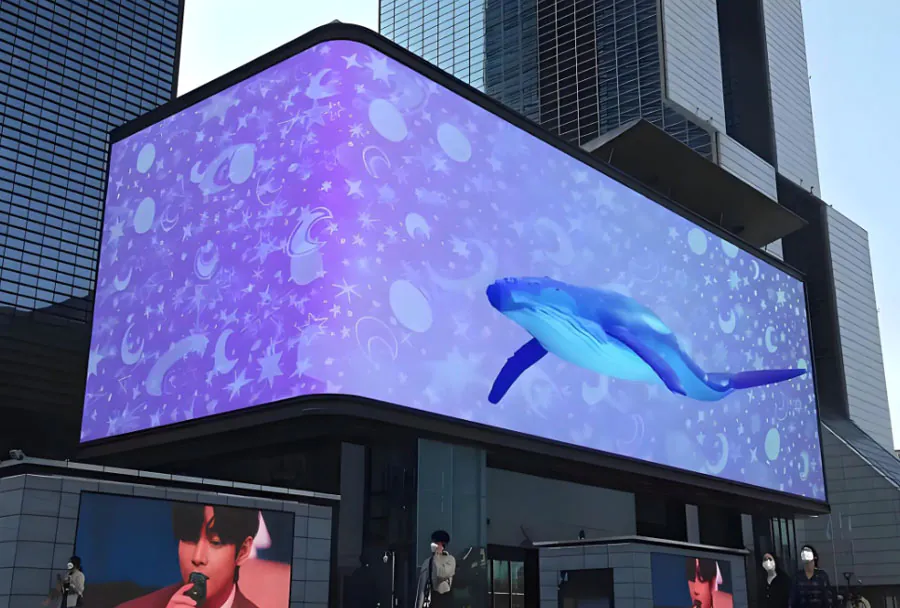
Large-scale outdoor LED screens have become essential for sports venues and live broadcasts. They transform the spectator experience, expand sponsorship opportunities, and enable immersive storytelling for remote and onsite audiences. Whether deployed for a weekend tournament, a multi-day festival, or a season-long installation at a stadium, rented LED screens offer flexibility, access to the latest technology, and operational support without the capital expense of a permanent build. This article examines technical specifications, operational planning, broadcast integration, cost drivers, risk management, and best practices for renting and deploying outdoor LED screens for sports and live broadcasts.
Core Technical Considerations
Selecting the right LED screen begins with understanding the event requirements and environmental constraints.
– Pixel Pitch and Resolution: Pixel pitch (distance between LED centers, measured in millimeters) dictates perceived resolution at a given viewing distance. For stadium-scale viewing where audience distance is tens to hundreds of feet, larger pixel pitches (e.g., P8–P16) can be acceptable; for close-range fan engagement zones or premium viewing areas, P3–P6 is preferable.
– Brightness (Nits): Outdoor environments require high brightness to remain visible in daylight. Typical rental panels range from 5,000 to 8,000 nits; some premium products go higher. Adaptive brightness control helps reduce power consumption at night.
– Contrast and Color Calibration: High contrast ratios and precise color calibration are critical for broadcast compatibility and accurate reproduction of branding and replay footage. Rental fleets should offer factory-calibrated color profiles and on-site calibration tools.
– Waterproofing and IP Rating: Outdoor screens must meet IP65 or better for front protection and at least IP54 for rear protection. Wind loading and structural stability, not just water ingress, are essential safety considerations.
– Frame and Rigging Systems: Modular frames, flyable cabinets, and ground-supported truss solutions each have use cases. Choose systems certified for local codes and with load-rated rigging hardware.
– Power and Thermal Management: LED panels draw significant power; staged conditioning (local generators, UPS, and distribution) plus proper ventilation/thermal design ensures reliability.
– Control and Latency: Real-time broadcast and replay require low-latency video processing and support for SDI/12G-SDI/NDI inputs, LED processors with gen-lock, and seamless multi-source switching.
Site Assessment and Logistics
A thorough site survey is the foundation for a successful rental deployment.
– Sightlines and Viewing Angles: Map spectator areas to determine optimal screen size, aspect ratio, and mounting height. Avoid placing screens where sightlines are obstructed or where sunlight causes glare.
– Structural & Ground Conditions: Verify ground bearing capacity for ground-supported screens. For flown screens, confirm rigging points meet load specifications and local safety codes.
– Permits & Local Regulations: Municipalities often require permits for temporary structures, electrical connections, and amplified content. Start applications early.
– Power Availability: Calculate total power needs (including redundancy) and plan for generators if venue supply is insufficient. Factor in peak loads for halftime entertainment and post-game shows.
– Access for Trucks and Cranes: Deliveries for large screens frequently need heavy equipment. Confirm access routes and staging areas.
– Noise, Light, and Community Impact: Large LED screens can generate late-night light and operational noise. Proactive community outreach can reduce complaints and permit delays.
Integration with Live Broadcast Systems
For live broadcasts, LED screens serve both the audience and the production workflow.
– Signal Flow and Synchronization: Use gen-locked video sources to prevent rolling and tearing. Ensure frame rates and color space are consistent across cameras, replay servers, and LED processors.
– On-Site Production: Coordinate between the broadcast truck and LED control operator for timing of replays, graphics, and sponsor spots. Establish protocols for cutaways and emergency content.
– Latency Requirements: Broadcast-grade LED processors introduce minimal latency, but the entire chain — encoders, decoders, processors — needs to be evaluated. For interactive segments or second-screen synchronization, aim for single-digit frame latencies if possible.

– Redundancy: Dual feed inputs, backup processors, and failover power paths are critical. Test failover procedures before doors open.
Operational Staffing and Workflow
Professional crews reduce the risk of downtime and ensure safe operations.
– Setup and Takedown Crews: Experienced riggers, electricians, and LED technicians are required. A standard crew might include rigging leads, LED technicians, a power distribution specialist, and a production liaison.
– Content Management: Hire or assign a content operator familiar with LED player software, media codecs, and playlist scheduling. They should manage pre-event testing, in-event graphics insertion, and post-event content removal.
– Maintenance and Troubleshooting: On-site spares for panels, data cables, power supplies, and controllers minimize disruption. Develop a troubleshooting matrix for common issues such as pixel faults, sync loss, and power distribution failures.
– Safety Officers: For large, elevated screens and crowded events, safety personnel monitoring crowd interactions, barriers, and weather changes are necessary.
Cost Drivers and Rental Pricing Models
Rental pricing is influenced by multiple factors. Typical cost components include equipment rental, labor, transportation, power, insurance, and content services.
– Equipment Tier: Higher-resolution, high-brightness panels and flyable frames command premium rates.
– Rental Duration: Daily vs. multi-day vs. season rentals have different rates; longer rentals usually reduce daily cost.
– Location and Logistics: Remote sites, difficult access, or international shipping raise costs.
– Staffing Intensity: 24/7 on-site staffing or advanced broadcast integration increases labor charges.
– Ancillary Services: Power generation, line-of-sight video links, and content creation are often add-on services.
Analysis Table: Screen Recommendations by Use Case
| Use Case | Recommended Pixel Pitch (mm) | Typical Screen Size | Recommended Brightness (nits) | Key Notes / Considerations |
|---|---|---|---|---|
| Large Stadium Jumbotron | P8–P16 | 100–400 sq. meters | 6,000–8,000 | Emphasize long-range readability, rigging certification, and broadcast integration. |
| Mid-Sized Outdoor Arena | P4–P8 | 20–100 sq. meters | 5,000–7,000 | Balance between close fan engagement and distant viewing; consider viewing zones. |
| Fan Viewing Screens / Fan Zones | P3–P6 | 10–60 sq. meters | 4,000–6,500 | Closer viewing distances demand finer pitch; higher content flexibility required. |
| Stage Backdrops & Concerts | P2.5–P6 | 10–200 sq. meters | 3,000–6,000 | Focus on creative content, seamless panels, and lower latency for performance cues. |
| Live Broadcast Integration (Multi-Use) | P3–P8 | Variable | 5,000–8,000 | Requires broadcast-grade processors, gen-lock, high color fidelity, and redundancy. |
Content Strategy and Creative Considerations
The screen is only as effective as the content it displays.
– Aspect Ratio & Resolution Planning: Define the native resolution based on chosen pixel pitch and cabinet configuration. Prepare content assets at native resolution to avoid scaling artifacts.
– Dynamic Content Mix: Alternate live feed, instant replays, statistics, sponsor ads, and crowd engagement content. Create templates to speed up in-event transitions.
– Branding & Sponsor Integration: High-resolution sponsor ads look premium on large screens; ensure contractual clarity on ad durations and placements.
– Accessibility & Messaging: Include captions for live commentary, emergency messaging templates, and multi-language overlays where necessary.
– Media Formats and Codecs: Use uncompressed or high-bitrate codecs for critical live content. Pre-encode secondary assets in supported formats to avoid runtime transcoding.
Health, Safety, and Weather Contingencies
Outdoor events pose weather-related and crowd-safety risks.
– Wind Loading and Anchoring: Screens present large sail areas. Follow structural engineer recommendations for wind loading and use secondary anchoring methods.

– Lightning and Storm Response: Develop a shut-down and secure plan for thunderstorms. Identify safe shelter zones and evacuation routes.
– Fire & Electrical Safety: Use ground-fault protection, proper cable routing, and surge suppression. Keep clear access for emergency services.
– Crowd Barriers and Line-of-Sight Protection: Prevent unauthorized access to screen infrastructure to mitigate vandalism and injury.
Common Problems and Troubleshooting
Anticipate and prepare for typical issues:
– Sync and Tearing: Check gen-lock sources, frame rates, and video processor settings. Keep spare timing modules.
– Heat-Related Failures: Ensure ventilation, provide thermal cutoffs, and monitor panel temperatures.
– Pixel & Module Failures: Maintain a spare parts kit and rapid replacement workflow; many rental companies swap defective modules during event downtimes.
– Power Trips & Brownouts: Use staged ramp-ups, soft-start equipment, and UPS systems for critical control gear.
– Connectivity Issues: Redundant media paths (fiber + copper) and backup wireless links prevent single-point failures.
Case Study Summaries
– Major League Soccer Cup Final: A rented P6 flown LED screen provided replays and sponsor content. The producer used dual SDI feeds and a redundant master processor. Live latency was within acceptable limits for replays. The rental included three technicians and on-site spares, minimizing downtime during halftime.
– City Marathon Fan Zones: Multiple P4 ground-supported screens were placed along the course. Solar-shaded positions reduced brightness needs and generator costs were optimized by staggering content schedules.
– Outdoor Concert Series: A mix of P3 stage screens and P6 side-fill screens delivered close-up performer shots and audience interactions. Night-time brightness was reduced to enhance performer visibility and conserve power.
Choosing a Rental Partner: What to Ask
Selecting the right vendor is as important as the hardware. Ask prospective rental partners the following:
– Fleet Specifications: Request detailed spec sheets for the panels, processors, power distribution, and rigging equipment.
– Experience with Similar Events: Ask for references and case studies of comparable stadiums or broadcast events.
– On-Site Support: Confirm crew size, roles, and hours included in the rental. Is 24/7 support available during critical windows?
– Spare Parts & Redundancy: What spare parts are carried? Is there a backup processor and alternate power plan?
– Insurance & Liability: Verify the vendor’s insurance coverage and what is required from the client for site-specific liabilities.
– Certification & Compliance: Confirm that rigging crews are certified and that equipment meets local electrical and structural codes.
Sustainability and Energy Considerations
As events move toward greener operations, LED rental strategies can incorporate sustainability:
– Energy-Efficient Panels: Newer LED generations deliver high brightness with reduced power consumption.
– Adaptive Brightness: Automated dimming algorithms reduce power use during night shows.
– Shared Rides and Logistics Optimization: Coordinate multi-event logistics to reduce transport trips and carbon footprint.
– Recyclable Materials: Choose rental partners with take-back programs for older panels and responsible disposal methods.
Future Trends in Outdoor LED Rentals
– Higher Pixel Density at Lower Cost: Advances in manufacturing lower the cost of fine-pitch outdoor LEDs, enabling higher fidelity screens for more use cases.
– Edge Processing & AI: Smart processors will optimize brightness, perform automated calibration, and manage predictive maintenance using sensor data.
– Interactivity & Second-Screen Syncing: Synchronized mobile apps and low-latency feeds will allow interactive fan engagement during live events.
– Modular & Lightweight Panels: Easier handling and faster install cycles reduce labor costs and turnaround times.
– AR & Mixed Reality: LED screens will increasingly work in tandem with AR overlays for enhanced broadcast graphics.
Checklist for a Successful Rental Deployment
– Pre-event: Site survey, permits, power plan, content in native resolution, crew scheduling, spare parts inventory.
– Setup: Rigging inspection, grounding and bonding, color calibration, gen-lock verification, power ramp testing.
– Rehearsal: Full technical rehearsal with broadcast chain, latency checks, sponsor content tests.
– Event Operation: Dedicated control operator, monitoring dashboards for panel health, real-time communication with production truck, emergency protocols ready.
– Post-event: Safe takedown, equipment inventory and inspection, data and content cleanup, lessons learned debrief.

Conclusion: Maximizing Value from Rentals
Large-scale outdoor LED screen rental for sports and live broadcasts is a complex but highly rewarding endeavor. Choosing the right pixel pitch, brightness, and mounting system is only the start; success depends on meticulous planning, broadcast-grade integration, experienced crews, and contingency planning for weather and technical failures. Rental solutions enable organizers to access cutting-edge technology, scale to meet audience demands, and control costs. By partnering with an experienced vendor, aligning content strategy with screen capabilities, and prioritizing safety and redundancy, event producers can deliver immersive, memorable experiences for fans both in-stadium and watching worldwide.